How Employees Leak Company Data to AI Tools
AI data leakage happens when employees put company information into AI tools that store it, review it, or train on it. It's rarely malicious. It's a paste, an upload, or a meeting transcript, done to save 20 minutes. Banning AI doesn't fix it. Knowing which data can't leave, and checking for it at the moment of the paste, does. That check is the core job of a data loss prevention program.
Table of Contents
Unapproved AI tools showed up in 43% of the security incidents IBM studied for its 2026 Cost of a Data Breach Report, up from 20% the year before, and those incidents cost an average of $5.39 million, with roughly half ending in data actually lost or exposed.
Nobody broke in. An employee with a valid login opened a browser tab. That's it. A controller pastes an aging report into a free chatbot to get a cleaner summary for Monday, a project manager uploads a client contract and asks for the renewal terms, and a sales rep drops last quarter's pricing sheet in to draft a proposal faster. Reasonable things to want. And each one moves company data somewhere you don't control, under terms nobody at your company signed.
If your question is which AI tools are running inside your business, start with our guide to shadow AI. This piece covers the other half. What data leaves, how it leaves, and where it sits once someone hits Enter.
What Is AI Data Leakage?
AI data leakage is the exposure of company information through AI tools during normal, authorized work. There's no attacker and no malware. The data leaves because an employee put it there, and the tool's terms decide what happens next.
That's what separates it from a breach. Your firewall, your EDR agent (the security software running on each laptop), and your MFA prompts all assume the threat is someone who shouldn't be there. Here, the person belongs. The login is valid. The website is one half your staff visit every day.
Standards bodies stopped treating this as a side issue a while ago. OWASP ranks sensitive information disclosure second on its 2025 Top 10 risks for AI applications, and NIST's Generative AI Profile (AI 600-1) lists data privacy and information security among the 12 risks that are unique to, or made worse by, generative AI. Neither document will stop anyone from pasting a payroll file. Still. Hard to call it fringe now.
Six Ways Company Data Walks Out the Door
Pasting into ChatGPT gets the headlines. It's one route of six. Not always the biggest.
Pasting into a personal account
Picture a staff accountant with a free ChatGPT login tied to a Gmail address. They've used it for a year. You don't know it exists. It's their account, not yours. On consumer plans, OpenAI uses conversations to improve its models unless the user switches off Improve the model for everyone in settings. Anthropic moved Claude's Free, Pro, and Max plans to the same opt-out model in August 2025, and it keeps chats from users who leave training on for 5 years instead of 30 days.
You don't control either setting. The employee does.
Uploading the whole file when the question needed one number
Someone wants the average days-to-pay for a single customer, so they upload the full receivables export, ask the question, and get an answer back in about 10 seconds without a thought about what else was sitting in that file. Every other customer's balance, contact, and payment history went along with it, because that's what was in the file. Uploads are where the volume is. A pasted paragraph exposes a paragraph. An uploaded spreadsheet exposes the whole ledger.
Meeting recordings and AI notetakers
Samsung got burned by this one in 2023. An employee recorded an internal meeting, ran it through a transcription app, and pasted the transcript into ChatGPT to get minutes. Think about what gets said in a meeting that never goes in an email. Pricing floors. A personnel problem. The lawsuit nobody has announced yet. Transcripts are the frankest documents a company produces, and AI notetakers that join calls automatically create one for every meeting, including calls with clients who never agreed to that vendor.
Source code, and the keys hidden in it
Samsung's other two incidents involved an engineer pasting source code to track down a bug and another feeding in a chip test sequence to optimize it. The company had allowed ChatGPT on March 11, 2023, logged all three leaks within about 20 days, and by May had banned generative AI tools on company devices entirely. Code carries a second problem. Developers sometimes leave API keys, database passwords, and connection strings written directly into the file, which means a paste meant to fix one function can hand over working credentials too. Live ones.
Share links that go public
In July 2025, people found thousands of ChatGPT conversations sitting in Google search results. Users had created share links and ticked a box labeled Make this chat discoverable, likely without reading it closely. Fast Company counted more than 4,500 indexed chats, some with names and job details, before OpenAI pulled the feature on July 31. That specific checkbox is gone. The share button isn't, on any of these tools. Nobody reads its options first.
The approved tool that can read too much
This one surprises people. Nothing leaves the building. Microsoft is explicit that Copilot only surfaces data a user already has at least view permission to, and that prompts aren't used to train its foundation models. Good. Now think about the SharePoint site from 2021 that someone shared with Everyone except external users so a vendor could grab one file. Before Copilot, finding the 2023 salary spreadsheet on that site meant knowing it was there. Now an employee can ask Copilot to summarize compensation for the operations team. It will. The data stays inside your tenant and still lands in front of the wrong person. Tightening this is a big part of any AI security posture review.
Where Does Your Data Go After Someone Hits Enter?
It depends on the account tier far more than the brand. Consumer AI plans may train on prompts, allow human review, and keep data for years. Business plans from the same vendors exclude training by default and give admins control.
Same model, different contract. ChatGPT on a personal Gmail and ChatGPT Enterprise run on the same technology. What changes is who owns the account, what the terms let the vendor do with your prompts, and whether anyone at your company can go back later and see what was shared.
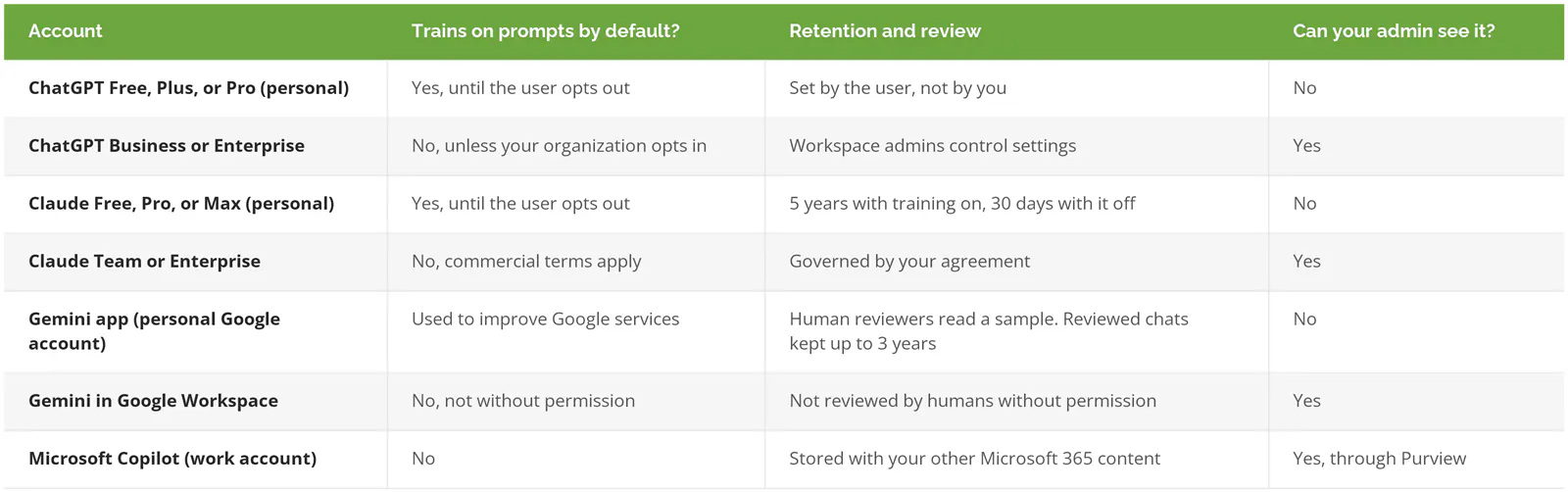
Sources: OpenAI enterprise privacy, Anthropic's consumer terms update, the Gemini Apps Privacy Hub, the Google Workspace generative AI privacy hub, and Microsoft's Copilot privacy documentation, all checked September 2026. Vendors revise these terms without much notice, so recheck before you rely on any single row.
Read down the last column. Every row with a No is a leak you'll hear about last, if at all.
Deleting doesn't reliably undo it, either. Google's own privacy hub says reviewed Gemini chats are kept for up to 3 years even after the user deletes their activity, and it tells users directly, "Please don't enter confidential information that you wouldn't want a reviewer to see." That's the vendor talking. Worth putting in front of your staff exactly as written.
So the cheapest control on this whole page is a licensing decision. Put the people who use AI on a business-tier account your company administers, and every row with a No in the last column stops applying to company work.
How Common Is AI Data Leakage in 2026?
Common enough to show up in about a third of incidents. Microsoft's 2026 Data Security Index, a survey of more than 1,700 security leaders, found 32% of data security incidents involve generative AI tools.
Other numbers line up behind it.
- High-risk AI prompts, the ones that could expose sensitive corporate, personal, or regulated data, doubled from 2% to 4% over the past year in Check Point's AI Security Report 2026.
- Business services firms ran highest at 5.91%. About 1 prompt in 17.
- 68% of breached organizations had no governance in place to manage AI or detect shadow AI, per IBM.
- And among organizations that had an AI-related breach, 92% lacked proper access controls on their AI tools.
One in 17 sounds small. Then you count how many prompts a 60-person office sends in a week, and it doesn't.
Why Banning ChatGPT Doesn't Stop the Leak
Samsung banned it. The ban arrived after three leaks, and the data from those three leaks was already gone.
A block on the company network doesn't remove the reason people used the tool. The report still needs summarizing by Monday. So the work moves to a personal phone on cellular data, where there's no DLP, no web filter, no log, and no chance of you ever knowing it happened. You've traded a risk you could see for one you can't. I'd call that a worse position than where you started, not a better one.
It's getting looser, too. IBM found only 38% of organizations now require IT approval before AI gets deployed, down from 45% a year earlier, so the gate is widening at the same moment the share of risky prompts going through it has doubled.
Blocking still has a place. Microsoft's own playbook for preventing shadow AI leaks includes blocking unsanctioned AI apps as one step, right after discovering what's in use. It just can't be the only step, because it's the first one employees route around. A policy with no approved alternative behind it is a suggestion.
How Do You Stop AI Data Leakage Without Stopping AI Use?
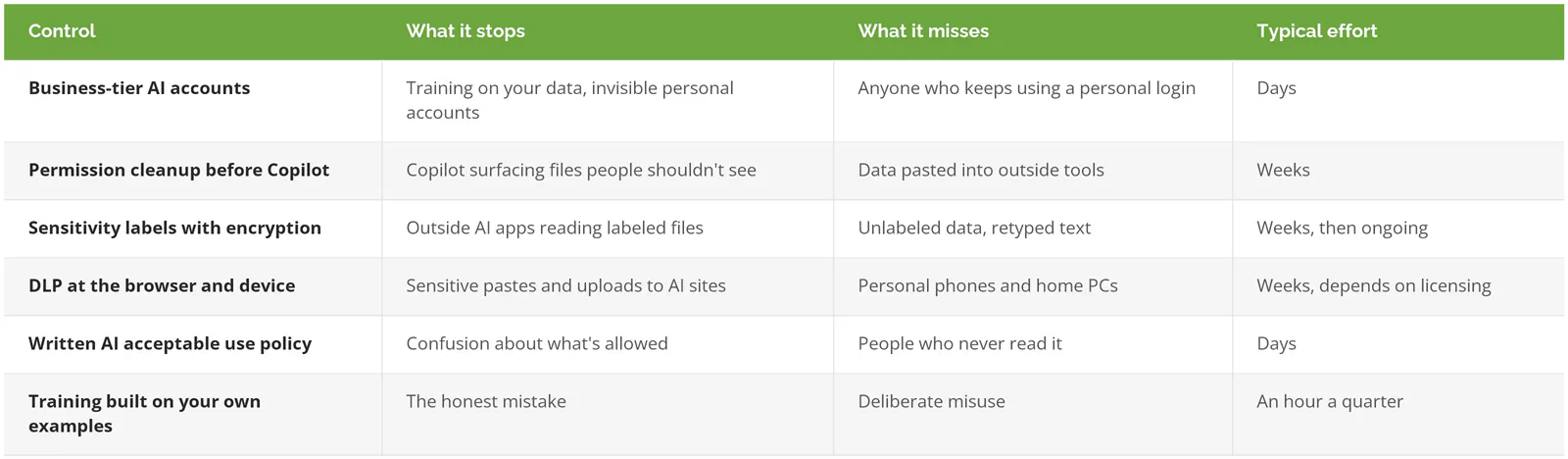
Give people an approved business-tier AI tool, fix file permissions before turning on Copilot, label your sensitive data, and add DLP that checks what gets pasted into AI sites. Then write the rules down and train on real examples.
Order matters. Each control below covers a gap the one before it leaves open, and the first two cost far less than the last four.
Put people on accounts you administer
Covered above. It's first because it changes the terms on every prompt at once.
Clean up permissions before you switch on Copilot
Find the sites and folders shared with everyone in the company, and the old sharing links that never expire. Close them. Copilot inherits every permission mistake your file shares have collected over the last decade, from the folder a former CFO opened to the whole company to the guest link a contractor never gave back, so this has to happen first.
Label the data that matters
Microsoft Purview sensitivity labels can encrypt a file so that only the right people open it. Per Microsoft's guidance, outside AI apps can't process content that Purview has encrypted, so an uploaded contract arrives as unreadable noise. Don't label everything. Start with the categories that would hurt, like payroll, client financials, pricing, and anything under NDA. The joint CISA, NSA, and FBI guidance on AI data security puts the same idea at the base of its recommendations. Classify the data, control who can reach it, and encrypt what matters.
Catch it at the paste
This is where DLP, short for data loss prevention, earns its keep. Purview Endpoint DLP can block pasting or uploading sensitive information to AI websites from company laptops, and Browser Data Security in Microsoft Edge for Business goes a step further by inspecting the text typed into ChatGPT, Gemini, DeepSeek, and consumer Copilot before it's submitted. Microsoft recommends running these policies in simulation mode first, and it's right to. A DLP rule that blocks the whole finance team on day one gets switched off by day three. Ask anyone who's tried.
Check what your Microsoft 365 plan already covers before buying anything. Business Premium includes DLP for Exchange, SharePoint, and OneDrive. Endpoint DLP, the piece that watches the browser paste, isn't in Business Premium on its own. It comes with E5, the E5 Compliance add-on, or the Purview Suite for Business Premium add-on Microsoft launched in late 2025. Our Purview DLP walkthrough covers setup.
Write the rules down
Which tools are approved, which data never goes into any of them, and who to ask when it's unclear. Keep it short. Our AI acceptable use policy guide has a template.
Train with your own examples
Skip the generic slide deck. Show your team the six routes above using your own file names and your own tools, then show them the Gemini retention line. People change what they paste when they see a vendor's actual terms in the vendor's own words, far faster than when someone from IT stands up at the all-hands and tells them AI is risky.
When You Can Keep This Simple
A 12-person design studio using AI to rewrite marketing copy, where nobody handles client financials, regulated data, or source code, doesn't need a DLP project. Put everyone on a business-tier account, write a one-page policy, turn off public sharing, and check it again in 6 months. Done.
That changes fast. Sign one client whose contract has a data-handling clause, take on defense work with controlled unclassified information (sensitive government data that isn't classified but still has handling rules), or hire your first developer, and the simple version stops being enough.
What to Do This Week
Ask whoever runs your IT one question. Which of our people use AI on accounts we don't administer? If the answer is a shrug, start there. That's your first fix, and it's a purchasing decision, not a security project.
Consilien is a managed IT and cybersecurity provider that runs managed DLP for businesses nationwide, starting with the protections your Microsoft 365 license already includes. We also help businesses put AI governance around the tools their teams already use. If you want a second set of eyes on where your data is actually going, speak to a data protection expert.