Backup as a Service vs Traditional Backup: Which One Actually Gets You Back Up?
Backup as a service (BaaS) means a provider runs your backups and keeps copies offsite for a subscription. Traditional backup means you own and run the hardware and software. BaaS cuts the workload. Local backup restores faster.
Table of Contents
So BaaS vs traditional backup isn't really cloud versus server. It comes down to who operates your backups, how fast you need data back after a bad day, and whether someone holding your admin password can reach the copies. Plenty of businesses end up running a little of both inside one backup and disaster recovery plan.
Every executive will tell you the business is backed up. Far fewer can name who ran the last test restore, or when.
That second question is what BaaS vs traditional backup is really about. Both approaches copy your data every night. The difference is who's accountable for those copies, where they sit, and how long it takes to get them back when a server dies or ransomware locks up the file shares. It's one of the first calls you'll make when you rebuild a recovery plan, and it usually gets made on price per terabyte.
That's the wrong number to shop on. Storage is the cheap part of both models. Recovery is where they split.
What Is Backup as a Service, and What Counts as Traditional Backup?
Backup as a service is a subscription where a provider runs the backup software, watches every job, and stores your copies in its cloud. Traditional backup is software and storage you own, usually a backup server or appliance in your building, run by your staff or your IT provider.
"Traditional" covers more ground than the name suggests. It's a tape drive in a closet. It's a Synology NAS (a network storage box) collecting nightly copies. It's Veeam running on a spare server. Same idea, different decades. And these days it's often any of those pushing a second copy up to Amazon S3 or Backblaze B2, which is where the labels start to blur.
A setup where your people install, patch, and babysit the backup software is traditional, even if one copy lands in the cloud. A setup where a provider owns that work, including chasing the job that failed at 1 a.m., is BaaS. The line is who operates it, wherever the data ends up.
One more distinction. BaaS gets your data back. Disaster recovery as a service, or DRaaS, gets your whole servers running somewhere else while your office is dark, which is a bigger and pricier commitment covered in our DRaaS buyer's guide.
BaaS vs Traditional Backup, Side by Side
Seven rows cover the decision for a business with a typical mix of servers and Microsoft 365.
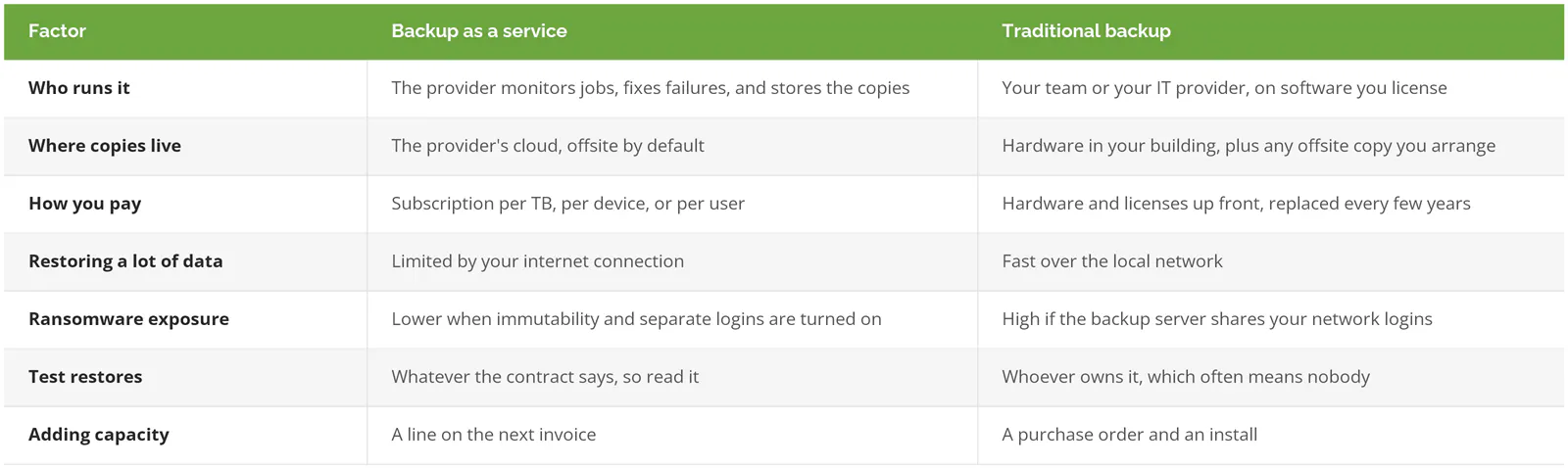
Compare rows four and five. The model that restores fastest is also the one attackers find easiest to reach. That tension is the whole decision.
How Long Does a Restore Actually Take?
Over the internet, restore time is set by your bandwidth. At full line speed, 1 TB takes about 23 hours on a 100 Mbps connection and just over 2 hours on 1 Gbps. A local backup on a 10 Gbps office network moves 5 TB in roughly an hour.
Three common data sizes, worked out. These are best-case numbers at 100% of the line, which you'll never actually get while the rest of the office is online.

Nineteen days. For a design firm with 20 TB of CAD files on a 100 Mbps line, that's what cloud-only backup means in a full-site loss. The arithmetic takes two minutes. Do it before you sign.
Nobody restores everything at once. You bring back the ERP database first, then the shared drives accounting needs to close the month, then the email archive and the file shares nobody has opened since 2019, and the order matters because every hour spent restoring the wrong thing is an hour the right thing stays down. Your recovery time and recovery point targets decide that order, and if you haven't set them, our RTO calculator puts a dollar figure on each hour of waiting.
Getting the data out can cost money too. Sometimes a lot. Pulling 5 TB out of Amazon S3 runs about $450 at the $0.09 per GB rate after the first free 100 GB. Backblaze B2 lets you download up to 3 times what you store each month at no charge, and Veeam Data Cloud Vault folds download (egress) fees into its price, within fair use. A good BaaS provider can also restore into its own cloud so your servers run there, or ship your data back on a drive. Ask which one they'll actually do, and how fast. Then get it in writing.
Which One Holds Up Against Ransomware?
Neither one, by default. A traditional backup server that shares your network logins is an easy target, and a BaaS account with a weak console password isn't much better. What protects you is a copy nobody can delete before its date, stored behind separate credentials.
Attackers go after backups on purpose. In Sophos's 2024 research on compromised backups, 94% of the 2,974 organizations hit by ransomware said the attackers tried to compromise their backups, and 57% of those attempts worked. Victims whose backups were hit paid about 8 times more in total recovery costs than those whose backups survived. Eight times. And in the State of Ransomware 2025, only 54% of organizations whose data was encrypted got it back from backups, the lowest rate in six years of Sophos surveys.
That's a backup problem wearing a ransomware costume.
The traditional weak spot is usually the domain join. When the backup server is joined to the domain (connected to your company network so the same logins work everywhere), the attacker who steals an admin password gets the backups in the same move. CISA's #StopRansomware Guide warns that many ransomware variants "attempt to find and subsequently delete or encrypt accessible backups," and tells you to keep offline, encrypted copies and test them regularly.
BaaS has its own soft spots. Immutable storage, meaning copies that can't be changed or deleted until a retention date passes, is standard on some platforms and an optional checkbox on others. Veeam's Vault, for instance, ships immutable by default. The provider's web console is another door, and if it isn't protected with multifactor authentication, you've moved the risk without shrinking it. CISA also flags that immutable storage can clash with certain regulatory requirements and can run up real costs when it's misconfigured, so somebody should pick the retention window on purpose.
If you want the step-by-step for the day it happens, our ransomware recovery playbook walks through it.
What Does Each One Cost?
Two different shapes of bill. BaaS is an operating expense that grows with your data. Traditional backup is a capital expense you pay again at every hardware refresh, plus the staff hours to run it. Those hours matter. They're the line almost everybody forgets to price.
Some published numbers for scale. Storing 5 TB on Backblaze B2 costs $34.75 a month at $6.95 per TB, but that's raw storage, so somebody still has to run the backup software pointed at it. Veeam's managed Vault lists at $14 per TB a month for Foundation and $24 for Advanced, billed annually up front, which works out to $70 or $120 a month for the same 5 TB with immutability included. Full BaaS from a provider adds monitoring, support, and test restores on top of storage, so expect the quote to run well above storage alone. Ask for the breakdown.
On the traditional side, the appliance or server, the disks, the backup license, and the offsite copy are the easy parts to add up. The hard part is the IT hours spent checking job reports, swapping failed drives, and running restores that nobody schedules until something breaks. For a line-by-line budget with three example tiers, see our breakdown of what disaster recovery costs.
The Microsoft 365 Gap Neither Model Covers by Default
An employee clears out a folder of client emails in March. In August a former customer sues, and legal needs those emails.
It's gone. Exchange Online keeps deleted items for 14 days by default, adjustable up to 30, and SharePoint and OneDrive hold deleted files in the recycle bin for 93 days. After that, Microsoft won't restore it for you. Microsoft support can roll back a whole SharePoint site for 14 more days, but not pull back individual files. Retention policies can stretch those windows, but a retention setting lives inside the same Microsoft 365 account it's protecting, so a stolen admin account, a bad script, or a misfired cleanup policy can take out the data and the safety net in the same afternoon. That's not a backup.
Your server backup, BaaS or traditional, doesn't touch any of this unless you add it. Microsoft 365 Backup lists at $0.15 per GB a month, so 40 people averaging 30 GB each comes to $180 a month. Third-party tools usually price per user instead. Either way, it's a separate line item. Budget it now.
Which One Fits Your Business?
For a business without in-house IT and a manageable amount of data, BaaS usually wins. With large data sets or a slow internet connection, a local copy for fast restores plus an immutable offsite copy, run by a provider, holds up best.
By situation:
- No IT staff, a few servers or none, and a decent internet connection? BaaS. Having someone accountable for every failed job is worth more than owning the hardware.
- A manufacturer with 15 TB of ERP data and engineering files on a 200 Mbps line needs a local appliance for fast restores and an immutable cloud copy for the day the building is the problem. That's hybrid. It's also the setup that fails most quietly when nobody's assigned to watch it, so put it under a managed contract.
- Regulated data with rules about where it's stored. Either model works, as long as the storage region is written into the contract and not just mentioned on a sales call.
- Everything lives in Microsoft 365 and a handful of SaaS apps, with no servers of your own. Skip server backup entirely and buy SaaS backup.
And if you already have an in-house team that runs documented test restores every quarter, keeps an offline copy, and can show you the last report? You probably don't need BaaS. Keep what works, confirm the offsite copy is immutable, and spend the budget somewhere else.
What to Ask a Backup Provider Before You Sign
NIST's contingency planning guide, SP 800-34 Rev. 1, lists five things to check for any offsite storage arrangement, including geographic distance from your office, how long retrieval takes, and security. That's a solid starting frame. Turn it into questions a salesperson has to answer on paper:
- Who runs test restores, how often, and do I get the report?
- Is the offsite copy immutable, for how many days, and can anyone on your team or mine delete it early?
- What will a full restore cost me in download or egress fees?
- If my building is gone, can you run my servers in your cloud, or will you ship a drive? How fast, and is that time in the contract?
- Which region is my data stored in, and is it far enough away that the same wildfire, flood, or power outage won't take out both copies?
- Is multifactor authentication enforced on the backup console?
- Does the quote include Microsoft 365, or is that separate?
Any provider worth hiring answers all seven without a follow-up call. Notice which ones get dodged. If you're comparing platforms at the same time, our ranking of the best cloud backup solutions scores eight of them, and our guide to disaster recovery testing covers what a real restore test should include.
Consilien runs managed backup and disaster recovery for businesses nationwide, including monitoring, backup validation, and scheduled test restores with results you can hand to your leadership team. If you're weighing a quote or trying to figure out whether your current setup would actually restore, speak to a backup expert.