Co-Managed IT in Long Beach for Companies With a Small IT Team
Co-managed IT pairs your one- to three-person IT team with an outside provider that takes after-hours monitoring, patching, security alerts, and backup checks, while your staff keeps the people, vendors, and business systems only they know.
Table of Contents
Picture your IT person taking a week off in August. On Tuesday at 2:10 a.m., the firewall flags a run of failed logins against your VPN. Who sees it? For a lot of Long Beach companies the honest answer is nobody, until Wednesday morning, when someone opens a laptop and wonders why the file server feels slow. Co-managed IT in Long Beach exists for that gap. It's one of the setups we offer alongside managed IT services in Long Beach, and it's built for companies that already have someone good on staff and simply don't have enough of them.
Key Takeaways: One IT person covers roughly 40 of the 168 hours in a week, before vacation and sick days. Co-managed IT keeps that person in charge and hands the round-the-clock work to a provider. Split the work by knowledge versus noise. Keep what needs company memory, hand off what needs constant attention. A provider usually costs less than a second hire and covers far more hours. Compliance is a separate service.
What does co-managed IT mean when your IT team is one or two people?
Co-managed IT means your internal IT staff and an outside provider share responsibility for the same environment, each owning a written list of tasks. With a one- or two-person team, the provider mostly covers hours and depth your people can't, while your staff stays the decision-maker.
People use the phrase for very different arrangements. At a 2,000-person company, co-managed might mean an MSP (managed service provider, an outside firm that runs IT on contract) runs the service desk for a 30-person IT department. That isn't you.
At a 60-person distributor in Signal Hill, it usually looks like this. One IT manager who knows every user, every vendor contract, and why the ERP (the system that runs orders, inventory, and accounting) server has that odd scheduled task. Plus a provider that watches alerts overnight, pushes patches, checks that last night's backup actually finished, and picks up the phone when the IT manager is at a dentist appointment. Your person still sets priorities. The provider follows them. Simple split.
It's a common setup, by the way. Kaseya's 2026 Cybersecurity Outlook found 59% of businesses rely on a dedicated internal IT team, about 30% run a co-managed relationship with an MSP or MSSP (a managed security services provider), and only 6% outsource everything. So the middle option is hardly exotic. If you want the textbook comparison of the three models, the explainer on co-managed vs fully managed vs in-house covers it.
Why a small IT team runs out of hours before it runs out of skill
A week has 168 hours. One full-time IT person covers about 40 of them, which is roughly 24%, and less once you subtract vacation, sick days, holidays, and the meetings that eat their afternoons. Attackers and failing hard drives don't keep office hours.

I want to be careful here. This usually gets framed as a skills problem. It isn't. It's a math problem. Small-team IT people are often very capable. They just can't be awake all the time.
Depth is the second squeeze. One generalist is expected to know Microsoft 365 security settings, firewall rules, backup software, the phone system, laptop imaging, and whatever the accounting team bought last quarter. ISC2's 2025 Cybersecurity Workforce Study, which surveyed 16,029 security practitioners and decision-makers, found 59% reported critical or significant skills needs, up from 44% a year earlier. And 88% had experienced at least one significant security consequence because of a skills shortfall. Those are dedicated security teams. A one-person IT department is doing security as one job among nine.
Then there's monitoring. Kaseya found about 15% of businesses have no real-time threat monitoring at all, and another 4% don't know how threats are monitored. That's a lot of companies finding out about problems from users. Bad way to find out.
None of this means the person is failing. It means the job grew and the headcount didn't. That happens quietly, a reasonable decision at a time, until one person owns everything.
What should your IT team keep, and what should the provider take?
Keep the work that depends on knowing your company, like users, vendors, business applications, and priorities. Hand off the work that depends on constant attention or rare depth, like overnight monitoring, patching, alert triage, and backup verification. I call it knowledge versus noise.
Sounds obvious. It gets broken all the time anyway, usually in one of two ways. Either the provider is handed the knowledge work (onboarding a new hire into the dispatch system they've never seen) and fumbles it, or the internal person keeps the noise work (reading 400 overnight alerts every morning) and never gets to the projects leadership actually asked for.
Here's how I'd draw the line for a typical 40- to 150-person company with one or two IT staff:
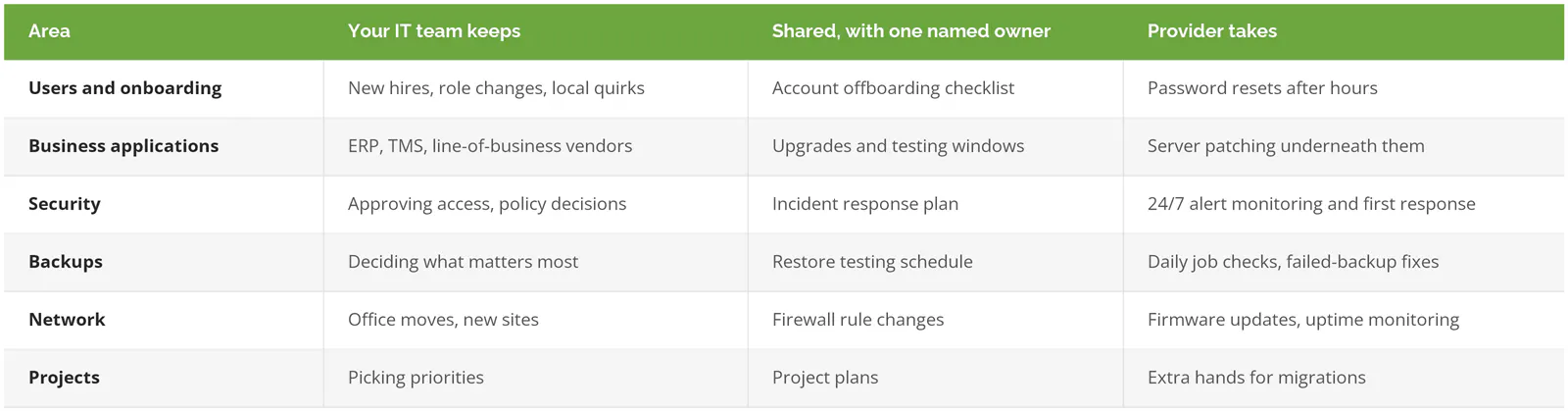
Notice the middle column says one named owner. That isn't decoration. A task owned by two teams is a task owned by nobody, and the Network World analysis of co-managed MSP engagements puts the core risk plainly, writing that "it's not always clear where the management boundaries and overlaps exist and how they should be handled." The fix is boring. Write it down by system. Name a person.
What co-managed IT looks like at Long Beach companies
Every business splits it differently. These three are illustrations, not client stories, but each one matches a type of company that's common around Long Beach.
A port-area freight forwarder with one IT person. The Port of Long Beach moved a record 997,177 TEUs (twenty-foot container units) in September 2026, according to FreightWaves, and the offices that handle that freight don't close at 5. The IT person here also runs the TMS (transportation management system) and is the only one who understands the EDI connections to carriers (EDI is the automated format companies use to swap shipping documents). The provider covers nights and weekends, watches the shared dispatch mailboxes for suspicious logins, and owns patching. The IT person keeps the carrier integrations. The IT guide for Long Beach logistics companies goes deeper on that world.
An aerospace parts supplier near Douglas Park. Two IT staff, one of whom spends half the week on the shop floor keeping CNC workstations and label printers alive. Their gap is depth, not hours. Microsoft 365 hardening, firewall design, and a real backup restore test are things they haven't had time to learn properly. The provider brings that depth on a schedule. Defense-related compliance work is its own engagement, and we sell compliance services separately from co-managed IT on purpose. Mixing the two blurs who's accountable for the audit.
A downtown professional services office. One IT manager who is also, somehow, the facilities manager. Badge readers, the copier lease, and the conference room screens all land on the same desk. What breaks here is attention. The provider takes the help desk overflow during busy weeks and the overnight monitoring every week, so the IT manager can finish the laptop refresh that's been on the whiteboard since spring.
Same model, very different splits. Treat the table above as a starting point, never the contract.
Is co-managed IT cheaper than hiring a second IT person?
Usually, yes. And it covers more hours. A second network or systems administrator costs about $145k a year once benefits are included, and still works around 40 hours a week. Consilien's co-managed plans start at $4,000 a month, which includes overnight monitoring that one more hire can't provide.
The Bureau of Labor Statistics puts the median pay for network and computer systems administrators at $99,130 (May 2025, national). Benefits make up 31.5% of total compensation for full-time private-industry workers, per the BLS Employer Costs for Employee Compensation release for June 2026. Divide $99,130 by 0.685 and you get roughly $144,700. Long Beach sits in the Los Angeles metro, where IT pay tends to run above the national figure, so treat that as a floor.
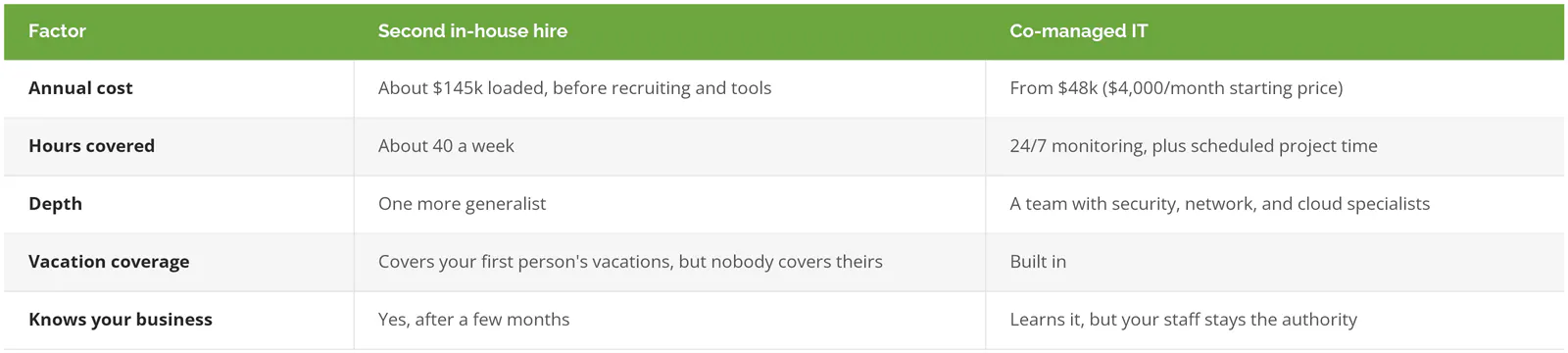
Two caveats. The $4,000 is a starting price, and the real number depends on users, devices, and what's in scope, which the Long Beach managed IT cost guide breaks down by business type. And a second hire is the right call sometimes. If your problem is that someone needs to physically walk the warehouse floor every day, a provider 15 miles away won't fix it.
Where co-managed setups go wrong with small teams
These arrangements rarely fail because of the provider's skill or the internal person's attitude. They fail at setup. Each problem starts as a reasonable shortcut. Then it compounds.
Start with the threatened IT person. Leadership signs a contract without involving them, and they hear about it as a done deal. Of course they read it as a step toward replacing them. So they keep the passwords close, the documentation stays in their head, and the provider ends up locked out of half the environment. The fix is to put your IT person in the room before anything is signed and to let them pick which work they want off their plate.
Sometimes it runs the other direction. The provider treats your IT person as a gatekeeper to get around rather than the person who knows how things actually work. Changes get made without telling them. Then something breaks on a Friday. Nobody can say what changed.
Then there's the quiet one. No documentation. Ask a one-person IT department for a network diagram and you'll often get a sheepish laugh. That's understandable, since nobody has had the time, but a provider can't safely watch what it can't see. The first month of any decent co-managed engagement should produce documentation your company owns, whether or not the contract continues.
And the last one is scope drift. The written split from onboarding never gets revisited, the business adds a second location, and suddenly nobody owns the new site's firewall. A quarterly review fixes this. Thirty minutes. The table from onboarding, and a pen.
How to tell if your company is ready for co-managed IT
Co-managed IT tends to fit when most of these are true:
- You have at least one capable IT person, full-time or close to it.
- Alerts, backups, or patches go unchecked on nights, weekends, or vacations.
- Projects leadership asked for keep slipping by a quarter or more.
- Your IT person is the only one who knows certain passwords or systems.
- Security questions from insurers or customers take your IT person days to answer.
- You'd rather keep your IT person's company knowledge than swap it for an outside team.
And when it doesn't fit? If you have no IT staff at all, co-managed is the wrong model, and fully managed IT is simpler and usually cheaper. At the other end, a company with six or more IT staff and its own round-the-clock coverage probably needs a specialist for one gap, like security monitoring, rather than a broad co-managed agreement. If that's closer to your situation, the post on scaling IT without adding headcount is written for IT directors with bigger teams.
What do the first 90 days of co-managed IT look like?
The first 30 days are discovery and documentation, the next 30 are monitoring and access, and the last 30 are handing over the agreed work and testing it. By day 90, your IT person should have noticeably fewer overnight surprises and a written split everyone can point to.
Roughly, it runs like this:
- Days 1 to 30. The provider interviews your IT person, inventories devices and accounts, and writes down how things are set up. Your company keeps the documentation.
- Days 31 to 60. Monitoring agents go on servers and laptops. Access gets set up with individual named accounts, never a shared admin login.
- Days 61 to 90. Patching, alert response, and backup checks move to the provider one area at a time. Then someone runs a real restore test, because a backup nobody has restored is a guess.
- Day 90. First quarterly review. Revisit the table and adjust.
Long relationships in IT come from that kind of steady structure more than from any single fix. Quiet work, mostly. Interactive Health, a consumer products company in Long Beach, has worked with Consilien since August 2010. Charles Warren, a financial analyst there, wrote on Clutch that "Consilien is a quality IT partner that has done a great job keeping our business up and running."
Where Consilien fits
Consilien is a managed IT and cybersecurity provider headquartered in Torrance that serves businesses nationwide. Our IC24 Co-Managed IT plans are built for companies with internal IT staff who need help desk overflow, monitoring and alerting, cybersecurity oversight, project support, and vCIO (virtual chief information officer) planning. Same-day on-site support is available in Long Beach, and compliance is sold as its own service. If you're still comparing options, the roundup of IT support companies in Long Beach lists several, and if your equipment is aging, the guide to IT infrastructure modernization in Long Beach covers what to replace first.
If your IT person is stretched and you want a second opinion on what to hand off, speak to a Long Beach IT expert. Bring your IT person. They'll have the best questions.