DLP Policy Examples and Templates That Match Your Tool
A DLP policy exists in two forms. The written document people sign, and the configured rule your tool enforces. Examples of both look nothing alike, and companies that build only one keep leaking data.
Table of Contents
Ask two people at the same company to show you the DLP policy and you'll get two different files. Legal hands you a four-page Word document about handling confidential information. IT opens an admin console and shows a rule watching for credit card numbers in outbound mail. Both are correct. Closing the gap between them is most of what a managed data loss prevention program does in its first quarter, because neither file references the other, and that's how a company ends up with a signed policy promising controls the tooling never enforces, alongside a tool quietly blocking things the policy never mentioned.
So this piece gives you both. Real clause text you can lift into your own document. Real rule logic written the way Microsoft Purview or Google Workspace would read it. Plus the mapping between them, which is the part that keeps auditors satisfied.
What People Mean When They Say "DLP Policy"
Two artifacts. Different systems, different approvers, different failure modes. One is governance. The other is configuration. And data loss prevention as a category gets discussed as though it were only the second one.
The written policy sets intent. It says what counts as sensitive, who may move it where, and what happens when someone doesn't follow the rule. It's an HR and legal instrument. It gets signed. The configured rule is a condition and an action inside a specific product. Microsoft describes a Purview policy as a set of locations, conditions, and actions, and Google structures its data protection rules the same way. Scope, trigger, action.
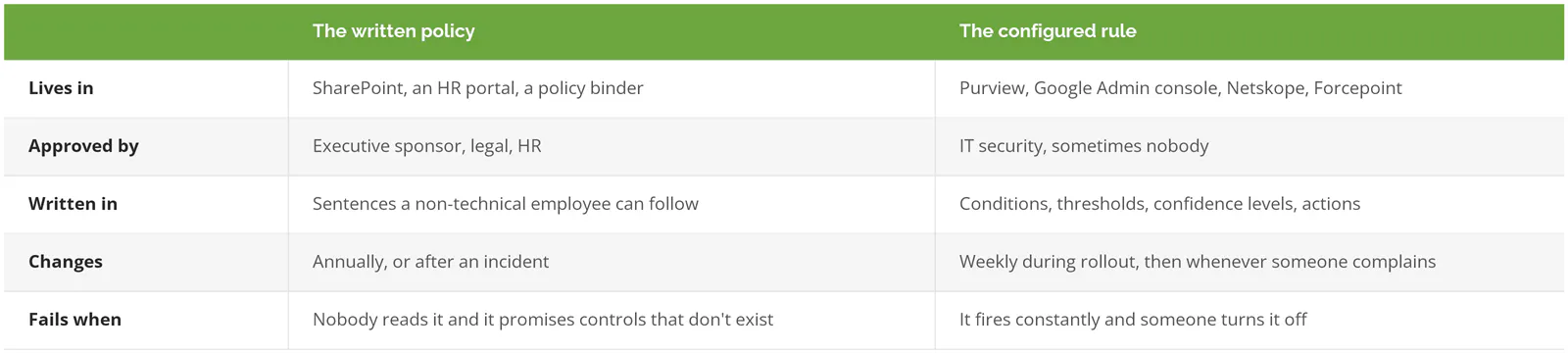
Both need to exist. A rule with no document behind it has no authority when you have to discipline someone, and no evidence trail when an auditor asks why you block what you block. A document with no rule behind it is a promise. That's the gap.
Neither is new ground, incidentally. NIST has carried the underlying control for years as AC-4, Information Flow Enforcement, in SP 800-53, alongside the Media Protection family that governs removable drives and disposal. If you're already writing information security policies and standards, DLP is a specific instance of work you've started.
A DLP Policy Template You Can Copy
What follows is clause text for a data loss prevention policy, not section headings. Change the bracketed parts. Nine sections is plenty for a company under 1,000 people. If your draft is running past eight pages, you're writing a procedure manual instead of a policy. Nobody reads those.
1. Purpose and Scope
This policy governs how [Company] classifies, stores, transmits, and monitors sensitive information. It applies to all employees, contractors, and temporary staff, and to all company-managed devices, email accounts, cloud storage, collaboration tools, and generative AI services accessed with a [Company] identity. It applies to personally owned devices whenever they are used to access [Company] data.
That last sentence is the one people forget. Leave it out and your policy doesn't cover the sales director's phone. That phone holds the pipeline.
2. Data Classification
Three tiers. Four if you're a defense supplier and need a tier for CUI, meaning Controlled Unclassified Information. Not five, and definitely not seven.

Information not explicitly classified is treated as Internal. Data owners named in Appendix A are responsible for classifying information within their business unit and reviewing classifications annually.
Default-to-Internal matters more than the tiers themselves. Without that sentence, every file nobody got around to labeling is Public by omission, which in a company with 12 years of accumulated SharePoint sites and a shared drive that predates the current IT team means the overwhelming majority of your data sits outside the policy the day you publish it. One line fixes it.
3. Handling Rules by Tier
Restricted information may not be transmitted to external recipients unless encrypted in transit and sent to a recipient domain on the approved partner list maintained by [role]. Restricted information may not be copied to removable media, uploaded to personal cloud storage, printed to non-company printers, or pasted into any AI service that has not been approved under Section 6. Internal information may be shared with external parties under an executed NDA. Public information carries no transmission restriction.
Write these as sentences about actions, not about data. "May not be copied to removable media" is enforceable. "Shall be protected appropriately" is not. The first one names something a person does. The second one is just a mood.
4. Channel Coverage
[Company] monitors the following channels for movement of Restricted information: corporate email, endpoint file transfers including USB and local sync clients, cloud storage services, collaboration platforms, web uploads through the corporate browser, and approved generative AI interfaces. Channels not listed are considered unmonitored, and Restricted information may not be transmitted through them.
Name your channels. All of them. An unnamed channel is an unmonitored one, and the sentence that closes the list is what makes the omission a violation rather than a loophole.
5. Monitoring and Notice
[Company] inspects content transmitted through the channels listed in Section 4 for the purpose of enforcing this policy. Inspection is automated. Human review occurs only when an automated rule generates an alert. Employees acknowledge this monitoring as a condition of system access. Monitoring records are retained for [12] months.
Get this clause reviewed by employment counsel before you publish it. Notice requirements vary by state, and a few countries where you might have remote staff treat content inspection very differently than the U.S. does. Short conversation. It's the one clause where getting it wrong costs real money.
6. Exceptions
Business needs that conflict with this policy are handled through a documented exception. Exceptions are requested from [role], approved by [role], recorded with a business justification and an expiration date not to exceed [90] days, and reviewed at expiration. Standing exceptions are not granted.
The expiration date is the whole clause. Exceptions without one become permanent architecture, which is how a temporary workaround granted in 2021 for a single month-end close ends up being the standing reason your finance team still emails unencrypted spreadsheets to an outside accountant four years later, with nobody able to name who approved it or why. Put a date on it.
7. Incident Handling
A confirmed transmission of Restricted information outside approved channels is a security incident and is handled under the [Company] Incident Response Plan. Incidents involving regulated data are escalated to [role] within [4] business hours of confirmation for evaluation against applicable breach notification requirements.
8. Consequences
Violations are addressed through the standard disciplinary process. Repeated violations after coaching, and any deliberate circumvention of a control, may result in termination. Attempted exfiltration of Restricted information is treated as a deliberate act.
Almost every template leaves this section out. Without it HR has nothing to point at, so the policy stops being a policy and becomes a suggestion.
9. Review
This policy is reviewed annually by [role] and after any material change to the data environment, applicable regulation, or a Severity 1 incident. The current version and approval date are recorded in Appendix B.
DLP Policy Examples by Data Type
Generic templates protect nothing in particular. Below is the same policy pointed at five specific kinds of data. Watch how the leak channel changes each time. That's the part that decides the rule.
Customer PII. Detects names paired with Social Security numbers, dates of birth, or account numbers. It leaves through email attachments and through CRM exports someone runs before a vacation. The rule that matters is the export threshold, not the email one. A single record in an email is usually a support ticket. 4,000 records in a CSV is a resignation letter. Same data type, same person, same afternoon, and the only thing separating the routine event from the one your lawyers will eventually read about is a number somebody has to choose deliberately. Choose it.
Payment card data. Sixteen-digit numbers passing a Luhn check, the arithmetic test that separates a real card number from 16 random digits, sitting near the words expiry, CVV, or cardholder. PCI DSS obligations attach the moment this data touches a system, and the standard's scoping guidance pushes hard toward shrinking where cardholder data lives rather than defending everywhere it currently sits. So the best rule here deletes scope instead of guarding it. Find the places it shouldn't be. Get it out of them.
Engineering files and source code. CAD drawings, Gerber files, PCB layouts, repository archives. This is the tier where manufacturers have the most to lose and the weakest detection, because a .STEP file holds geometry rather than text, so there's no pattern inside it for a content-matching rule to find the way it finds a Social Security number. So you classify by location and file type instead of by content. Everything in the engineering share is Restricted, full stop, and the rule watches that folder tree for movement to a USB drive or a personal Google Drive.
Financial results before announcement. Short-lived, high-consequence. Rather than a permanent rule, this is a two-week window before close where the finance team's outbound mail gets a stricter policy applied and then released. Almost nobody builds the temporary version. It's the most useful example on this list.
HR and payroll records. Leaves through the least exotic channel there is, which is someone forwarding a benefits spreadsheet to a personal address so they can look at it from home. Not malice. Convenience. The right action is a warning with a business justification prompt, not a block, because blocking a benefits spreadsheet doesn't stop the person from seeing it at home, it just moves them to photographing the screen with a phone, and now the same data is sitting in a consumer photo library you have no visibility into and no ability to revoke.
DLP Rule Examples, Written the Way a Tool Reads Them
Four parts to a configured rule. Where it applies, what triggers it, how confident the match must be, and what happens next. Below is the written policy from the previous section, translated into that shape, which is the translation step almost no template on the internet performs for you and the reason so many companies end up with a document and a tool that quietly disagree about what the company has decided.
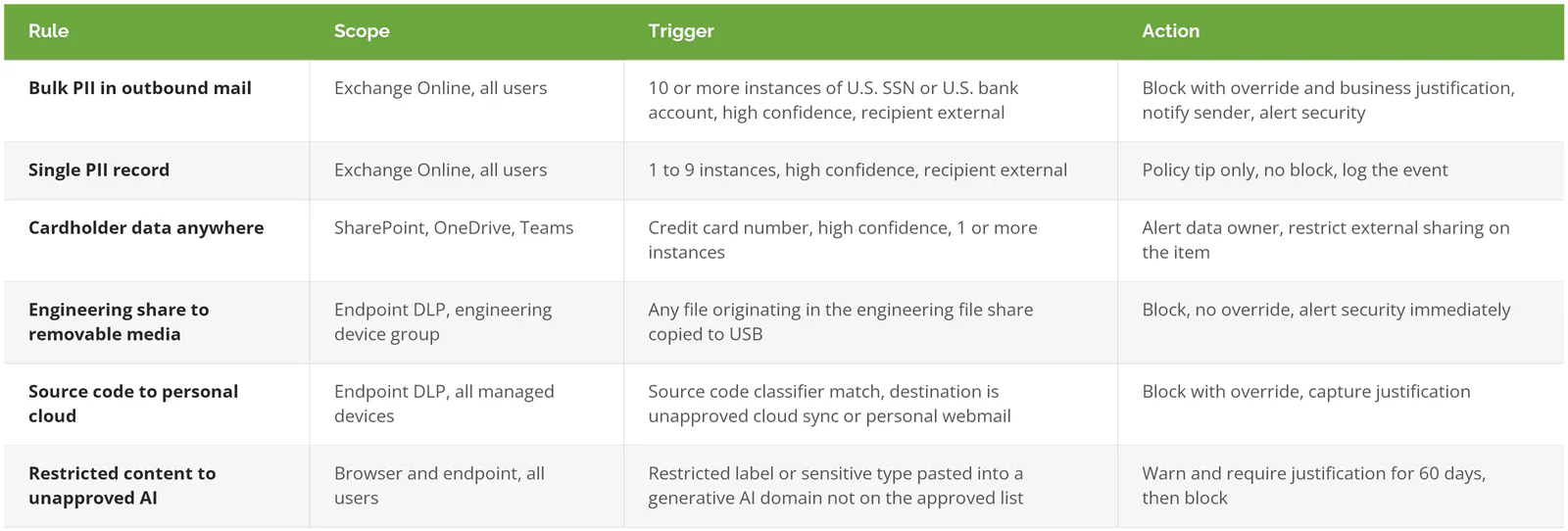
Two rules for PII rather than one. The difference between a support ticket and a data theft is volume, and a single rule can't tell them apart. Microsoft handles this through instance counts and confidence levels in its policy reference, and Google exposes the same idea as likelihood thresholds. Set instance count and confidence to their most aggressive values, which is what almost everyone does on the first attempt because it feels like the safe choice, and you get a policy that fires on every invoice accounting sends, every offer letter out of HR, and every insurance form in the building, until somebody with authority tells IT to switch the whole thing off. Usually around week three.
Microsoft also ships preconfigured starting points. The built-in template list covers financial, medical, and privacy scenarios by jurisdiction. Start from one, then strip out what doesn't apply. Building from the Custom template on day one means writing detection logic Microsoft already wrote. Wasted week. Worth knowing before you compare DLP tools on the market, because a chunk of what vendors demo is licensing you may already own.
The Shadow AI Clauses Almost Nobody Has Written
Templates ranking for this term were written for email, USB drives, and cloud storage. That was a reasonable scope when they were drafted. The channel that grew fastest last year isn't on any of them. Not one.
IBM's 2026 Cost of a Data Breach research found that 20% of organizations studied had a breach involving shadow AI, meaning AI tools employees adopted without IT knowing. Those incidents added as much as $670,000 to the average breach cost, and they disproportionately exposed customer PII and intellectual property. Shadow AI now shows up in 43% of security incidents, roughly double the prior year. The global average breach reached $4.99 million, up 12%.
Nobody is pasting customer records into a chatbot to hurt the company. They're doing it to summarize a call transcript at 6pm. That's the whole threat model.
Three clauses cover it. Approved services, named individually, with the paid tenant version distinguished from the free consumer one, because those carry different data retention terms. A prohibition on Restricted data in any unapproved service. Then a rule about connectors, which is the clause everyone misses, because granting a Copilot or Gemini agent access to a SharePoint site hands that agent whatever the site holds, including the folders somebody shared broadly in 2023 for a project that ended, and the agent will happily surface those contents to any employee who asks it a reasonable-sounding question. If you're drafting this section, the AI acceptable use policy guide covers the employee-facing half in more depth than belongs in a DLP document.
Thresholds Are Where Policies Die
Block on day one and the policy gets switched off by day 20. The sequence that survives has three stages, and each one ends on an exit criterion rather than a date.
Run in audit mode until you understand your own traffic. Two to four weeks. You're not tuning yet. You're finding out that the accounting team legitimately emails 200 invoices a month, that the recruiter's offer letters all carry a Social Security number by design, and that your first draft of the outbound PII rule would have blocked every one of them on the morning you turned it on. Then move to warnings with policy tips, the inline message that tells someone why something looks wrong and lets them proceed. Microsoft's documentation on notifications and overrides treats the justifications people type as tuning data, which is exactly right. Read them. Rising override volume on one rule means the rule is wrong, not that the users are.
Only then do you block, and only on the rules where a false positive costs less than a miss. Which rules are those at your company? If nobody can answer that in a sentence, you're not ready to enforce yet. Our DLP best practices guide goes deeper on running the program past that first quarter.
Mapping Clauses to the Frameworks an Auditor Will Ask About
Could you show an assessor which clause satisfies which control, today, without opening anything? Write the mapping while you're drafting. Reconstructing it 11 months later, the week before an assessment, takes four times as long, because by then the person who chose the thresholds has moved teams and nobody remembers whether the 10-instance trigger on outbound PII was a considered decision or a number somebody typed on a Thursday. Do it now. It's an hour.
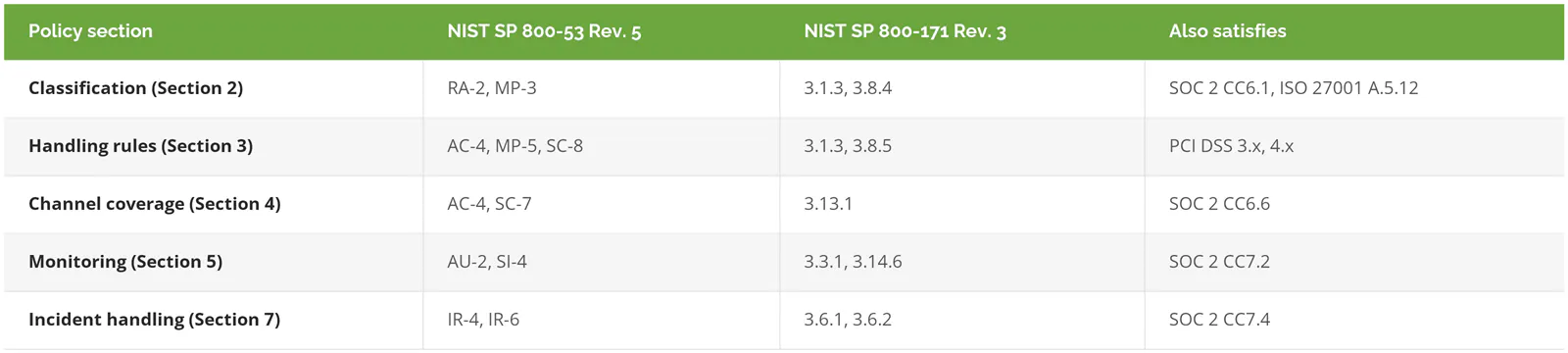
Control numbers shift between framework revisions, so confirm against the current text of SP 800-53 Rev. 5 and SP 800-171 Rev. 3 before you hand this to an assessor. Same caution applies to the SOC 2 trust services criteria in the right-hand column. The mapping is a starting point. It isn't evidence on its own.
Skip Most of This If You're Under 50 People
Under 50 employees, with everything in Microsoft 365 and no regulated data, the nine-section template is more governance than you need. Skip it. Write two pages. Classification and handling rules, and that's it. Turn on the built-in policies your license already includes, run them in audit mode, and look at what they find in 60 days.
Only four situations earn the full document. You hold regulated data. A contract names a framework. You're past roughly 150 employees, where informal control quietly stops working and nobody notices for a year. Or you're carrying intellectual property that would materially damage the business if a departing engineer walked out with it.
None of those apply? Then a short document you'll actually maintain beats a long one going stale in a drawer.