DRaaS Buyer's Guide: What Disaster Recovery as a Service Costs, Covers, and Leaves Out
DRaaS, or disaster recovery as a service, is a contract where a provider keeps ready-to-boot copies of your servers on its infrastructure so you can switch to them when your own systems go down. Backup gets your data back. DRaaS gets the business running again while you fix the original environment. It's one layer of a full backup and disaster recovery program, and it's the layer buyers most often sign without reading.
Table of Contents
Two things to know before you compare DRaaS providers. The per-server platform fee is the smallest number on the bill. And the terms that decide whether you actually recover live in the contract, not in the replication engine.
Confidence isn't the gap. In Veeam's Data Trust and Resilience Report 2026, a survey of more than 900 senior IT, security, and risk leaders, 90% said they were confident they could recover from a cyber incident. Among the ones hit by ransomware, only 28% fully recovered the affected data, and 44% got back less than three quarters of it.
Having recovery tools and having a recovery you've actually proven are different things.
What Is DRaaS, and How Is It Different From Backup?
DRaaS replicates whole servers, including the operating system, the applications, and every setting, to a provider's environment and lets you boot them there. Backup copies data so you can restore it later, onto hardware you still have to find, configure, and power on.
That difference sounds academic until the server room floods. A perfect backup of your ERP system is still just a file if there's no machine to run it on, and replacement hardware plus a rebuild is measured in days. With DRaaS, the machine already exists. It's waiting in someone else's data center, a few minutes or a few hours behind your production copy.
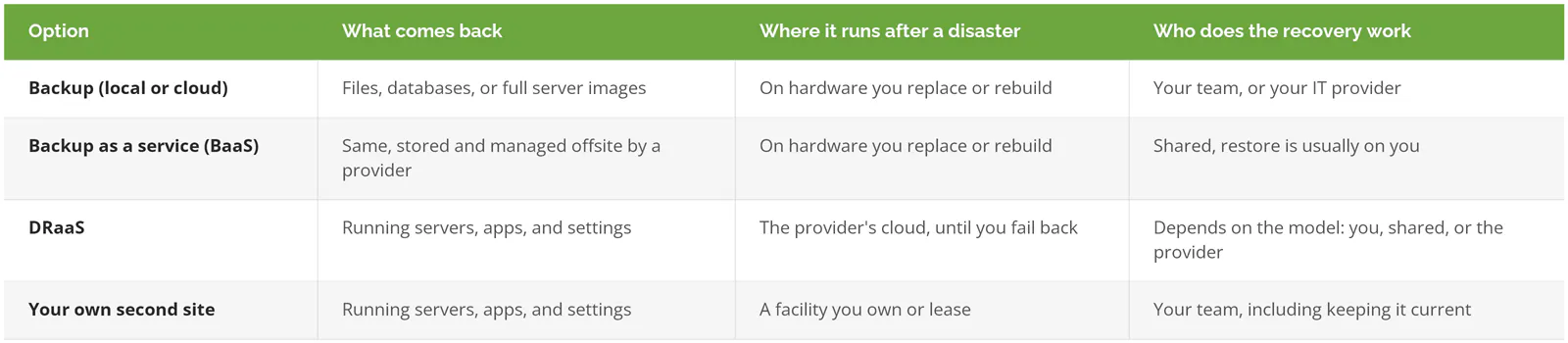
NIST's contingency planning guide, SP 800-34 Rev. 1, lays out the classic alternate-site options, from cold sites with power and nothing else to hot sites that mirror production. DRaaS is really a rented warm or hot site. If those terms are new, our breakdown of hot vs. warm vs. cold disaster recovery sites covers the tradeoffs.
Do You Actually Need DRaaS?
Start with one question. If your most important system stopped right now, how long before it costs you customers, revenue, or a contract?
NIST calls that number the maximum tolerable downtime, "the total amount of time the system owner/authorizing official is willing to accept for a mission/business process outage or disruption." Your recovery time objective (RTO, how fast a system has to be back) and recovery point objective (RPO, how much recent data you can afford to lose) both flow from it. If you haven't set those yet, our guide to RTO vs. RPO walks through it, and the RTO calculator puts a dollar figure on an hour of downtime.
Skip DRaaS if any of these describe you:
- You run entirely on Microsoft 365, Google Workspace, and other SaaS apps, with no servers of your own. There's nothing to fail over. What you need is SaaS backup, which is a different purchase, and our cloud backup comparison covers it.
- Your honest downtime tolerance is a week.
- You have one file server, and everyone could work out of OneDrive for 3 days without a single order slipping.
DRaaS earns its cost when you run line-of-business systems on your own servers, like an ERP, a SQL database behind a practice-management app, or the MES (manufacturing execution system) scheduling your production floor, and a day without them costs more than a year of protection.
Self-Service, Assisted, or Managed: Who Runs the Recovery?
DRaaS comes in three delivery models, and the difference is labor, not technology. Two companies can replicate to the same cloud with the same software and get very different outcomes depending on who owns the runbook, the step-by-step recovery document that says which server boots first, which network settings change, and who tests the result.
Self-service means you buy the platform and do the rest. Azure Site Recovery and AWS Elastic Disaster Recovery are the common examples. Your team configures replication, writes the runbook, keeps it current every time a server changes, and runs the failover. Cheapest on paper. Only works if someone on your staff has time to own it.
Assisted splits the work. The provider hosts the environment and helps during a test or a real event, while your team keeps the plan and makes the calls.
Managed hands the runbook, the testing, and the failover itself to the provider. It costs more per server, and it's the model that survives staff turnover.
No model takes the decision away from you, though. Microsoft's own Site Recovery documentation is blunt about it. "Failover isn't automatic." Somebody at your company has to declare a disaster, and that's a business call, not an IT one.
What Does DRaaS Cost?
Published hyperscaler rates start around $20-25 per protected server per month, but that covers the platform fee alone. Storage, replication infrastructure, recovery-point retention, compute during tests and failover, and outbound data transfer are all billed on top.
Both big clouds publish their rates, which makes them a useful yardstick even if you end up buying a managed service.
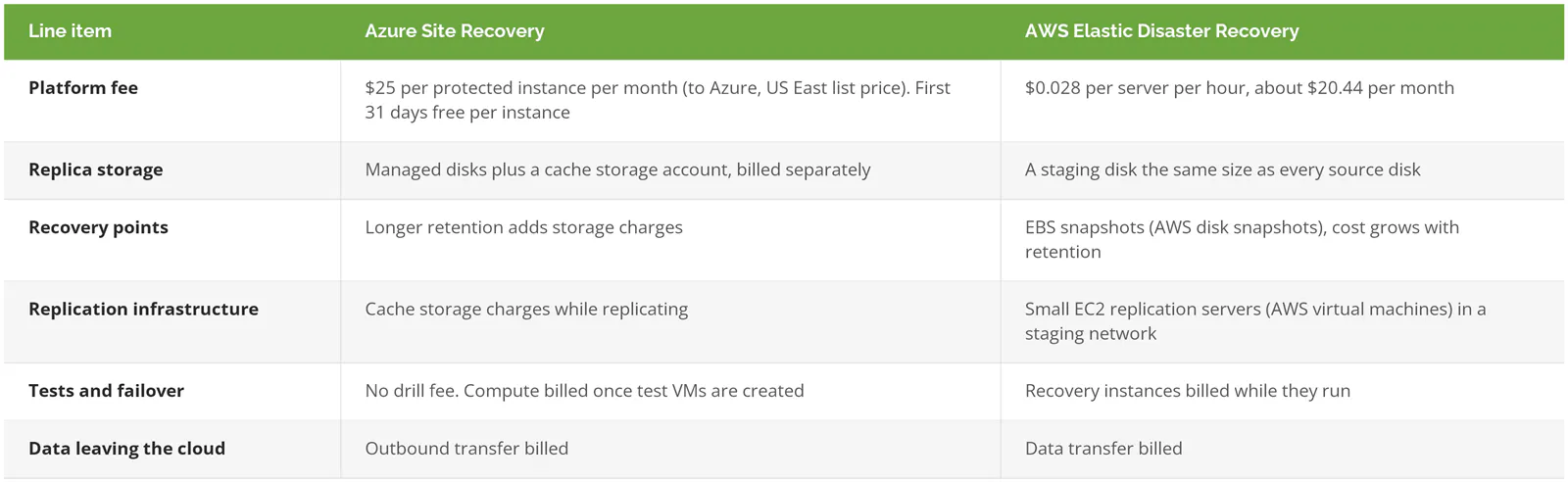
Sources: Azure Site Recovery pricing and AWS Elastic Disaster Recovery pricing, checked September 2026.
AWS publishes a worked example. Protecting 100 on-premises servers with 30 TB of disk, a 3.3% daily change rate, and 7 days of snapshot retention comes to $6,389.03 a month. The per-server DRS fee is $2,044 of that, roughly 32%. Staging disks, snapshots, and replication servers are the rest.
So if a quote leads with a per-server number, ask where the other two thirds went.
Managed DRaaS pricing is rarely published, because it bundles those infrastructure lines with the provider's labor, runbook upkeep, and testing. That's fine. It just means two quotes are only comparable when they're built on the same assumptions:
- Number of servers and total terabytes protected
- Daily change rate (how much data actually changes each day)
- Target RTO and RPO for each tier of systems
- Days of recovery-point retention
- Tests per year, and what a test includes
- Failback, priced as its own line
One more number from the same AWS page. An 8-hour drill that boots all 100 servers costs $122.94 in cloud compute and storage. Testing is cheap for the infrastructure. When a provider rations tests, the constraint is staff time, and that's worth knowing before you negotiate.
Eight Questions to Ask a DRaaS Provider Before You Sign
Put these in writing and ask for written answers. A sales deck answers different questions.
1. How far back can we recover?
Replication copies whatever is on the disk. Encrypted files included.
Azure Site Recovery creates a crash-consistent recovery point (a snapshot of the disk as if the power were pulled) every 5 minutes, but its default replication policy keeps just one day of history, and the oldest point you can go back to is 15 days on managed disks, per Microsoft's documentation. If ransomware started encrypting quietly three days ago and your retention is one day, every replica you own is already encrypted. Fast replication just got you a fast copy of the damage. Ask for retention in days, and ask what sits behind replication, ideally a separate backup chain with immutable copies that nobody can alter or delete for a set period.
2. How many tests do we get, and on how much notice?
Get the numbers. Datto, a backup and recovery platform sold through IT providers, publishes its cloud test policy, and it's a good example of what real terms look like. One cloud DR test per quarter, per device. At least 7 business days' notice. Test machines left running more than 30 days may be powered off and deleted. Test VMs default to 2 GB of RAM and 1 CPU core, with up to 16 GB and 8 cores allowed without extra approval.
Nothing unreasonable there. But if your ERP server needs 64 GB of RAM to run month-end close, you want to find that out in March, not during an outage. NIST's baseline is testing the contingency plan at least annually. Our disaster recovery testing guide covers how to structure one.
3. Who gets capacity first when a whole region goes down?
A hurricane, a wildfire, or a regional cloud outage doesn't hit one of your provider's clients. It hits every client in that area in the same hour, and they all start failing over at once.
NIST flagged this back in 2010. SP 800-34 says vendor agreements "should further discuss what priority status the organization will receive in the event of a catastrophic disaster involving multiple vendor clients." Ask how much standby capacity is reserved for you versus shared, and whether your recovery region is far enough from your production site that the same storm can't take out both.
4. What does it take to start a failover?
A phone call? A ticket? A named approver with a verbal passphrase? Find out, and then name the two people at your company who can make that call at 2 a.m. on a Saturday. Then ask the provider how long it took, in their last actual test for a client like you, from the declaration to the first server answering. A measured number. Not a brochure one.
5. How will people and customers reach the recovered systems?
Booting the servers is half the job. Your staff still need a way in, usually a VPN into the recovery environment, plus DNS changes so your applications resolve to new addresses, firewall rules, and public IP addresses for anything customers touch, like a customer portal or the EDI link (the automated order feed) a big customer sends purchase orders through. Datto's test policy allows one public IP per VM. Microsoft notes that you "need to prepare a number of things in order to connect" after an Azure failover.
And then there's licensing, which catches manufacturers and engineering firms more than anyone. Azure doesn't support persistent MAC addresses (the fixed hardware ID some software is licensed against), so Microsoft states that "software with MAC based license models cannot be used" for disaster recovery there. If your CAD, CAM, or ERP licensing is tied to hardware, ask how it runs after failover before you need it to.
6. How do we get back, and what does that cost?
Failover is the part everyone plans. Failback, moving operations from the provider's environment back to your own once it's repaired, is a second cutover with its own downtime window, its own data transfer bill, and its own ways to go wrong. AWS says you can replicate back to your primary site "whenever you're ready." Microsoft's documentation adds a limit worth knowing. A physical server recovered into Azure can't fail back to a physical server, only to a VMware virtual machine. Ask for the failback runbook and a price for it.
7. Can someone with our admin password delete the recovery copies?
If the answer is yes, an attacker who steals that password can too. CISA's #StopRansomware Guide tells organizations to keep offline, encrypted backups because many ransomware variants go looking for reachable backups to delete or encrypt first. Ask whether deleting recovery data needs a separate credential or the provider's sign-off, and whether any copies are immutable. The same guide says to restore into a clean, isolated network so you don't reinfect recovered systems, which is exactly the environment a good DRaaS test should rehearse. Ransomware recovery is its own discipline, and our ransomware protection and recovery page covers what it adds.
8. Is the RTO in the contract, or only in the brochure?
"Recovery in minutes" on a website is marketing. An RTO in the service agreement, per tier of systems, with a defined remedy if it's missed, is a commitment. Read the exclusions too. Datto, for instance, reserves the right to leave a machine out of a cloud test until it has a verified local boot check, so a server that's been failing its screenshot verification (an automated boot test of each backup) quietly falls outside the test. Fair rule. You just want to know it applies.
Red Flags in a DRaaS Proposal
- A per-server price with no storage, retention, or testing lines.
- "Recovery in minutes" with no RTO anywhere in the agreement.
- No failback plan, or failback described as "simple."
- Tests that are "available on request" with no number attached. Ask what happens when you request the fifth one in a year.
- Replication with no separate, immutable backup behind it.
- A recovery region in the same metro area as your office.
If you're weighing specific names, our ranking of DRaaS providers ranks seven providers serving California businesses.
What a Passing First DR Test Looks Like
"The servers booted" is not a pass.
A pass is a named employee, working from outside the office, logging into the recovered environment and finishing a real transaction, entering a sales order, printing a pick ticket, or running a report a customer actually needs. Record the time from the declaration to that transaction and hold it against your RTO. Record how old the recovered data is and hold that against your RPO. Log every problem with an owner and a date, fix them, then tear down the test environment so it doesn't linger (Datto's policy puts that cleanup on the IT provider running the test, for what it's worth). If the test exposes that nobody knows the order systems have to come up in, that's a strategy gap more than a DRaaS one, and our guide to building a disaster recovery strategy starts there.
Want a second set of eyes on a DRaaS quote or a test plan before you sign? Speak to a disaster recovery expert.