FinOps for Mid-Market Companies: Governing Cloud Spend
Your cloud bill has an ownership problem before it has a cost problem. Nobody's title says FinOps, so the invoice gets approved every month by someone who can't say what half of it bought. What follows covers who should own cloud spend at 20 to 1000 users, the three numbers a monthly review should produce, which guardrails cost nothing to switch on, and where all of it fits inside a managed cloud services plan.
Table of Contents
FinOps is the practice of making cloud spending someone's explicit job. At mid-market scale it runs as one named owner, a monthly review, and three tracked numbers. Not a dedicated team.
Cloud waste runs about 29% of all spend, according to Flexera's 2026 State of the Cloud Report. At companies spending under $100,000 a year, it runs 35%. Smaller bill, bigger leak.
That runs backward from the assumption. A $9,000 monthly invoice feels manageable, so nobody governs it, and the absence of governance is exactly what pushes the percentage higher. No commitment discounts, because nobody ran the math. No owner, because the bill isn't big enough to justify hiring one. And the architect who stood up a test environment in March is the only person alive who knows it's still running in September.
That last one is where the first 20% usually hides. Not in a clever optimization. In a list of things nobody turned off.

What Is FinOps, and Does It Apply Below 1,000 Users?
FinOps, or cloud financial management, gives cloud spending a named owner, a review cadence, and a short list of decisions that owner can make. The FinOps Foundation calls it a framework and cultural practice, not a job title.
The Foundation is blunt about the team question. FinOps "is not done by a single person or team but rather changes the way that disparate engineering, finance, and business teams work together." Read that at 200 people and it stops sounding like a hiring plan and starts sounding like a standing meeting.
Three stages run on a loop. Inform means you can see who spent what. Optimize means somebody acts on it. Operate means the acting happens on a schedule instead of during a panic. Then it starts over. Those aren't phases you complete and tick off, because you're in all three at once, permanently, which is the detail that trips up anyone treating this as a project with an end date.
None of that requires scale. Microsoft frames it the same way in its own FinOps guidance, as a discipline rather than a department. It requires that somebody owns the loop. Your infrastructure as a service footprint can be 30 virtual machines, a database, and a backup target, and the loop still works the same way. It just runs shorter.
Something did change this year. The Foundation widened the framework in 2026 past raw cloud spend to cover SaaS, licensing, and AI. For a mid-market company that's less abstract than it sounds. It means your Microsoft 365 licensing, the seats nobody reclaimed after the last round of departures, and whatever your team has been quietly spending on AI tooling all belong in the same conversation as your Azure bill. Same discipline. Bigger bill.
Why Cloud Waste Gets Worse at Smaller Spend
Waste runs 29% of cloud spend overall and 35% at companies spending under $100,000 a year. Smaller bills attract less scrutiny, qualify for fewer commitment discounts, and rarely have a dedicated owner.
Flexera surveyed more than 750 cloud decision makers for the 2026 report and found waste climbing for the first time in five years, which reverses five years of decline. The same survey found 85% of respondents naming cloud spend management as their top challenge, ahead of security. The driver behind the reversal, by Flexera's own reading, is new cost complexity from AI workloads and newer platform services, where the usual instincts about what a thing should cost simply don't apply yet. Nobody has a baseline. That takes a year.
So why does the smaller company do worse? Three mechanisms. None of them are about competence.
- Commitment discounts don't scale down. Reserved instances and savings plans pay off on predictable, steady-state workloads. Below a certain spend, the analysis to identify those workloads costs more staff time than the discount returns, so nobody does it and everything stays on demand at list price.
- Nobody's compensation depends on the number. At $5M a month there's a person whose quarter goes badly if spend drifts. At $18k a month there's an IT manager with 40 open tickets.
- Single-architect risk. One person made every provisioning decision. That's efficient right up until they're on vacation, or they leave, and it turns out the reasoning behind the sizing of your production database lived entirely in their head.
Tactics are well-covered ground. If you want the specific moves, the rightsizing, the idle-resource sweeps, the storage tiering, that's a separate conversation about cloud cost optimization and it's mostly a checklist. This post is about the part that decides whether the checklist gets run twice or once. Or never.
Who Owns Cloud Spend When Nobody's Title Says FinOps?
One person, named, inside IT. The State of FinOps 2026 found 78% of practices report into the CTO or CIO and 8% into the CFO. Finance consumes the numbers. IT produces them.
Worth knowing where that survey comes from before you lean on it. It covers 1,192 respondents representing more than $83 billion in annual cloud spend, and 47% of them are large enterprises with another 33% enterprise. Only 20% are SMB. Flexera's report puts 76% of large enterprises above $5M a month. So the published playbook was written by people managing more cloud in a week than you'll manage this year, and the structural advice inside it needs translating before it's useful to you.

The centralized enablement model that 60% of those practices run turns into one person at your size. Not a team with a hub and spokes. One hub. The spokes are the four people who already provision things.
Your CFO will often volunteer for this. Decline politely. Finance can see that spend rose 14% in August and cannot see that it rose because someone swapped a server onto a more expensive hardware tier during a performance troubleshoot, which is the only half of that sentence leading anywhere. The owner has to be able to open the console. That's the whole test. Anything else is a reporting relationship dressed up as accountability.
What the owner actually needs is narrow. Read access to billing, every account. Authority to ask why something got provisioned, without the question landing as an accusation. Forty-five minutes a month. And a decision right, meaning they can switch off an orphaned resource under some agreed dollar threshold without convening anybody. Programs that stall usually stall on that last one. Give someone the reporting job without the decision right and you've built a newsletter. Nobody reads it.
If nobody internally has the bandwidth, cloud cost governance is standard IT strategy consulting territory, and it usually sits with a vCIO rather than a help desk, because the output is a set of decisions rather than a set of tickets.
The Three Numbers a Monthly Cloud Review Should Produce
A cloud review that produces a spend total has produced nothing. You already had the total. It arrived by email on the first of the month.
Three numbers do the work.
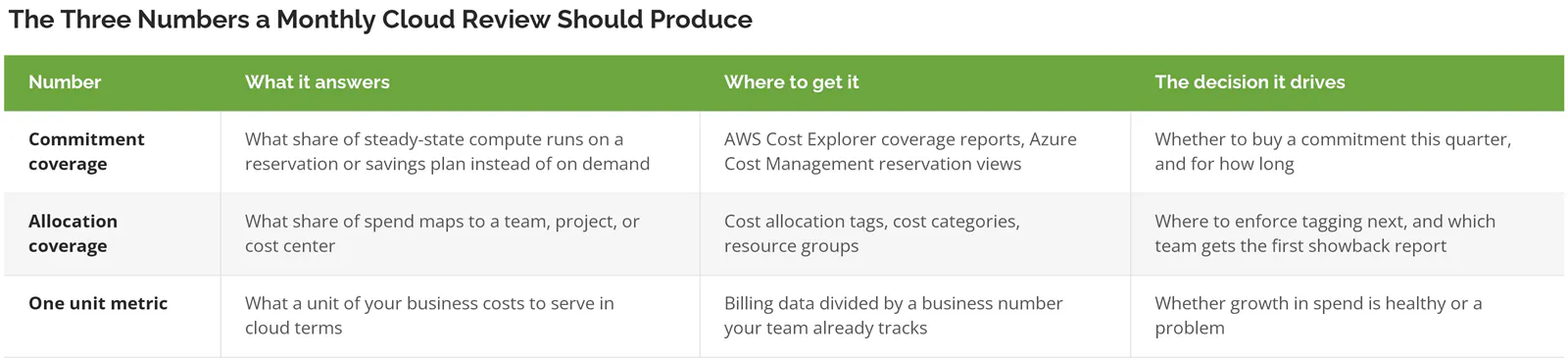
Unit metrics deserve more room than they're getting here. The FinOps Foundation's guidance on unit economics splits the metrics into resource-efficiency measures like cost per GB stored or cost per virtual CPU, and business measures like cost per tenant, cost per transaction, or cost per case resolved. It also says the starting point is modest. At the crawl stage you're just asking, during an architecture discussion, roughly what this costs per GB or per thousand requests.
Pick a unit your business already counts. A distributor counts orders shipped. For a professional services firm it's active matters, or billable projects, whichever number the partners already argue about in the Monday meeting. Manufacturers have production hours. Divide cloud spend by that number and track it monthly, and the conversation with your CFO changes shape immediately, because a 14% rise in spend against a 22% rise in orders is a fundamentally different meeting than a 14% rise against flat volume. Growth or drift. The unit tells you which.
A grounded example. A 200-person distributor running roughly $18,000 a month across Azure and Microsoft 365 finds three things in a first honest review. About $2,400 a month in virtual machines running 24 hours a day for a development team that works 40 hours a week. Another 60 Microsoft 365 licenses still assigned to people who left, because license reclamation never made it onto anybody's offboarding checklist and nobody audits seat counts unless finance asks. And zero commitment coverage on a database cluster that hasn't changed size in 19 months. None of that is exotic. All of it is invisible without a review, and the license piece in particular tends to compound the same way technical debt compounds inside an IT budget, quietly, until somebody finally looks.
Which Guardrails to Turn On This Week
Turn on budget alerts with forecasted-cost thresholds, anomaly detection, and a required-tag policy. All three are free on AWS and Azure, and AWS Cost Anomaly Detection can start alerting within 24 hours of a spike.
Buying a tool is the reflex. Resist it. Cloud cost governance at this size starts with native controls that cover the mid-market case almost completely, and they're already included in what you pay.
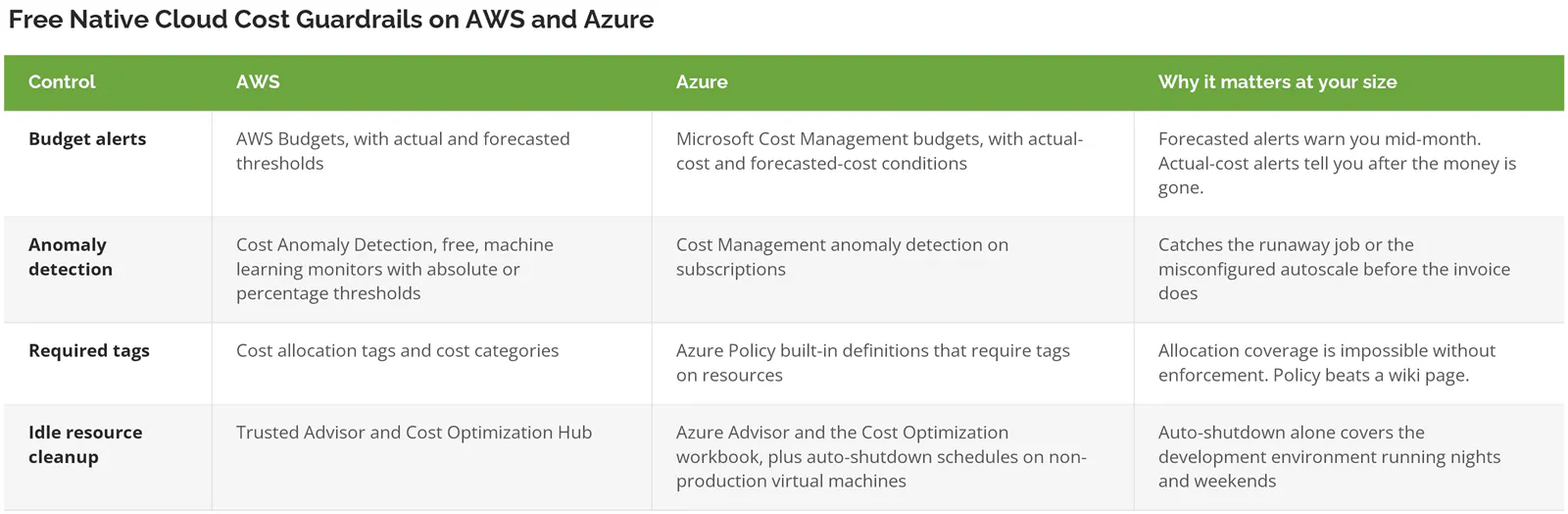
Microsoft's own Well-Architected guidance on spending guardrails puts four categories on the list, which are release gates, governance policies, resource limits, and access controls, and it tells you to prioritize automation over manual process. Automation doesn't forget. The access controls point is the one teams skip. Separating who can view cost data from who can create resources is a five-minute role assignment, and it's the control that stops an unattended credential from turning into a crypto-mining bill over a long weekend.
AWS publishes its anomaly detection documentation openly, and it's worth ten minutes of reading. Set the threshold in absolute dollars, not percentages, if your baseline spend is small. A 300% spike on a $40 service is noise. A $2,000 jump is not, and percentage thresholds will bury the second one under a dozen of the first.
Which platform you're on changes the mechanics but not the shape. If that decision is still open, the tradeoffs between Azure, AWS, and Google Cloud at mid-market scale come down to licensing position and support cost more than compute pricing.
Showback First. Chargeback Maybe Never.
Showback reports what each team's cloud usage costs. Chargeback bills them for it. Start with showback, because it exposes bad tagging without starting a fight, and move to chargeback only when the numbers survive a quarter unchallenged.
Money moving is the whole difference. Under showback, the operations team sees a number next to their name and the cost stays on the central IT budget. Under chargeback, that number lands on their own budget line and somebody in operations now has a strong incentive to argue about it.
Argue is the operative word. The first showback report you circulate will be wrong, and it will be wrong in a specific and predictable way, because a large share of spend, often a third or more, won't map cleanly to anyone and the shared services line will be larger than everything else combined. That's fine. That's the report doing its job. Run it for two or three months and the untagged pile shrinks every cycle as people find their own resources in the unallocated column and claim them. It self-corrects.
Run that same report as a chargeback in month one and you get a different outcome. You get a finance dispute, a team that stops trusting the data, and an owner who now spends their forty-five minutes a month defending arithmetic instead of finding savings. Nobody wins that one.
Most mid-market companies never need to cross over. Showback plus a named owner produces the behavior change. Chargeback mainly earns its complexity when business units run genuinely separate books and carry a real incentive to optimize independently, and that's a structural condition, not a maturity badge.
One practical note on tagging, since allocation depends on it entirely. Tag at creation, enforced by policy, or you'll spend a quarter tagging retroactively and still miss things. The cleanest moment to establish a tagging standard is during a migration, before anything is running, which is one of the underrated line items in what a cloud migration actually costs.
When a Paid FinOps Tool Starts Paying for Itself
Below $15,000 a month in cloud spend, a paid cost management platform usually costs more than it recovers. Native tools and a monthly review cover the same ground. Above that, allocation and commitment work gets too manual to sustain.
Run the arithmetic before you take a demo. Take your monthly spend, multiply by 29% for the waste baseline, then assume you'll realistically recover a third of that in year one, because some of the waste is politically expensive to remove and some of it is a workload somebody genuinely needs. At $15,000 a month that's roughly $1,450 a month in realistic recovery. Now compare that against the platform quote, however it's priced, often as a percentage of the spend it manages, and against the hours somebody still has to spend inside the tool for it to produce anything. Then decide.
Between $10,000 and $15,000 it's a judgment call, and the deciding factor is how many hours a month the manual work is eating. Skip the purchase outright if any of these describe you. You're under $10,000 a month. You're on a single cloud platform with fewer than four subscriptions or accounts. Your environment is mostly Microsoft 365 and a handful of virtual machines rather than a sprawling platform footprint. In those cases the native tools plus a calendar invite get you most of the way, and the money is better spent on the migration work that shrinks the footprint in the first place, which is a different problem that cloud migration services exist to solve.
Buy the tool when multi-account tagging has become a part-time job, when you're managing commitments across two or more platforms, or when finance needs allocated cloud costs inside a monthly close on a deadline. Those are workload problems, and a tool solves workload problems. It does not solve an ownership problem, and a platform bought to fix an ownership gap becomes an expensive dashboard nobody logs into by the second quarter.
Where These Programs Stall
Four failure modes, and they show up in roughly this order.
First comes the tag nobody enforces. A standard gets written, circulated, agreed to in a meeting, and then never attached to a policy that blocks an untagged deployment. Six months later allocation coverage sits at 55% and everyone is surprised. Nobody should be.
Then the report nobody reads. A monthly export goes out to eleven people, none of whom have a decision to make when they open it, and attendance at the review drops to two. Then one.
Third, savings that never get banked. The review identifies $1,900 a month in idle resources, and nobody has the authority to switch them off without an approval chain, so the finding rolls forward to next month's report unchanged. Then the month after that.
Last, ownership that rotates. The person who built the tagging standard moves to a different project, the role gets reassigned to whoever has capacity that quarter, and the institutional memory of why a particular resource is sized the way it is walks out with them.
Consilien runs managed IT, cloud, and cybersecurity programs for companies with 20 to 1000 users nationwide, and cloud cost governance usually shows up inside the strategy work rather than as a separate project, because the useful output is a set of decisions and a recurring cadence rather than a report. If your cloud bill has grown faster than your headcount and nobody can tell you why, speak to a cloud expert and bring three months of invoices.