How to Switch MSPs in Los Angeles Without Losing a Day of Productivity
Switching MSPs takes 2 to 4 weeks and shouldn't cost you a day of downtime. The new provider documents your environment, verifies backups, transfers admin credentials, and deploys monitoring while your current MSP is still working. Cutover happens last, after everything is confirmed.
Table of Contents
Most of the horror stories you've heard about switching providers come from the same mistake. Someone gave notice before the new provider had access to anything. The order of operations is the whole game.
Why Companies Switch Managed Service Providers
Companies usually switch MSPs when their current provider stops delivering consistent support, proactive cybersecurity, or strategic IT leadership. In Los Angeles, this often happens when growing organizations outgrow smaller IT vendors or need stronger security and compliance capabilities.
Common reasons businesses replace their MSP:
- Slow response times to support tickets
- Recurring outages or unresolved technical problems
- Weak cybersecurity protections
- Lack of strategic IT planning or vCIO guidance
- Poor communication and transparency
- Confusing contracts or hidden costs
For executives, the decision isn’t just about fixing IT problems. It’s about protecting productivity and reducing operational risk.
Can changing MSPs be done without any system downtime?
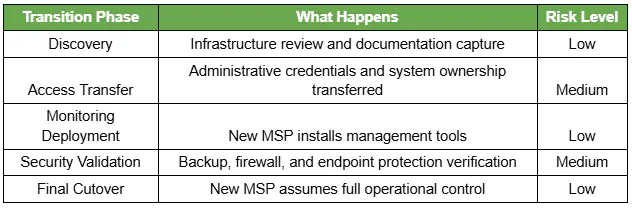
Yes. The systems themselves don't change during a switch. Only the people managing them do. The incoming provider runs discovery, takes ownership of admin credentials, verifies backups, and deploys monitoring while the current agreement is still active.
Zero-downtime transitions follow several key principles:
- Parallel onboarding before terminating the current MSP
- Complete IT documentation capture
- Administrative access verification
- Backup validation and recovery testing
- Phased deployment of monitoring and security tools
When these steps happen in the correct order, employees never notice the transition.
The 7-Step Process to Switch MSPs Safely
A structured transition protects your infrastructure, data, and employee productivity.
Step 1: Review Your Existing MSP Contract
Before starting the transition, review the contract with your current provider. It is worth knowing what's actually in an MSP contract before you read your own, and if the terms turn out to be tighter than you expected, there is a separate process for how to get out of an IT managed services contract in California.
Key items to check:
- Termination notice period
- Auto-renewal clauses
- Hardware ownership terms
- Data access rights
In the agreements we review during discovery, 30 to 60 days is the typical notice period. Planning around it is what prevents an unexpected delay at the end.
Step 2: Gather IT Documentation
Good documentation is the difference between a 2-week transition and a 6-week one. Most environments have less of it than leadership assumes.
Critical documentation includes:
- Network diagrams
- Firewall configurations
- Administrative credentials
- Asset inventory
- Backup systems and schedules
If documentation is incomplete, the new MSP can rebuild it during the discovery phase.
Step 3: Conduct a Full IT Environment Assessment
The incoming MSP performs a discovery process to map your infrastructure and identify potential risks.
This assessment typically identifies:
- Servers and endpoints
- Cloud platforms such as Microsoft 365
- Security and monitoring tools
- Network hardware and firewalls
- Backup platforms and storage locations
Discovery ensures no critical system is overlooked during the transition.
Step 4: Transfer Administrative Access
Ownership of administrative credentials has to sit with your organization, not with whichever provider happens to be managing them. That means the Microsoft 365 tenant, the domain registrar account, firewall and router administration, the backup and disaster recovery platforms, and every cloud infrastructure account.
Here is how it goes wrong. A company gives notice on a Friday and finds out on Monday that the outgoing provider is the only global admin on the tenant, and the domain was registered under that provider's own account. Nothing is technically lost. But the transition now runs on the goodwill of a vendor you just fired.
The joint CISA, NSA, and FBI advisory on cyber threats to managed service providers makes the same point from a security angle: the contract should state plainly who owns which access, and accounts that are no longer in use should be identified and disabled. Microsoft's guidance on emergency access accounts is the practical companion. Keep at least two cloud-only global admin accounts your own organization controls, held outside the policies that could lock everyone else out.
Businesses should always retain ultimate ownership of these credentials.
Step 5: Deploy Monitoring and Security Tools
Before the full transition occurs, the new MSP installs its management platform across the environment.
Typical tools include:
- Remote monitoring and management software
- Endpoint security agents
- Backup monitoring systems
- Patch management tools
Deploying these tools early allows the new provider to monitor systems before taking full responsibility.
Step 6: Validate Backups and Security
Backup validation is one of the most critical steps in any MSP transition.
Your new provider should verify:
- Backup jobs complete successfully
- Data restore testing works correctly
- Firewall rules and access controls are configured properly
- Endpoint protection is active on all devices
A backup that has never been restored is a theory, not a backup. NIST SP 800-34 Rev. 1 treats recovery testing as a standing requirement rather than a one-time checkbox, and a provider transition is exactly the moment to prove it works. Ask for the restore test results in writing.
Step 7: Execute the Final Cutover
Once systems, security tools, and monitoring are verified, the new MSP assumes full operational responsibility.
At this point:
- Helpdesk support transitions to the new provider
- Monitoring alerts route to the new MSP
- Security management shifts to the new provider
Employees should experience no interruption to daily work.
MSP Transition Checklist
Before ending your relationship with the current provider, confirm the following items are complete.
- Administrative credentials transferred
- Backup systems verified and tested
- Monitoring agents installed across devices
- Asset inventory documented
- Security policies reviewed
- Helpdesk contact procedures established
This checklist helps eliminate most transition risks.
Want this checklist run against your actual environment?
How Long Does It Take to Switch MSPs?
Most organizations can complete an MSP transition in 2–4 weeks, depending on the complexity of the infrastructure and the availability of documentation.
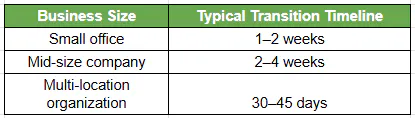
Companies with well-documented infrastructure usually transition faster because fewer systems require rediscovery.
Risks When Switching Managed Service Providers
When a transition is poorly planned the failures are predictable: administrative access nobody can produce, documentation that turns out to be three years stale, backup jobs that quietly stop running mid-handoff, a monitoring gap while agents change hands, and a helpdesk nobody is sure how to reach.
The pattern underneath all of them is the same. Notice was given, access was revoked on schedule, and the incoming provider was still three days out from having monitoring deployed. For that stretch, nobody is watching. Every one of these is a sequencing failure, not a technology failure.
How the Right MSP Protects Productivity During the Transition
Experienced MSPs protect business operations by prioritizing a controlled onboarding process.
Effective onboarding typically includes:
- Parallel monitoring deployment
- Complete infrastructure discovery
- Verified backup and recovery testing
- Proactive cybersecurity validation
- Dedicated onboarding engineers
This approach allows the new provider to assume control smoothly without interrupting business operations.
What Our Onboarding Actually Looks Like
Every MSP claims a structured onboarding process. Here's ours, with the time commitment on your side spelled out, because vague promises are how people end up in the wrong agreement twice.
- Discovery Session, 20 to 30 minutes. We find out whether we're a fit before either of us spends real time on this. Sometimes the answer is no, and we'll say so.
- Strategy Session, 45 minutes. Your leadership team, not just IT. What the business is trying to do over the next 24 months, and where technology is in the way.
- Technology Assessment, 2 to 4 hours. Our engineers map the environment: endpoints, servers, cloud tenants, firewalls, backups, identity. This is where undocumented dependencies surface, and there are always some.
- Solution Presentation, 75 minutes. What we found, what we'd change, what it costs. In writing.
- Q&A, 60 minutes. Separate from the presentation on purpose, so you have time to think before you ask.
- Kickoff, 60 minutes. Ownership handoff, escalation paths, who to call on day one.
The Part Most Providers Won't Put in Writing
If you're reading a guide about switching MSPs, you've already been locked into an agreement that stopped working. The reasonable fear is doing it again.
Our standard agreement runs 3 years with a 1-year opt-out. You can exit inside the first year with 60 days' notice, no penalty. We don't need a contract to keep clients, and a provider confident in delivery shouldn't need one either. When you're evaluating anyone, including us, ask what the exit terms are before you ask what the price is.
Consilien has run managed IT and security since 2001, and was named to the Channel Partners MSP 501 list in 2025 and again in 2026, ranked #306 globally. IC24 Managed IT is the service that takes over once cutover is done, and transitions are handled by our own engineers out of Torrance, not a subcontracted onboarding team.
Signs It’s Time to Replace Your MSP
Businesses often tolerate IT problems longer than they should. But certain warning signs indicate it’s time to consider a new provider.
Common indicators include:
- Frequent downtime or recurring system issues
- Slow response times to support tickets
- Outdated cybersecurity protections
- Lack of strategic IT planning
- Compliance concerns or audit failures
- Unexpected or rising IT costs
If these issues persist, switching MSPs may improve both security and productivity. It is worth understanding why your last IT provider failed you before you sign with the next one, because the same gap tends to repeat.
Not sure whether the problem is your provider or your setup?
A 20-minute discovery session will tell you which one it is. No pitch. Speak to an IT Expert.
Choosing the Right Managed IT Services Provider in Los Angeles
Before selecting a new MSP, leadership should evaluate providers carefully. The transition process matters just as much as the services offered, and it is a fair question to put to anyone selling managed IT services in Los Angeles.
Key factors to evaluate include:
- Cybersecurity expertise and certifications
- A documented onboarding process
- Experience with compliance frameworks
- Guaranteed response times and service levels
- Strategic IT consulting or vCIO services
The right provider will focus on both technical stability and long-term business alignment. If you are not sure where your current environment actually stands, a cybersecurity risk assessment is a reasonable first step, with or without a provider change.