Outsourced IT Services vs In-House IT: Cost and Risk Compared
Outsourced IT services cost $100 to $250 per user per month. One in-house IT hire costs about $138,500 a year once benefits are counted. The spreadsheet part is easy and mostly beside the point. What actually decides it is coverage hours, security skills, and what your insurance carrier now demands.
Table of Contents
Outsourced IT services typically run $100 to $250 per user monthly, while one in-house IT hire costs roughly $138,500 fully loaded. Cost rarely decides it. Coverage hours, security skills, and insurance requirements do.
The decision usually arrives as a resignation letter. Your one IT person gives two weeks notice, and nobody else knows the firewall password, the backup schedule, or which vendor holds your domain registration. That's when companies start pricing outsourced IT services against a replacement hire. It's the worst possible moment to run that math, because you're running it under pressure with a deadline someone else set.
So run it now instead.
You've seen the standard version. A salary column next to a monthly fee column. It's incomplete in a specific way. It prices what each model costs. Not what it leaves uncovered. And in 2026, between what cyber insurance underwriters now require and what a single generalist can realistically cover on their own, the uncovered part is where the money actually goes.
What Does Outsourced IT Actually Cost Compared to In-House?
Outsourced IT runs $100 to $250 per user per month for fully managed support. In-house costs roughly $138,500 per year for one generalist, before tools, training, or the recruiting bill when they leave. Both numbers are real. Neither one is the answer.
For a 60-person company, that's about $108,000 a year outsourced at a mid-range $150 per user, against $138,500 for a single hire who can't cover nights, weekends, or their own vacation. Roughly $30,000 apart. The gap widens once you add the tool stack that person needs. Then it flips. Above roughly 150 users, per-user pricing stops being the bargain it looks like at 40.
Pricing tiers sort out fairly predictably. Entry-level plans run $100 to $150 per user and cover help desk and patching. Mid-range runs $150 to $200 and adds security monitoring. Anything with 24/7 coverage and audit documentation starts at $200 and climbs from there, which tracks with what SMBs actually pay once the contract is signed.
Those are the headline numbers. Now the parts that don't make the headline.
One In-House Hire, Priced Honestly
Start with the salary, and be careful which salary you start with. The Bureau of Labor Statistics puts the median for network and computer systems administrators at $96,800. PayScale says $72,120. Glassdoor says $102,262.
Same job. Three answers. That's $30,142 between the highest and lowest source, and the spread is not noise. It's methodology, because PayScale skews toward people early in their careers while Glassdoor folds in bonuses and the Bureau of Labor Statistics counts everybody in the occupation regardless of tenure. Pick the flattering one and your business case is fiction before you've added a single line item.
Then there's the multiplier almost nobody applies correctly. BLS data from March 2026 shows benefits account for 30.1% of total compensation for private industry workers. Wages averaged $32.60 per hour, benefits $14.01. So a $96,800 salary is really about $138,500 landed. That's before the laptop.
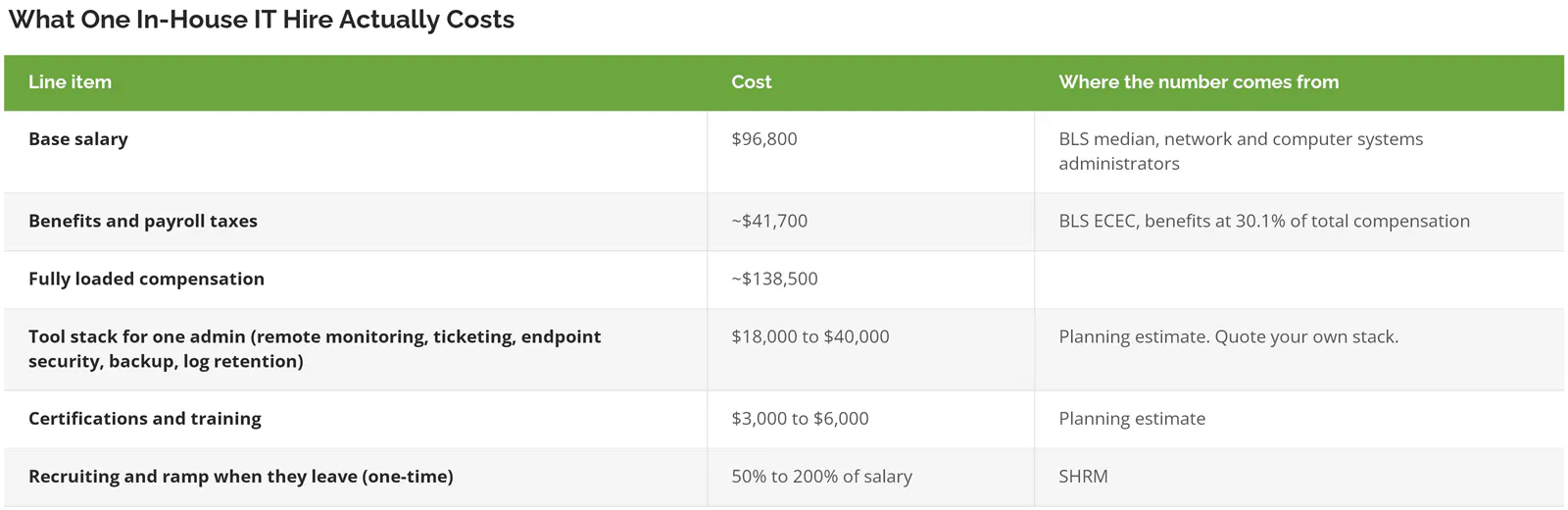
A quick translation on that tool row, because it hides real money. Remote monitoring and management is the software that watches every machine and pushes patches. Endpoint security is what catches malware on laptops and servers. Log retention is keeping a searchable record of what happened on your network, which your auditor and your insurer will both ask about, usually at the least convenient possible moment and usually with a specific retention window already in mind. An outsourced provider spreads those licenses across hundreds of clients. You buy them at list price for one company. That's the whole arbitrage.
Manufacturers hit a sharper version of the same problem, since the plant floor adds device counts and uptime pressure that an office-only headcount model never accounts for. We broke that scenario down separately in the same math for manufacturers.
Cost Per Covered Hour
Start with the calendar. A year has 8,760 hours. A full-time employee works 2,080 of them on paper. Subtract 10 holidays, 15 vacation days, and 5 sick days and you land near 1,840 hours of actual coverage. Call it 21%. Your business, its email, its servers, its backups, and every automated scanner probing your perimeter from a data center in another time zone all keep operating during the other 79%.
Divide the money by the hours and the comparison stops being close.
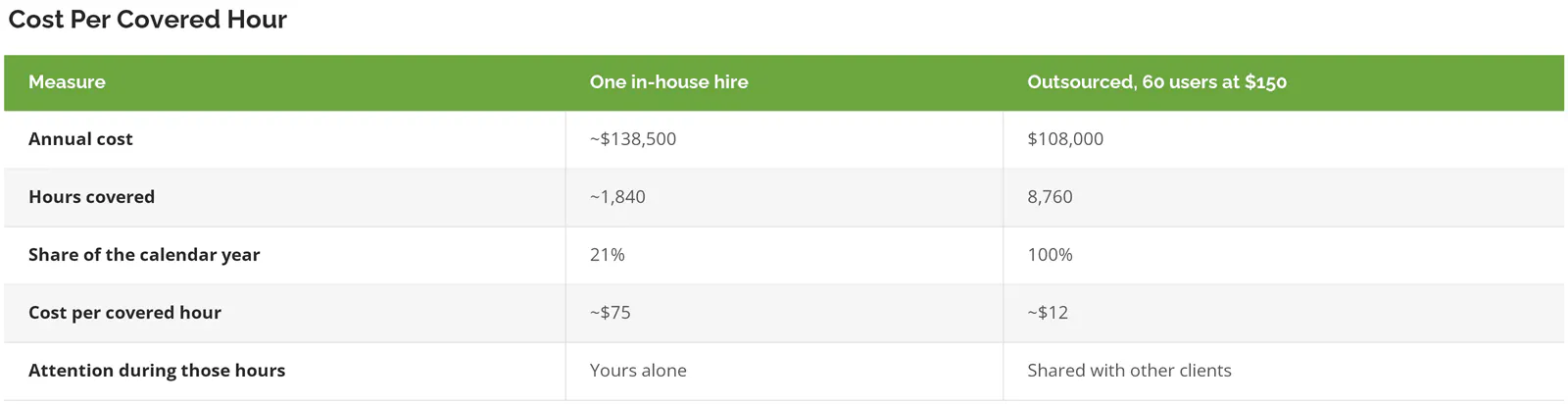
Read that last row before you quote the fourth one at your CFO. The $75 hour buys undivided attention from someone who knows your building, your people, and the reason the accounting server has that one weird setting nobody wants to touch. The $12 hour buys a queue position. Different products. Any provider who tells you otherwise is selling you something.
What the covered-hour view does is force an honest question. You aren't choosing between two prices. You're choosing between depth and duration. Which one does your business actually break from?
A design agency that runs 9 to 6 and loses a few billable hours to an outage should probably buy depth. A distributor whose warehouse scanners run a second shift, or a food processor whose line runs overnight, is buying duration whether they've priced it that way or not, and usually they haven't.
Cost Is the Easy Half. The Risk Ledger Is Harder.
Money is the part you can model, which is why comparisons stop there. Risk is the part that shows up as a single event that erases three years of savings. It lives in four places.
One person is one point of failure
When your IT person resigns, you lose the systems and the institutional memory in the same week. SHRM puts the cost of replacing an employee at 50% to 200% of their annual salary once you count recruiting, lost productivity, and ramp time. On a $96,800 role that's $48,000 to $193,000, landing in a quarter you didn't plan for. Nobody budgets for that.
And the number understates it for IT specifically, because the departing person is the only one who knows what's undocumented. Something is always undocumented. That's not a criticism of the person. It's what happens when one human runs an environment alone for four years.
The skills gap that stopped being about headcount
ISC2 has published a cybersecurity workforce gap number for years. In its 2025 Workforce Study, built on responses from 16,029 practitioners, it dropped the number entirely. Not because the shortage ended. Because respondents said missing skills matter more than missing bodies.
The finding that should concern a 60-person company is this one. 88% of organizations reported at least one significant security incident in the past year that they attributed directly to a skills shortage. Not a staffing shortage. A skills shortage. That's the shift.
Your generalist can rebuild a domain controller, sort out a VPN, and get the CFO's laptop working before the board meeting. Asking that same person to also run threat detection, tune alerts, handle incident response, and keep current on attacker technique is asking for a specialization they were never hired for. Nobody's bad at their job here. The job split into two jobs and only one of them got a headcount.
Your insurance carrier already decided this
This is the change that has quietly moved the answer for companies under 200 users, and almost no cost comparison mentions it, because it showed up in underwriting questionnaires rather than on anybody's pricing page.
Cyber insurance underwriting in 2026 works like a technical audit. Carriers expect enforced multi-factor authentication across email, VPN, and admin accounts, meaning users can't skip it even if they want to. They expect endpoint detection and response deployed everywhere, which is security software that watches for attacker behavior rather than just known viruses. And roughly 9 in 10 carriers now require EDR or managed detection and response across all endpoints, with 24/7 monitoring as the working expectation.
24/7. Read that against the 1,840 hours.
Pull your renewal questionnaire. Go look.
One employee cannot supply round-the-clock monitored response. Not effort. Arithmetic. So companies with one IT person either buy monitoring as a separate service, which quietly turns the in-house model into a hybrid, or they answer the underwriting questionnaire optimistically and find out what that means at claim time.
What a bad week actually costs
One correction first, because this stat gets misused constantly.
ITIC's downtime research found that over 90% of mid-size and large enterprises lose more than $300,000 per hour of unplanned outage. You'll see that figure pasted into posts aimed at 40-person companies. It doesn't apply to them. ITIC surveyed mid-size and large enterprises, and $300,000 an hour is not what happens when a 45-person distributor loses its file server.
Use your own arithmetic instead. Take fully loaded payroll for the people who stop working, add the revenue that doesn't get booked during the outage, and multiply by the hours you'd realistically be down rather than the worst case somebody sold you. For a lot of companies in the 20 to 500 user range that lands somewhere between $4,000 and $20,000 an hour. Still enough to matter. Just not a number you should borrow from someone else's survey.
Breach costs are a different order of magnitude. IBM's 2026 report put the global average at $4.99 million, up 12%, with the US average at $11.5 million. Those averages skew toward large organizations too. The point isn't the exact figure. It's that the tail risk is large enough that a $30,000 annual difference between two IT models is not the variable you should be optimizing, especially when the cheaper-looking model is the one leaving 79% of the year unwatched.
What Outsourcing Costs You
Shared attention is real. Response is slower. Your ticket sits in a queue with other companies' tickets, and on a bad Monday you feel it. Response time commitments help, but a written 4-hour SLA, which is the service level agreement promising how fast somebody picks up your ticket, is not the same thing as a person walking over to your desk in 10 minutes.
Context takes months to build. A new provider doesn't know that your ERP, the system running orders and inventory, does something unusual at month-end close, or which production machine can't be patched during business hours without stopping a shift. Good onboarding shortens that curve. Nothing eliminates it.
Exit friction is the objection nobody says out loud. If it goes badly, who holds the admin credentials, the documentation, the backup keys, and the vendor relationships? Ask before you sign. A provider that won't put credential handover and documentation ownership in writing has told you something useful.
Then there's the contract itself. Three-year terms are standard across the industry, and they're the reason plenty of companies stay in-house well past the point where the math stopped working, because a bad five-year decision feels more expensive than an awkward hiring decision even when it isn't. Consilien runs a standard 3-year agreement with a 1-year opt-out at 60 days notice, which exists specifically so the term isn't the thing keeping a client in place. Ask any provider what happens in year two if it isn't working. Ask it early. The answer tells you how confident they are.
If you want a structured way to run that evaluation, we wrote up how to evaluate a provider without relying on the sales deck.
Keep It In-House If This Is You
Some companies should not outsource. The reasons are specific rather than philosophical. Five of them.
- You run proprietary software your team wrote. Nobody outside can support what only your developers understand.
- Production equipment on the plant floor, where the control systems that run machinery need someone who knows that line physically. Operational technology and office IT are different disciplines.
- Under 20 users with simple needs. A part-time arrangement or a light support plan usually beats both models on cost.
- Classified or air-gapped environments, meaning networks deliberately kept off the internet. Third-party access is the thing you're engineered against.
- Your current IT person is genuinely excellent, documents their work, and the business runs quietly. Leave it alone.
That last one deserves more room than a bullet. If IT is stable, if the backups get tested, if you know where your risks are, the model isn't your problem and you should go fix something that is, because switching a working arrangement on the strength of a spreadsheet is how stable companies make themselves unstable.
The Third Answer Nobody Prices
This gets framed as two options. There are three.
Co-managed IT keeps your person and adds the layers one person can't cover. They keep the relationships, the daily support, and the context. The partner supplies 24/7 monitoring, security operations, escalation for the hard problems, and coverage when your person takes a vacation like a normal human being. Everybody keeps their job.
It works best from roughly 75 users up. Below that, the internal role is usually hard to justify. Above 500, you're building a department. In between, it's frequently the answer that fits, and it's the one that rarely gets modeled because it doesn't fit neatly in a two-column table. The distinctions are worth understanding before you price it, which we covered in co-managed vs fully managed.
A Decision Framework by Headcount and Risk
Two variables. How many users you support, and whether a regulator, an auditor, or a customer contract is holding you to a security standard.
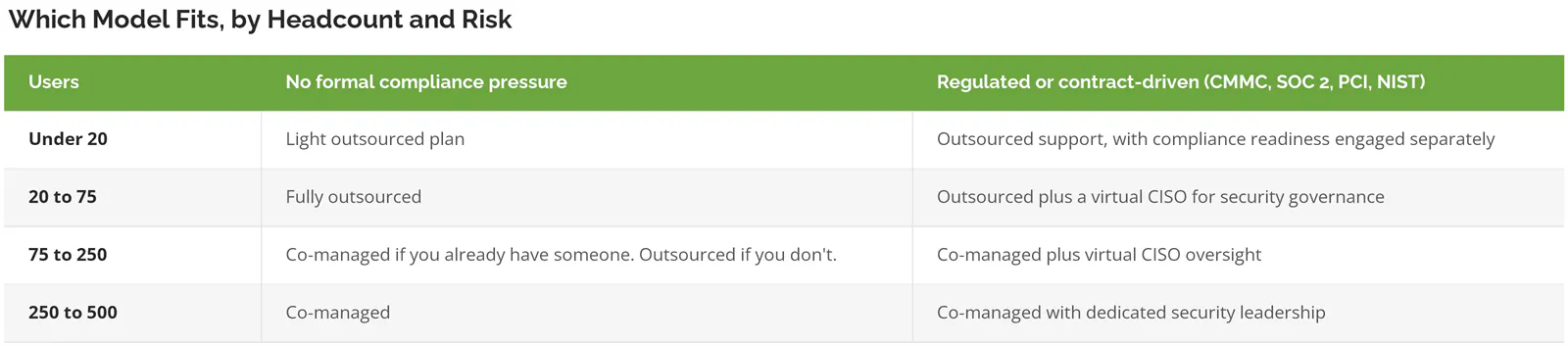
One note on that right-hand column. Compliance readiness is its own engagement, not something bundled into a managed IT contract. Read the scope. Any provider implying that a standard monthly fee makes you audit-ready is describing a different service than the one you'll need when the assessor shows up.
A virtual CISO, if the term is new, is a part-time senior security leader who owns policy, risk decisions, and audit posture without the salary a full-time one commands. Glassdoor puts the average chief information security officer at $313,613.
How Consilien Handles This
Consilien is a security-first managed IT and strategic advisory firm, founded in 2001 and headquartered in Torrance, California, working with companies of 20 to 500 users nationwide across manufacturing, distribution, food processing, real estate management, professional services, and creative agencies.
The problem we solve is the one this post describes. Companies run IT reactively, can't see where their risk sits, and can't get a straight answer on what any of it should cost. What's different about the approach is that vCIO and vCISO leadership are standard rather than an upsell, environments are aligned to a defined maturity standard we call CIMS instead of to whatever the last technician happened to prefer, and the 3-year agreement carries that 1-year opt-out.
Compliance is a separate offering. NIST, CMMC, PCI, and SOC 2 readiness are real work with their own scope, and folding them into a monthly IT fee would misrepresent both.
On what the coverage difference feels like day to day, one client, Human Touch in Long Beach, described getting a ticket number and issue description within 3 minutes and a live representative on the phone within 15. The whole thing was resolved in under 15 minutes. The technician then taught the user how to fix it herself and left written steps on her machine. Another client, a business consulting firm, has run 100% uptime across the relationship. A third, Interactive Health, has been with us roughly 14 years.
Those are the outcomes we can quote verbatim. We don't publish a blended savings percentage, because the honest answer is that it depends on your user count, your tool stack, and what you're currently not doing.
Making the Call
Three things to take with you.
First, price the whole thing. Fully loaded compensation, tools at list price, training, and the recruiting bill you'll eventually pay. Salary isn't a budget.
Second, divide by covered hours, not by months. 21% coverage at $75 an hour is a different product than 100% coverage at $12, and knowing which one your business needs is most of the decision.
Third, check your insurance renewal questionnaire before you finalize anything. If it asks about 24/7 monitored detection and response, part of the model question has already been answered for you.
If you're weighing a replacement hire against a provider right now, get an honest read on what your environment actually requires before you commit either way. Speak to an IT expert and bring the questionnaire, the salary range you were planning to offer, and your renewal date. If the answer is that you should keep the hire, we'll tell you that. If you'd rather see how the support side works in practice first, start with outsourced IT help desk coverage and expand from there.