IOC vs IOA: Indicators of Compromise vs Indicators of Attack
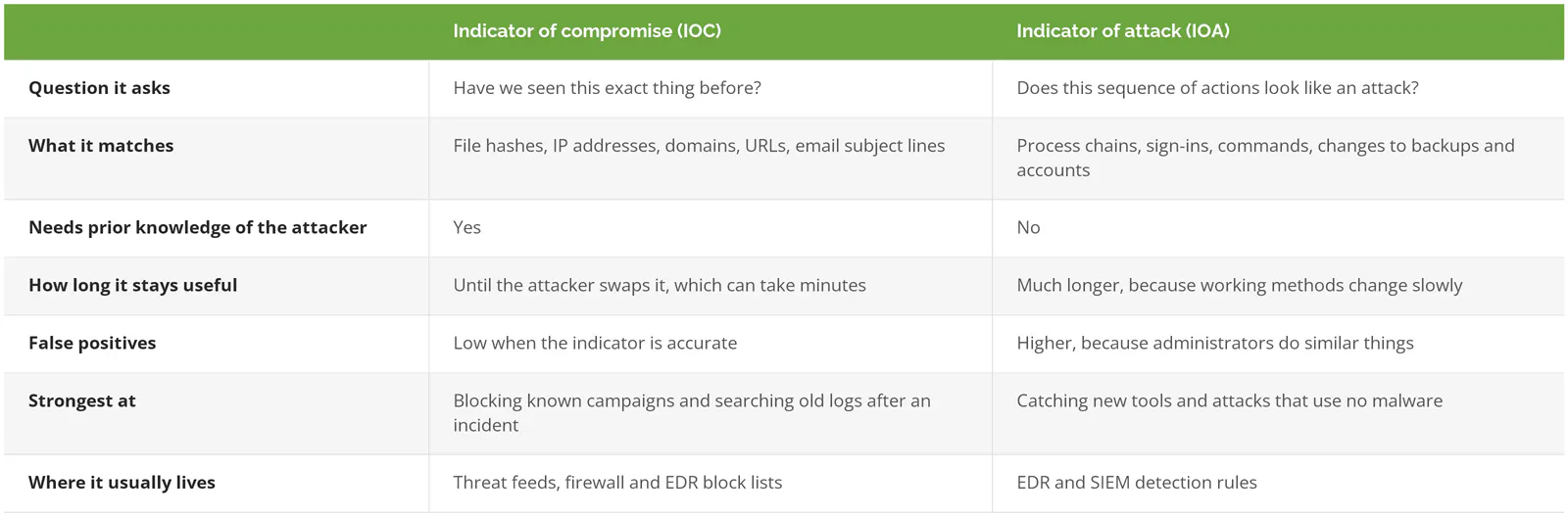
An indicator of compromise (IOC) is a known artifact, like a malware hash or attacker IP, that matches something seen before. An indicator of attack (IOA) is a behavior, like deleting backups, that signals an attack no matter the tool.
Table of Contents
Picture PowerShell, the Windows scripting tool IT uses to automate tasks, starting up on a file server at 2:14 on a Sunday morning. The company is a 150-person distributor, and whoever watches its alerts, an internal team or a SOC as a service provider, now has a decision to make. Maybe it's the backup script IT scheduled last spring. Maybe it isn't. An IOC-based tool asks whether it has seen this exact file, address, or domain before. An IOA-based tool asks whether this sequence of actions looks like someone breaking in. Both questions matter.
You'll usually see IOC vs IOA framed as reactive versus proactive. That's close. Not exact, though. And the real difference changes what you should expect from the security tools you already pay for.
What's the Difference Between an IOC and an IOA?
An IOC is a specific piece of evidence (a file hash, IP address, domain, or email subject line) tied to known malicious activity. An IOA is a behavior pattern, like a Word document launching PowerShell, that shows intent.
NIST's incident response guidance defines indicators of compromise as technical artifacts or observables that suggest an attack is imminent or underway, or that a compromise has already happened. A file hash, if that term is new, is a fingerprint calculated from a file's contents. Same file, same fingerprint.
A second NIST document, the guide to cyber threat information sharing (SP 800-150), lists the standard examples. The IP address of a command-and-control server, which is the machine an attacker uses to send instructions to infected computers. A suspicious domain name. A malicious URL. The hash of a malicious program. Even the subject line of a phishing email. Every one of those is something concrete you can search for in a log, a mail filter, or a firewall, and every one of them depends on somebody, somewhere, having spotted it first and written it down.
Indicators of attack work from the other direction. CrowdStrike's white paper on the two terms describes IOAs as active in nature and focused on identifying an attack that's still in process. In practice an IOA is a chain of actions that only makes sense for an intruder. An email attachment opens, starts a command shell, reaches out to the internet, and pulls down a script. No single step is strange. Together they tell a story.

IOCs usually arrive through threat intelligence feeds. IOAs usually live inside the detection logic of an EDR platform, the software on each laptop and server that records what programs actually do.
One Ransomware Intrusion, Read Two Ways
Take that same distributor. It's a hypothetical company, but nothing below is exotic, and each step is marked the way a detection tool would read it.
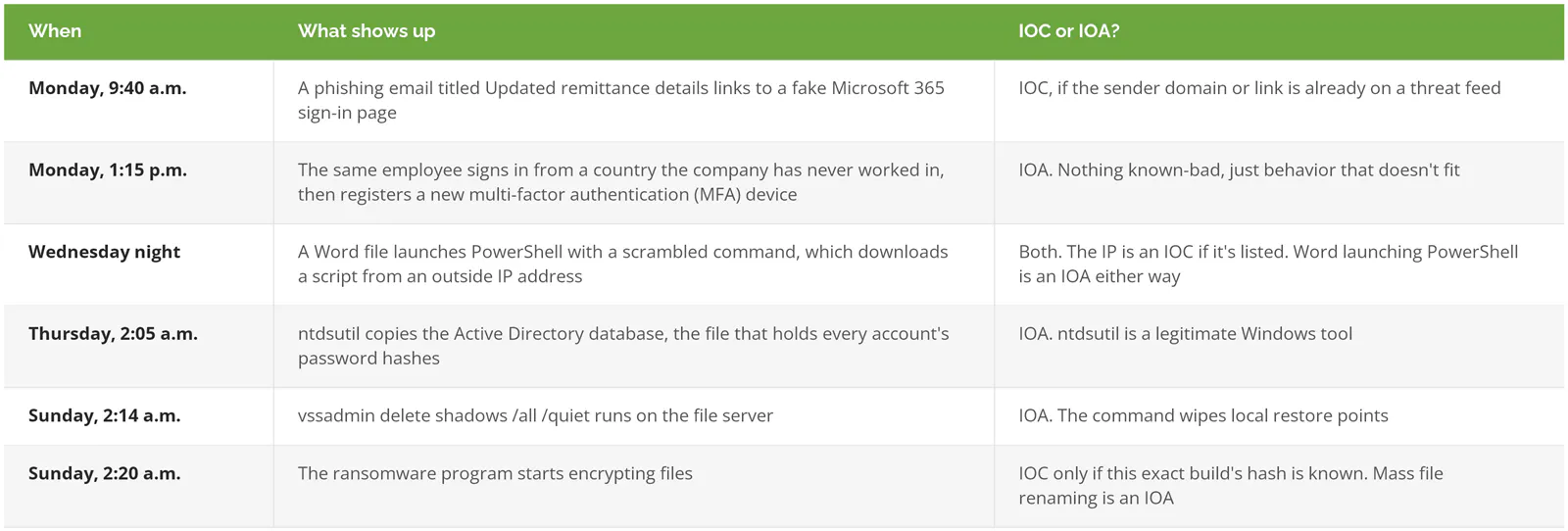
Count the chances. An IOC-only setup gets three. Each one depends on someone else having already cataloged this attacker's email domain, IP address, or ransomware build. The third comes too late. Encryption has already started. An IOA-based setup has something to notice at every step after the email, from the odd sign-in on Monday afternoon to the backup deletion early Sunday, which is five chances spread across nearly a week.
Step five has its own entry in MITRE's Cyber Analytics Repository, CAR-2021-01-009, mapped to technique T1490, Inhibit System Recovery, in MITRE ATT&CK, the public catalog of attacker techniques. Shadow copies are the restore points Windows keeps, and ransomware crews delete them so nobody can roll the server back to Saturday. The /quiet flag hides the confirmation prompt. Routine maintenance rarely needs that flag, and it almost never needs it at 2 a.m. on a Sunday, on the one server holding the files everyone would need to restore.
Six warnings in six days. Someone has to be listening.
Is Reactive vs Proactive the Right Way to Tell Them Apart?
Not quite. An IOC can stop an attack in real time when the indicator is already known. It comes down to prior knowledge. An IOC needs someone to have seen the attacker first, and an IOA doesn't.
Look again at NIST's wording. It says an IOC can point to an attack that's imminent or underway, not only one that already happened. If a threat feed flags a domain on Monday and your firewall blocks it Tuesday morning, that IOC stopped something before it started. Nothing reactive about it.
So why does the reactive label stick? Shelf life. Security researcher David Bianco drew this out in 2013 as the Pyramid of Pain, which ranks indicators by how much it hurts an attacker to lose each one. From the bottom up, the levels run like this.
- Hash values
- IP addresses, which attackers rent and drop cheaply
- Domain names. Cheap to register, cheaper to abandon.
- Network and host artifacts, the traces a particular piece of malware leaves in traffic or on a machine
- Tools, which take real effort to rewrite or replace
- At the top, tactics, techniques, and procedures (TTPs), meaning how the attacker actually works
IOCs sit mostly in the lower half. IOAs aim at the top, where, in Bianco's words, "you are operating directly on adversary behaviors, not against their tools."

Why a Hash Goes Stale Overnight
Bianco's example is plain. Flip one bit in an unused part of a file, or add a null to the end, and the hash comes out completely different. The malware still runs.
Microsoft makes a related point in its Defender for Endpoint documentation. Every version of an application has a different hash, so Microsoft doesn't recommend blocking applications by hash and points customers toward application control, the Windows feature that decides which programs are allowed to run at all. Hashes aren't useless, though. They earn their keep after an incident, when responders know the exact file that hit you and a hash search shows every other machine it landed on.
Why Behavior Detection Matters More in 2026
Attackers now move faster than indicator lists update, and a large share skip malware altogether. CrowdStrike found 82% of its 2025 detections were malware-free, which leaves an IOC-only tool very little to match.
The CrowdStrike 2026 Global Threat Report put average breakout time for financially motivated attackers, the gap between an attacker's first foothold and their move to a second machine, at 29 minutes. The fastest was 27 seconds. Mandiant's M-Trends 2026 tracked a different handoff, from the criminal who breaks in to the second group that takes over the access. In 2022 that took more than 8 hours. In 2025 the median was 22 seconds.
No threat feed moves that fast. By the time an IP address from this week's intrusion reaches a shared list, the attacker may already be using a different one.
Malware-free doesn't mean the attacker does nothing. It means they use what's already installed, which security teams call living off the land. CISA's May 2023 advisory AA23-144a described a state-sponsored group relying on wmic, ntdsutil, netsh, and PowerShell, all built into Windows, which let it blend in with normal system and network activity and avoid EDR alerts that trigger when unfamiliar software appears. There's no malicious file to hash. The only evidence is what those tools were told to do. CISA, NSA, FBI, and international partners followed in February 2024 with joint guidance on detecting living-off-the-land techniques.
Dwell time, how long an attacker stays inside before anyone notices, shows the same pressure from the other side. M-Trends 2026 put the global median at 14 days, up from 11 the year before. In Mandiant's 2025 investigations, organizations caught the intrusion themselves 52% of the time, up from 43%. Two weeks is still long.
What Do IOAs Cost You?
Noise, mainly. Behavior rules fire on things administrators also do, so every IOA alert needs someone who knows what normal looks like on your network. Without that person, IOAs turn into alert fatigue.
CISA says so directly in the same advisory. Many of the behavioral indicators it lists, in CISA's words, "can also be legitimate system administration commands that appear in benign activity." Your IT manager runs PowerShell. A backup product may resize shadow storage on its own schedule. An update pushed at midnight by your IT provider looks, from a certain angle, a lot like an intruder. Context decides.
This usually starts as a reasonable decision. A company buys an EDR with good behavior detection, turns it on, and sends the alerts to a shared mailbox. For a few weeks somebody reads them. Then the alerts that turn out to be IT's own scripts start piling up, someone adds a mailbox filter, and the one alert that mattered ends up sitting unread next to dozens that didn't. Nobody chose to stop watching. Nobody owned it.

Two things fix it, and neither one is another tool. The first is a baseline, a working record of which accounts run which admin tools, on which machines, at what hours, so a PowerShell session from the backup service account at 2 a.m. reads as routine and one from the receptionist's laptop doesn't. The second is a person with the authority to decide at 2 a.m. whether to cut a server off the network. A SIEM, the system that gathers logs from across your environment and connects related events, can hold the baseline. It can't make the call.
Where Each One Fits in a 20 to 1000 User Company
Both belong in the stack. For a company with 20 to 1000 users, the practical question is who handles each one, day and night, and the answer depends on what you already run and who's awake to read it.
- You already run Microsoft Defender for Endpoint. That's an IOC tool, built in. Custom indicators cover files, IP addresses, URLs and domains, and certificates, with actions from audit through block and remediate. Microsoft caps it at 15,000 indicators per tenant, meaning per organization's Microsoft account, and won't raise the limit, so it's meant for targeted blocks after an advisory, not for loading a giant feed. Indicators also aren't honored when Defender Antivirus runs in passive mode, which is typical when another antivirus product is primary.
- Want IOC data without paying for a feed? CISA's Automated Indicator Sharing program costs nothing and accepts private companies. Receiving it takes a STIX/TAXII client (the standard formats for packaging and delivering threat indicators), which is a setup job that's easier to hand to a security provider than to run in-house at 80 people.
- IOAs mostly come from your endpoint vendor's detection engine. How much of the response you get depends on what you bought, and the EDR vs MDR vs XDR comparison lays out where each tier stops.
- One or two IT generalists, no after-hours coverage. Behavior alerts will fire at night. They'll wait until morning.
- An internal security team that can't cover nights and weekends is the classic case for co-managed coverage, where they keep the decisions during the day and an outside team handles the rest.
If your EDR vendor already includes 24/7 managed detection, with an analyst who phones you when a behavior rule fires, skip writing IOA rules yourself. Confirm the call actually happens.
Questions to Ask Whoever Watches Your Alerts
Ask how they detect behavior, not just which feeds they subscribe to, and ask who makes the containment call after hours. Those two answers say more than any product sheet.
- When CISA publishes new IOCs, do you search our past logs for them, or only block new activity? Searching back through 30 or 90 days of old logs is how you find out an attacker was already inside last month, before anyone had published the indicators you're matching against today.
- Roughly what share of your detections are behavior-based? Ask for a number.
- Which MITRE ATT&CK techniques do your rules cover, and where are the known gaps?
- Who decides to isolate a machine at 2 a.m.? Do they need our permission first?
- How did you learn what normal looks like for us? A provider that skipped this step will either bury you in alerts or quietly tune the important ones away.
The answers should match how you've planned to handle an incident. If that plan doesn't exist yet, the NIST incident response lifecycle is a sensible place to begin.