IT Due Diligence in M&A: A Buyer's Checklist
You're about to buy a company, and with it every server, password, license, and unpatched laptop it owns. IT due diligence is how you find out what those cost before they become yours. This checklist is written for acquirers with 20 to 1000 users who don't have a CIO to run the review, and it's the pre-close half of the IT consulting work that usually carries a deal from letter of intent (LOI) to Day 1.
Table of Contents
IT due diligence is a buyer's review of a target's systems, security, licenses, data, and IT staff before close. It finds what will cost money or create risk after the deal, so you can price it in before signing.
In February 2017, Verizon took $350 million off its price for Yahoo's operating business after two data breaches came to light, according to the amended terms Yahoo filed with the SEC. The deal closed at roughly $4.48 billion, and Yahoo agreed to share certain breach liabilities after closing.
Your deal is probably smaller. The problems aren't.
A 140-person distributor can carry the same kinds of liability on a smaller scale. An admin password nobody has changed since 2019. A Microsoft agreement that doesn't follow the company to a new owner. A file server that stops getting security patches three months after you close. Nobody takes those off the price unless somebody finds them first.
Deal teams know the stakes. In SRS Acquiom's 2026 due diligence study, a Q4 2025 survey of 150 senior U.S. investment banking executives, 84% expected cybersecurity diligence to face more scrutiny over the next 12 to 24 months, and 51% named technology due diligence the single most burdensome part of the entire review. Burdensome isn't the same as done well.
What Does IT Due Diligence Actually Cover?
IT due diligence covers the technology a target uses to run itself. Networks, servers, cloud accounts, business applications, logins, laptops, security controls, software licenses, data, IT vendor contracts, and the people who keep all of it running.
It doesn't cover the product the company sells, unless that product is software. Three kinds of diligence get lumped together under "tech," and the difference decides who you hire and what you pay for.

Buying a manufacturer, a distributor, or a professional services firm? You need the first two rows. Skip the third.
Reviews go soft where IT and security overlap. An IT reviewer confirms the firewall exists. A security reviewer asks whether anyone has read its logs this year, and whether the remote access rule someone opened for a vendor in 2022 is still sitting there. The National Association of Corporate Directors' 2026 Cyber Risk Oversight Handbook recommends pairing document requests and interviews with technical testing. A questionnaire tells you what the seller believes. A scan tells you what's there.
When Should IT Diligence Start, and Who Should Run It?
Start IT diligence when the letter of intent is signed, not in the final two weeks before closing. Your deal lead owns the scope, an independent IT and security reviewer runs the testing, and your insurance broker weighs in before anything gets signed.
Timing matters because diligence windows are measured in weeks and replacing an ERP system is measured in quarters. When IT gets called in after the price is already agreed, a finding can only become an argument. Called in early, it becomes a term.
Deal windows attract attackers too. In November 2021 the FBI warned that ransomware actors were very likely using significant financial events, mergers and acquisitions among them, to pick victims and pressure them into paying, and it noted at least three publicly traded U.S. companies hit during their negotiations between March and July 2020 (FBI notice via CISA). Nonpublic deal information is ammunition. Lock down the data room and the email threads about the deal on both sides of the table.
Who belongs in the room:
- A deal lead (you, or whoever runs corporate development), who sets scope and decides what each finding means for price.
- An independent IT and security reviewer. Not the seller's MSP, which is grading its own homework.
- Counsel, who turns findings into representations, warranties, and indemnities.
- Your insurance broker, since your carrier will have opinions about the endpoints you're about to add to your policy.
- Whoever runs IT for you today, in-house or MSP, for a reality check on how long integration will take.
Scale it to the deal. A 25-person firm on Microsoft 365 with no servers doesn't need a six-week review. Two days of assessment and a clean admin handover cover most of the risk.
The Buyer's IT Due Diligence Checklist
Who holds the admin keys?

Ask for a list of every global admin in Microsoft 365, every domain admin, every cloud root account (the master login for AWS or Azure), and every person at the seller's MSP with standing access. Include MFA (multi-factor authentication, the second login step) status for each one.
Verify by pulling the admin role list directly from Entra ID, Microsoft's identity system, with the seller's IT lead on the call. A spreadsheet is a claim. The console is the answer.
A bad answer is when the only person with full access is the IT manager who leaves at close, or the MSP whose contract you plan to end. Make documented, transferred admin access a closing condition, delivered before funds move.
Keys come first.
Security posture and breach history
Start with five years of incident history, the last penetration test report, backup restore test results, the incident response plan, and a count of devices running EDR (endpoint detection and response, software that watches each laptop and server for attacker behavior).
Then test from the outside. Scan what the target exposes to the internet and check it against CISA's Known Exploited Vulnerabilities catalog, the federal list of flaws attackers are confirmed to be using right now. An unpatched entry from that list on an internet-facing system isn't a theoretical risk. It's an open door with a published map.
Marriott acquired Starwood in 2016. Starwood's guest reservation database had been breached in 2014, and nobody caught it until 2018. Four years, undetected. The FTC's 2024 action put the exposure at roughly 339 million guest records, and Marriott separately agreed to a $52 million penalty with 49 states and the District of Columbia. Marriott didn't cause that breach. It bought it.
Surveys back this up, though the best one is dated. In Forescout's 2019 study of 2,779 IT and business decision-makers, 53% said their organization had hit a critical cybersecurity issue or incident during an M&A deal, and 65% reported buyer's remorse after closing because of cybersecurity concerns. Seven years old. The SRS numbers above suggest the bankers think it's gotten harder since, not easier.
Missing EDR, backups nobody has ever restored, and no MFA on email are fixable. Price the fix in. An incident the seller didn't disclose is a different conversation, covered below.
Licensing that won't follow the company
Get the target's Microsoft agreement type, its license counts, the list of active user accounts, every major SaaS contract, and any letter from a software vendor that mentions the word "audit."
Perpetual and subscription licenses behave differently in a deal. Microsoft's volume license transfer rules let perpetual licenses move in a merger or divestiture, but only once they're fully paid, and only with a transfer form signed by both parties and sent to Microsoft. Subscriptions don't move that way at all. If you plan to fold the target's users into your own Microsoft 365 tenant (the company's private Microsoft 365 environment), each user needs a one-time Cross-Tenant User Data Migration add-on plus an Exchange Online license on your side, per Microsoft's cross-tenant migration documentation. That's integration cost. It belongs in the model now, not in month two.
Compare licensed seats to real people. Shared logins, 40 accounts for 25 employees, a former employee's mailbox still carrying an E5 license. Under-licensing is a true-up bill (the catch-up charge a vendor sends when you're using more licenses than you paid for) with a known number on it. An open vendor audit isn't, and it predates you.
End-of-life systems
Microsoft ends extended support for Windows Server 2016 on January 12, 2027. Sign a deal this fall and close in December, and you own servers that stop getting security updates a few weeks later.
Request a full asset inventory with operating system versions, warranty dates, and the business application each server runs. Watch for the ERP or production scheduling system pinned to an old OS because the vendor never certified a newer one. That's rarely a patch. It's a project, sometimes a year long.
Old isn't automatically bad. Unsupported and reachable from the internet is.
Data, and the obligations that come with it
Find out where the data actually lives. File shares, SharePoint, personal OneDrive folders, and the Dropbox account a sales manager has been paying for on a corporate card since 2021. Then find out who can reach it. Pull the report of files shared through "anyone with the link" and read it slowly. It runs long.
Obligations transfer with the data. State privacy laws, customer contracts that require specific security controls, and, for defense suppliers, CMMC requirements all come along at close whether anyone mentioned them in the confidential information memorandum (the seller's pitch document) or not. If a customer contract demands controls the target can't show evidence of, that's a representation you want in writing plus a remediation line in the budget.
Vendors, MSP contracts, and change-of-control clauses
Collect every IT contract and read three things in each: change-of-control language, termination fees, and auto-renewal dates. Then ask one operational question. Who holds the network diagrams and the password vault? At companies that outsource IT, the answer is sometimes only the MSP, and that MSP just learned it's about to lose the account. Motivation varies.
People and key-person risk
One IT manager who built everything and wrote none of it down is a people risk wearing a technology costume. A retention agreement through the transition and a documented handover as a closing deliverable handle most of it.
Cyber insurance
Request the current policy, the claims history, and the last renewal application. The application matters most. Read every checkbox. It's where the target attested to MFA, EDR, and backups, and if your scan says otherwise, you're looking at a claim dispute waiting for a claim. Ask your own broker what your carrier needs before those endpoints land on your policy.
Shadow IT and shadow AI
Card-expensed software and AI tools employees have connected to company data won't show up in the IT inventory. Pull 12 months of expense reports, and check the app consent log in Entra ID for third-party apps users have granted access to their mailbox or files. You'll find things. Usually small ones. Occasionally a support chatbot someone trained on the entire customer ticket history.
What Should Each IT Finding Do to the Deal?
Every material IT finding should land in one of five places: the price, an escrow or holdback, a specific indemnity, a closing condition, or your post-close budget. A finding that lands nowhere is just a paragraph in a report nobody rereads.
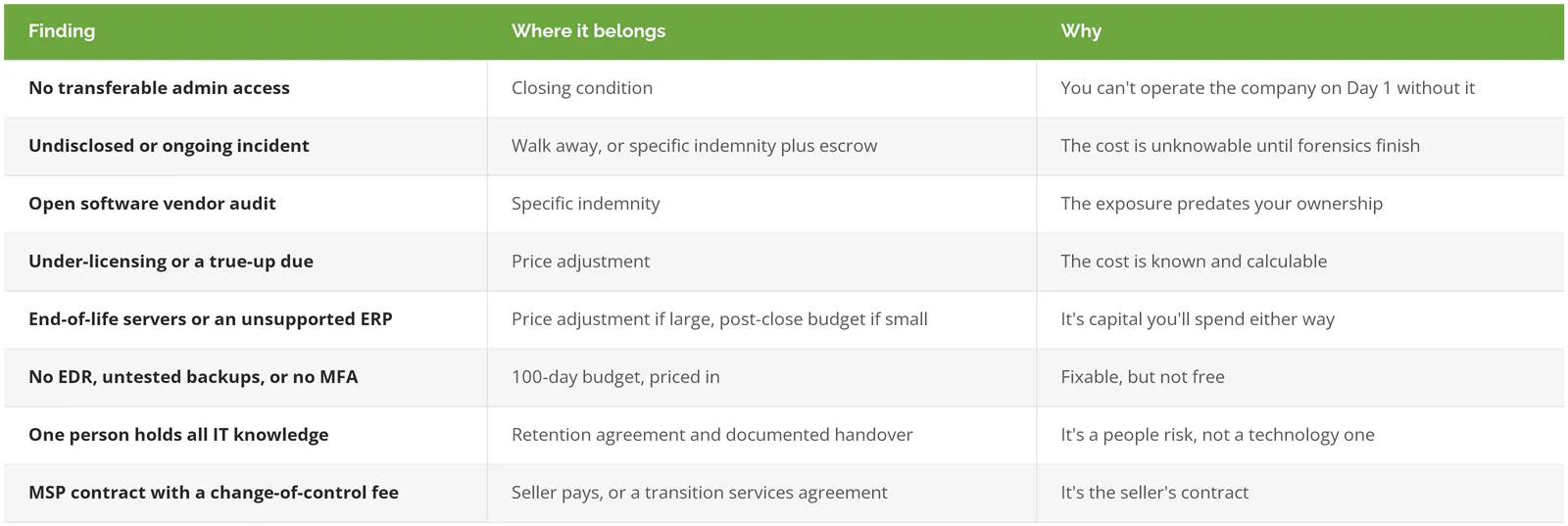
NACD's handbook makes the same point from the boardroom side, recommending that remediation costs go into the transaction price rather than get funded after close, when the money is harder to find. Your counsel drafts these terms. Your IT reviewer's job is to hand counsel a dollar estimate and a severity for every line, because "the backups look weak" can't be negotiated, and a dollar figure with a 60-day deadline can.
Which IT Red Flags Are Worth Walking Away Over?
Walk away over concealment, not over old equipment. A messy network is a price problem. A seller who hides an incident, blocks testing, or can't hand over admin access is a trust problem, and no escrow fixes that.
- Questionnaires and interviews are allowed, but technical testing is refused.
- Testing turns up an incident, or signs of one, that the seller never disclosed.
- Nobody on the seller's side can produce working admin access to email, the domain, or the ERP.
- The IT story changes between the first interview and the second.
That last one sounds soft. It isn't. When the answer to "how many servers do you run" moves from 6 to 11 in a week, the inventory was never real, and neither is anything built on top of it.
Selling instead of buying? The flip side of this list is in what sellers should fix before IT due diligence.
What Happens After the IT Due Diligence Report?
The report turns into three things. Deal terms, which counsel owns. A Day 1 plan covering admin access, email, and who answers the help desk phone the morning after close. And a 100-day remediation budget with owners and dates.
Day 1 onward is its own discipline, with transition services agreements, identity cutover, and the integration sequence, and it's covered in the practical playbook for IT during M&A. The longer arc, deciding which of the two companies' systems survives and what the combined IT function looks like in year two, is IT strategy consulting work.
Consilien is an IT consulting, managed IT, and cybersecurity firm for companies with 20 to 1000 users nationwide, and technology assessments sit inside that consulting practice. If you've signed an LOI and the IT section of your diligence list is still one line long, that's the week to speak to an IT expert.