How Long Beach Businesses Are Modernizing Their IT Infrastructure
IT infrastructure modernization in Long Beach mostly means replacing systems Microsoft stopped patching, like Exchange 2016 and 2019, Windows 10, and soon Windows Server 2016. Businesses are moving email and files to Microsoft 365, refreshing PCs, and retiring the server closet in stages.
Table of Contents
Ask a Long Beach business owner why they're upgrading their IT this year and you rarely hear about ambition. You hear about a date. The email server stopped getting public security fixes last October. The Windows 10 machines at the front desk now cost money every year just to stay patched. And the server in the back room, the one running the accounting system and the shared drive, has a deadline of its own in January.
So modernization here isn't a strategy deck. It's a calendar.
That's not a bad thing. A deadline forces the decisions a lot of companies have put off for five or six years. It's the same pattern from Torrance machine shops to freight forwarders near the port, and it's why upgrade planning is now part of managed IT in the South Bay. What separates a clean upgrade from an expensive one is the order you do it in, and knowing which systems to move, which to replace, and which to leave exactly where they are.
What's actually forcing IT upgrades in Long Beach right now?
Three Microsoft deadlines. Exchange Server 2016 and 2019 lost support in October 2025, Windows 10 now needs a paid extension that doubles in price every year, and Windows Server 2016 reaches end of support on January 12, 2027.
End of support means Microsoft stops writing security fixes. The software keeps running. Nobody patches the holes anymore.
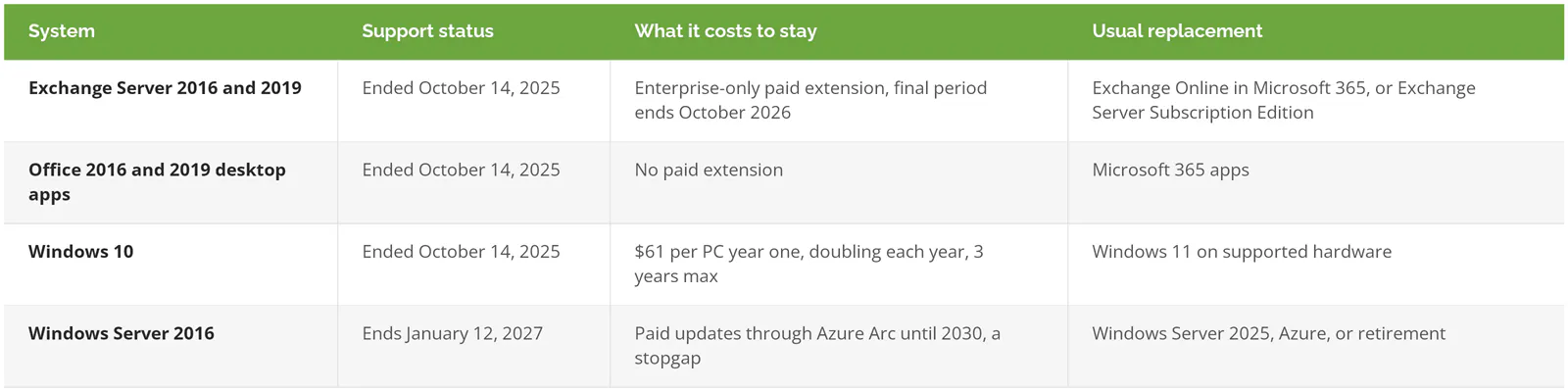
Exchange went first. Its end date is on Microsoft's lifecycle page for Exchange Server 2019. Office 2016 and 2019 lost support the same day. Windows 10 is the expensive one to ignore. Microsoft's Extended Security Updates program charges organizations $61 per device for the first year, the price doubles each year after, and a business that signs up late pays for the years it missed. Twelve old PCs at the front office and in dispatch? That adds up fast, and the bill buys you nothing except time.
Now the server. Windows Server 2016's extended support runs out in January 2027. If your office bought its server around the same time the software shipped, the machine and the operating system age out together.
Does any of this matter if the computers still turn on? CISA, the federal cybersecurity agency, puts running end-of-life software first on its list of bad practices and calls it especially dangerous on anything facing the internet, which describes every email server ever built. In the Sophos State of Ransomware 2025 survey of 3,400 organizations hit by ransomware, exploited vulnerabilities were the most common way attackers got in, behind 32% of attacks, and average recovery cost $1.53 million before any ransom.
Unpatched software is an open door. That's the whole argument.
What does a modernized setup look like for a Long Beach business?
Less hardware in the building and fewer things only one person knows how to fix.
For a typical office, the end state looks something like this. Email, calendars, and Teams live in Microsoft 365. Shared files move from the S: drive on the server into SharePoint and OneDrive, Microsoft's cloud file storage, with permissions set by department instead of by whoever asked the office manager in 2019. Every laptop runs Windows 11 and reports into a management console, so IT can patch it, lock it, or wipe it whether it's in the office on Ocean Boulevard or at an employee's kitchen table in Lakewood.
Logins collapse down to one front door. Everyone logs in with a single company identity, protected by multi-factor authentication (a second check, usually a prompt on your phone, after the password), and turning off a departing employee's access becomes one switch instead of six.
Then the firewall, which in plenty of Long Beach offices is whatever box the landlord's cabling guy mounted on the wall years ago. A managed firewall with current firmware, separate Wi-Fi for guests, and a second internet circuit if a single outage would stop the business. And backups, which belong in a different location from the thing being backed up, and which somebody actually restores from on a schedule to prove they work.
Hardware is where budgets get lumpy. A business replacing 30 PCs and a server in the same year takes a big capital hit, which is why some companies spread it into a monthly payment through hardware as a service instead.
Which systems should move to the cloud, and which shouldn't?
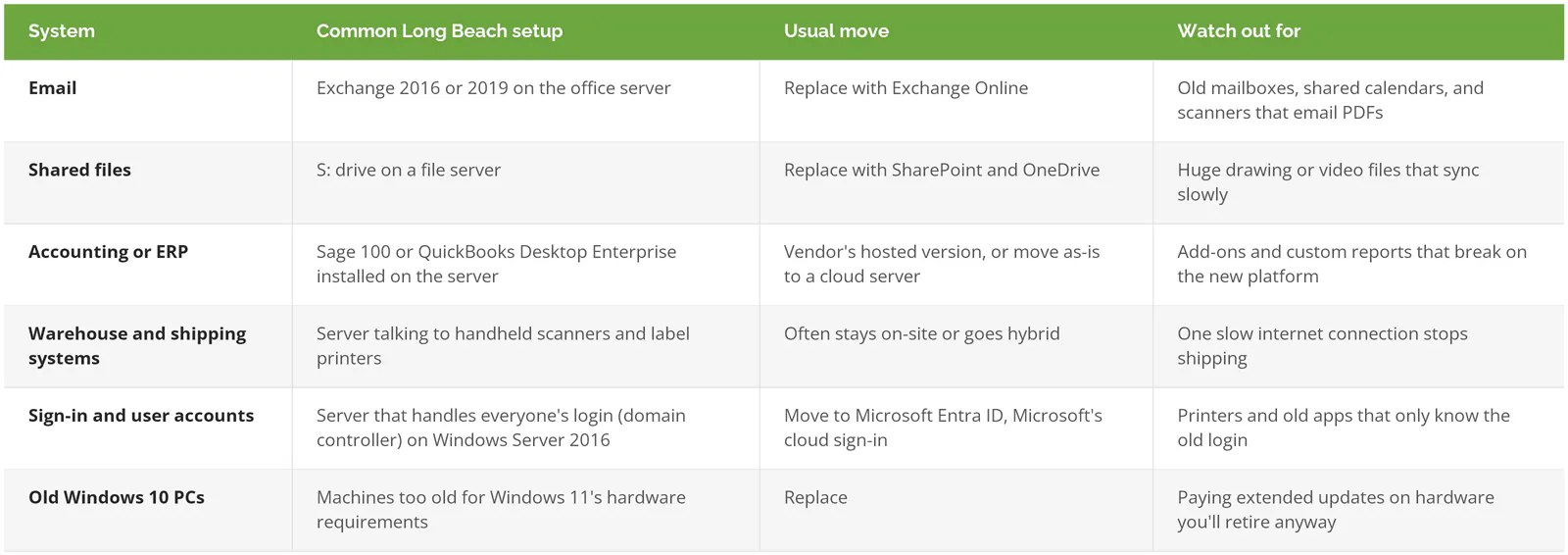
Email and office files almost always move. Accounting and ERP software (the system that runs orders, inventory, and billing) depends on what the vendor supports. Systems wired into warehouse scanners, label printers, or machine controls often stay on-site, at least for now.
People talk about cloud migration like it's one job. In practice it's a dozen small decisions, one per system, and each one has four honest options. Replace it with a subscription service. Move it as-is to a cloud server, what IT people call lift and shift. Keep it on-site and upgrade it. Or retire it, because nobody has opened that database since the person who built it left.
Before anyone touches the accounting system, read up on lift-and-shift versus refactor. Moving a server unchanged into Azure, Microsoft's cloud, is fast, but you keep every problem the server already had, and now you pay for it monthly.
The system nobody wants to touch
Any Long Beach company with a loading dock probably has one. A warehouse management system, a shipping station, a customs filing tool, something that talks to scanners on the dock and to a carrier's systems outside, and it's been running on the same box since a contractor installed it. It works. Everybody's afraid of it.
Leave it alone for now. Modernize around it first. Get email, files, sign-in, and PCs done, then deal with that system as its own project with the software vendor on the call, a tested rollback plan, and a weekend nobody is shipping.
Some workloads honestly belong on-site. There's a growing move to bring cloud workloads back in-house when the monthly bills climb past what owning the hardware would cost. Modern just has to mean something the vendor still patches.
What order should Long Beach businesses modernize in?
Order beats speed here. Companies that start with the server, the most visible piece, often end up redoing work, because the server depends on sign-in, email, and files that haven't been sorted out yet.
- Write down what you have. Every server, what runs on it, who uses it, and what else it talks to. The surprises in a migration tend to be a scheduled task or a printer nobody listed.
- Sign-in and multi-factor authentication. Before anything moves, lock down how people log in.
- Email, which is usually the cleanest win and the one with a hard deadline already behind it.
- Files. Clean them up on the way over, since moving 14 years of duplicate folders into SharePoint just relocates the mess.
- PCs. Replace what can't run Windows 11, upgrade what can, and only pay for extended updates on machines that have a scheduled retirement date.
- Servers and the specialized software your business runs on, one at a time.
- Network and internet, including a second circuit if the warehouse can't ship without it.
- Restore test. Pick a file, a mailbox, and a server, restore all three, and time it.
Skipping step 1 is the classic mistake. It's how technical debt piles up in the first place, every shortcut that saved a day back then and costs a week now.
What's different about modernizing IT in Long Beach?
The port. It shapes the business mix more than any other single factor.
In 2025 the Port of Long Beach moved 9,881,595 container units, a record, and that volume runs through a ring of local companies, freight forwarders, customs brokers, trucking dispatchers, distributors, and the accounting and law firms that serve them. Their systems talk to carriers, terminals, and customs every day. The port itself has been modernizing too. California put $7.875 million into the port's Supply Chain Information Highway, a shared data system that tracks cargo moving through the harbor. When the infrastructure on the other end of your connections gets newer every year, a 2016 server on your end becomes the weak link in somebody else's chain.
Downtime costs something different here, too. A freight forwarder that loses email for a day doesn't just lose a day. Containers sit, storage fees run, and a customer calls a competitor. So cutovers happen on Saturday nights, rollback plans get written before anything moves, and the warehouse system waits until the office systems are stable.
Aerospace is the other big one. Long Beach still has aerospace and space suppliers clustered around the airport, and the ones doing defense work carry CMMC requirements, the Pentagon's security certification for its supply chain. Modernizing helps, since supported, patched, monitored systems are the foundation CMMC is built on. But a new Microsoft 365 setup doesn't make anyone compliant. Compliance is its own engagement, with its own assessment and its own price, and it's best scoped separately from the infrastructure work.
Multi-site setups are common as well. An office downtown and a warehouse in North Long Beach or across the line in Carson means two networks, two firewalls, and a decision about where each system lives. If you're mapping that out, managed IT services in Long Beach covers what ongoing support across those sites looks like.
How much does modernization cost, and how long does it take?
It's usually phased over months, not done in one weekend, and the cost depends almost entirely on how many servers and line-of-business systems you have. Email and file moves are the cheap part. The server and anything tied to it is where the money goes.
Ranges for each piece are broken down in how much cloud migration costs. For a Long Beach business, two numbers frame the decision better than any range.
First, the cost of waiting. Take a 40-person office with 15 PCs too old for Windows 11. Signing those 15 up for extended updates now means paying the first two years, $61 and $122, so $183 per machine and $2,745 total, with year three at $244 each still coming. That's roughly $6,400 to keep 15 aging PCs patched through 2028, and at the end you still have 15 aging PCs.
Second, the license. Microsoft 365 Business Premium lists at $22 per user per month on an annual plan, and it bundles email, file storage, device management, and the sign-in security that replaces a lot of what the old server did. In a 30-person office, that license can take over most of what the old server did, which is a different math problem from buying another server in 2027.
Timelines stretch for predictable reasons. A vendor that won't support its software on a cloud server. A shared drive nobody has cleaned since 2012. A warehouse that can only be touched on weekends.
Where to start if your IT still mostly works
"It still works" is the most common reason companies hold off. In Saritasa's 2025 State of Legacy Software Modernization Report, 62% of the 504 U.S. IT professionals surveyed said their company still runs legacy systems, and half of those cited the system still working as the main reason to hold off. Budget came second, at 44%.
It does still work. Right up until the morning it doesn't, and then the upgrade happens on someone else's schedule, under pressure, at emergency rates.
If you already have an IT manager who has an inventory, a plan for the Server 2016 deadline, and a tested backup, you probably don't need outside help with this. You need a budget line. If nobody can tell you what's running on the server in the back room, start there, before buying anything. A written roadmap from a Long Beach IT consulting engagement can sequence the work against your actual deadlines and slow seasons. And if you're comparing providers to run it, this ranking of IT support companies in Long Beach scored eight local options side by side.
Consilien is a managed IT and cybersecurity provider headquartered in Torrance, a short drive up the 405 from Long Beach, that plans and runs infrastructure upgrades for businesses nationwide, with compliance offered as a separate service. If you'd like a second opinion on your own deadlines, speak to an IT expert.