How Much Should West LA Businesses Budget for IT Support?
A West LA business should plan an IT support budget of about $2,900 to $4,700 per employee per year. That covers managed support, Microsoft 365, a hardware reserve, security add-ons, and a small cushion. Compliance work sits outside it.
Table of Contents
Ask a Westside owner what they spend on IT and you'll usually get one number. The monthly invoice from their provider. That's the biggest piece of an IT support budget in West LA, but it's rarely more than two-thirds of the real total, and the other third is where next year's surprises come from.
The support contract is the engine. Licensing, laptops, security tools, and the odd project are the fuel, the tires, and the repairs. Price only the engine and you'll be asking finance for more money by March.
Owners who've priced managed IT services in Los Angeles already know the per-user rate. What follows builds the rest of the budget around it, line by line, for the kinds of businesses that fill Beverly Hills, Century City, Culver City, and Santa Monica. Law firms and business managers who move client money by wire. Production and post houses running on Macs. Agencies and startups whose staff are in the office two days a week, if that.
What should a West LA business budget for IT per employee?
Plan on $2,900 to $4,700 per employee per year. Managed support is $1,800 to $3,000 of it. Microsoft 365, a hardware reserve, security tools outside the support contract, and a 10% cushion make up the rest.
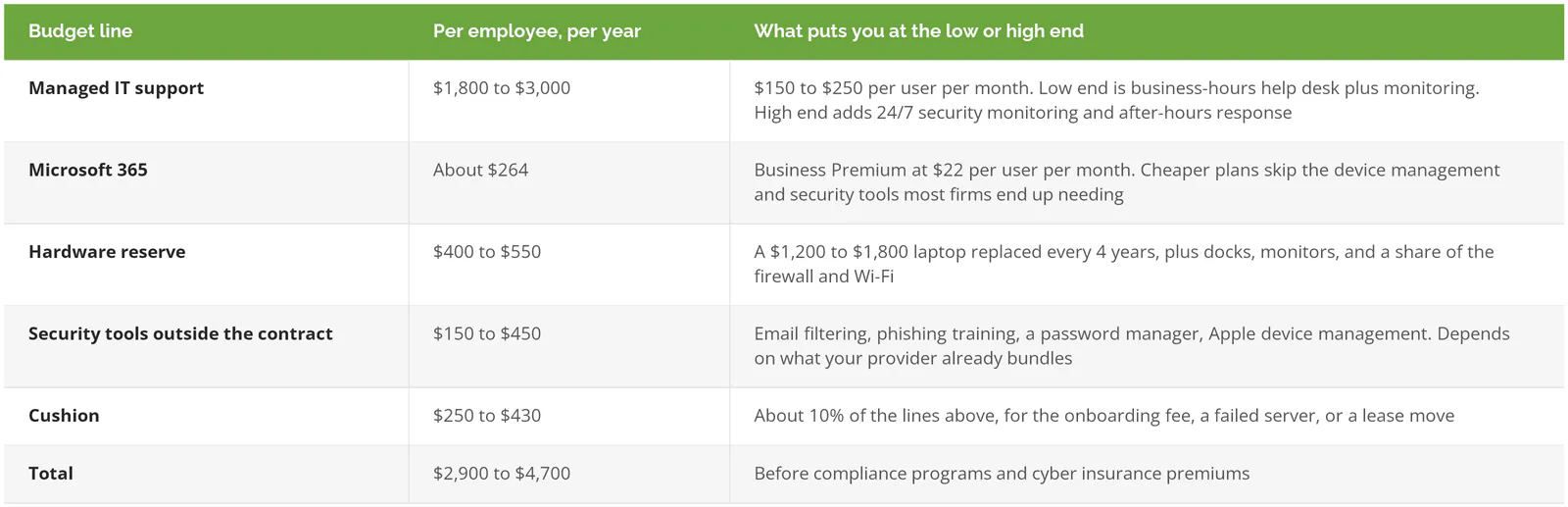
Licensing is the easy part. Microsoft's published price for 365 Business Premium is the one line here that's nearly fixed. Everything else moves with scope.
Treat the hardware and security-tool ranges as planning assumptions. They're what a reasonable Westside office spends, not a survey result, and your own laptop spec can blow straight past them. A video editor's MacBook Pro isn't a $1,200 machine. Not even close.
And the support line has a floor. In Kaseya's 2023 Global MSP Benchmark Survey, 22% of providers priced in the $50 to $100 per user band. That's real. It's also national, 3 years old, and heavy with help-desk-only shops. A Westside proposal at that number is short on technicians or short on scope. Usually both.
Why does the support line cost more on the Westside?
Labor. Almost entirely labor. Your provider's biggest cost is technicians, and Los Angeles technicians are expensive.
The Bureau of Labor Statistics puts the median computer user support specialist in the Los Angeles metro at $75,070 a year. Nationally it's $61,860. Wages are only about 70% of what an employee actually costs once benefits and payroll taxes are added, so one LA support tech runs a provider roughly $107,000 a year before a single tool is licensed.
Pay is set metro-wide. Quotes follow pay.
The managed IT cost in Beverly Hills is the same as in Culver City. The whole county hires from the same pool, so the ZIP code on your lease does almost nothing to the quote. What changes it is the work. The rest of the state looks similar, and what California businesses actually pay for managed IT walks through the statewide picture by company size.
What pushes a Westside IT budget up?
Four things, and they map pretty closely to which part of the Westside you're in.
Firms that move money by wire
Business managers in Century City pay their clients' bills. Entertainment law firms hold settlement funds in trust. Real estate offices in Beverly Hills sit in the middle of escrow. All of them send large wires on instructions that arrive by email. Every week.
That's exactly what attackers go after. The FBI's 2025 Internet Crime Report logged $3.05 billion in business email compromise losses, where a criminal takes over or fakes a trusted email account and redirects a payment, and 86% of those losses moved by wire or ACH (bank-to-bank electronic transfer). California led every state, with 116,414 complaints and $3.67 billion in reported losses.
The attacker doesn't need to break into your network, crack a password vault, or install anything exotic, because all it takes is one convincing email from what looks like a client's accountant at the moment your bookkeeper is trying to clear the afternoon's payments.
One bad wire wipes out years of IT savings. Coalition's 2026 claims report put the average funds transfer fraud loss at $141,000.
So the security line goes to the high end for these firms. Stronger email filtering, sign-in alerts when someone logs in from a new country, and a written call-back rule for any change to wire instructions. The call-back rule costs nothing. It's also the one that gets skipped when a partner is rushing to close. Law firms carry extra ethics duties on top of that, and our page on IT services for law firms covers them.
Mac-heavy teams
Culver City and Playa Vista production companies run on Macs. Supporting them properly means an Apple device management tool, a system that lets IT push settings, enforce encryption, and wipe a lost laptop remotely, plus a provider whose technicians actually know macOS. Some charge more per Mac. Some don't. Ask.
Creative teams have their own storage and backup math, and IT support for creative and media companies in West LA covers it in detail.
Staff who are rarely in the office
A Santa Monica agency with 20 people might have 6 at their desks on a Tuesday. The rest are in Mar Vista, Palms, or the Valley on home Wi-Fi, sometimes behind a router nobody has updated since 2019. Is that your network now? Effectively, yes. Securing that means managed laptops that enforce security policy wherever they are, and a support plan that doesn't charge extra when the problem turns out to be a flaky router on somebody's kitchen table in Venice instead of anything in the office.
Windows 10 machines you never replaced
This one has a date on it. Windows 10 lost free security updates in October 2025, and Microsoft's paid extension costs $61 per device for the first year and doubles every year after. Year two starts this month at $122. Buy in now and you pay for year one as well.
Six old PCs at a Brentwood office means about $1,100 to keep them patched for one more year. Or replace them. At $1,200 to $1,800 a machine, that's more up front, but the extension buys you 12 months and nothing else, and next October the same six machines cost $244 each just to stay patched for a third and final year. The 2027 renewal calendar, Microsoft's July price changes, and the rest of the dates on that list are in IT budget planning for 2027.
What does a 25-person Century City firm actually spend?
Say it's a business management firm. 25 people, all on Windows laptops, paying client bills by wire every week, landing at $200 per user for fully managed support with 24/7 security monitoring.
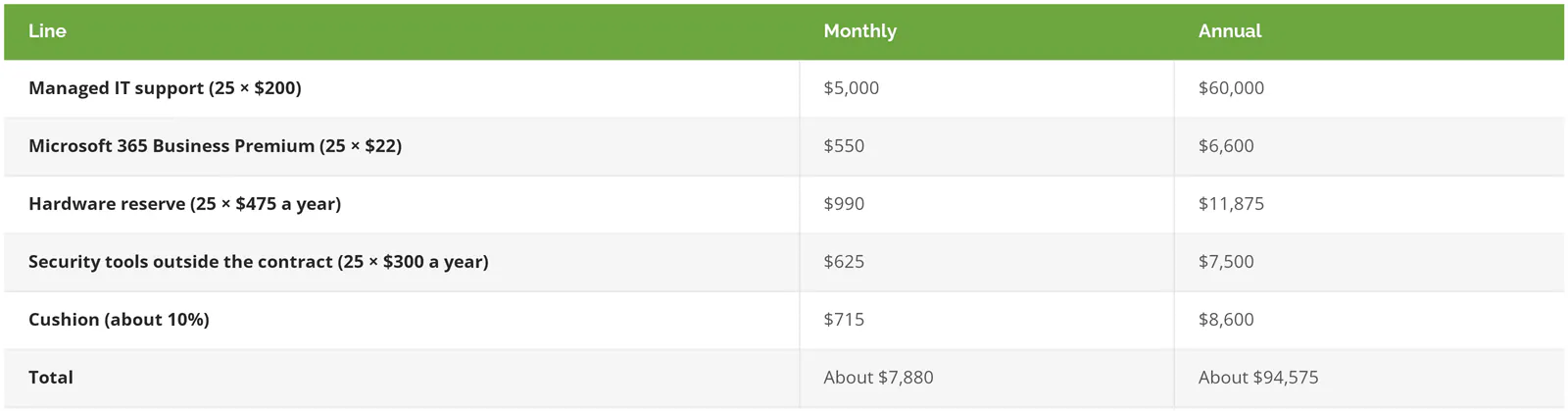
That's roughly $3,780 per employee per year. Dead center.
Now compare it to hiring. One in-house support tech at the LA median costs about $107,000 loaded. That's one person, with no 24/7 coverage, no backup when they're sick, and no tools. The firm would still need to buy every other line in that table.
Illustration, not a client. The numbers are the same planning assumptions as the first table, applied to 25 people.
Where that budget drifts in year one
Almost never in the support line. The per-user rate is in a contract. Headcount moves the total. The rate stays put.
The drift shows up around it. An onboarding fee nobody put in the forecast. Three new hires in April who each need a laptop the same week. A Microsoft license count that crept from 25 to 31 because nobody turned off accounts for people who left, which at $22 a seat is about $1,600 a year spent on former employees. And the server in the back closet that has been fine for 7 years, right up until the Friday it isn't.
None of these is huge alone. Stack three in one quarter and the cushion is gone.
Ask your provider for a quarterly license and device report. It takes them an hour. It'll pay for itself the first time it catches six dead accounts.
What doesn't belong in the support line?
Four things get lumped into IT support budgets that shouldn't be. Keep them separate so the support number stays comparable year to year.
- Compliance programs. SOC 2 (the security audit your clients' vendor questionnaires ask for), PCI (card-payment security rules), or NIST (federal security frameworks) work is a project with its own scope and price. Consilien sells it as a separate service from managed IT, and the managed IT contract doesn't include it.
- Cyber insurance premiums. Your carrier sets those, but the controls they ask for land in your IT budget. The cyber insurance requirements checklist lists what 2026 applications ask about.
- One-time projects like an office move from Wilshire to Colorado Avenue, a new phone system, or onboarding a new provider. Budget each one on its own line.
- California's new cybersecurity audit. The CPPA rules took effect January 1, 2026. They apply to businesses above roughly $26 million in revenue that also process personal information for 250,000 or more consumers, or sensitive data for 50,000, per Brownstein's summary. A 25-person law firm almost certainly doesn't qualify. A Santa Monica consumer app might. Check before you budget for it.
When is managed IT the wrong budget line?
Sometimes it is. Really.
A 6-person office with Microsoft 365, a printer, and no client data worth stealing can buy a block of hours from a break-fix shop and come out ahead. The managed IT vs. break-fix comparison shows roughly where that line crosses.
If you already employ an IT person, full outsourcing is probably wrong too. A co-managed setup, where your person keeps the day-to-day and a provider covers security monitoring, after-hours work, and projects, usually costs less per user. What co-managed IT costs lays out how those contracts get priced. And in-house vs. outsourced IT runs the risk side of the same choice.
What about tying the budget to revenue? Picture a Century City firm billing $400,000 per employee. Three percent of that is $12,000 per employee, which is three times what this budget calls for. A percent-of-revenue rule makes high-margin firms overspend and thin-margin ones underspend. Build the budget from headcount and devices instead, then sanity-check it against revenue at the end, because a number that looks fine per employee can still be a problem if the firm had a thin year and the partners are already arguing about the lease renewal on the 12th floor.
Turning the range into your number
A range only gets you so far. Your real number comes from your headcount, your device mix, how money moves through the firm, and what's already on your books.
Consilien is a managed IT and cybersecurity provider headquartered in Torrance, about 18 miles from Santa Monica, serving businesses nationwide, with compliance offered separately. Local pages for Beverly Hills, Culver City, and Santa Monica cover what on-site support looks like in each. If you'd rather build the first draft yourself, the free IT budget tool has the worksheets, and managed IT pricing in Los Angeles breaks the support rate down by team size. To check your current spend against these lines, speak to an IT expert.