IT Support Challenges for South Bay Manufacturing and Distribution Companies
IT support for South Bay manufacturers and distributors breaks in places office support never looks. Aging shop-floor PCs. Warehouse Wi-Fi dead zones. EDI and WMS failures timed to port schedules. Thin night-shift coverage. CMMC pressure from aerospace customers.
Table of Contents
A ticket that says Outlook is slow can wait until after lunch. A ticket that says the handheld scanners at dock door 6 stopped talking to the WMS can't. There's a trailer backed up to that door, and the carrier isn't going to hold its pickup window because your Wi-Fi had a bad afternoon. Different problem entirely.
WMS stands for warehouse management system, the software that tells every picker which bin to walk to and every truck what's on it. When it goes quiet, the floor goes quiet with it. Pickers stand around. Trucks wait. That's the whole difference in a sentence, and it's why a provider can look sharp in the front office and come apart the moment it walks through the door to the plant. It's a fair test for anyone selling managed IT services in the South Bay.
This corner of LA County still makes and moves physical things. Aerospace suppliers around El Segundo and Hawthorne. Machine shops and finishers in Gardena and Torrance. Distribution buildings in Carson and Rancho Dominguez living off the ports. The IT problems in those buildings rhyme with each other, and they look almost nothing like the problems in a law office on the same street. Not even close.
Why is IT support for a plant or warehouse different from office IT?
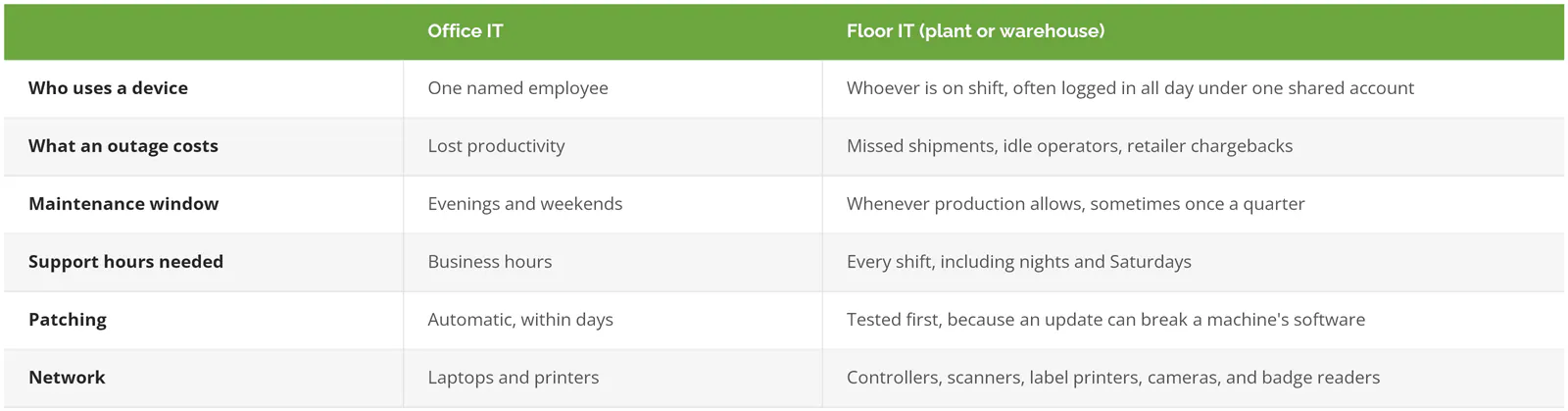
Plant floors run on shared machines, fixed schedules, and equipment that can't be rebooted on IT's timeline. An office outage costs productivity. A floor outage stops shipments, and the bill arrives as late orders, chargebacks, and overtime.
Office IT is built around one person, one laptop, and a workday that ends around 6. A plant or warehouse breaks all three assumptions. The same terminal gets used by four people across two shifts, the "workday" might run 5 a.m. to 1 a.m., and half the devices on the network aren't computers anyone would recognize. Cameras. Badge readers. Scale heads.
Large manufacturers have put a number on what stopped production costs. Siemens' True Cost of Downtime 2024 estimates unplanned downtime now eats about 11% of revenue at the world's 500 largest companies, roughly $1.4 trillion a year. That figure comes from 181 interviews at big industrial plants, so treat it as a direction, not a quote for a 60-person shop in Gardena. Direction's right, though. Floor time is the most expensive time in the building.
Any provider who has supported IT for manufacturing companies knows that before the first site visit. One who hasn't learns it on your dime.
What do you do with shop-floor PCs that can't be patched like a laptop?
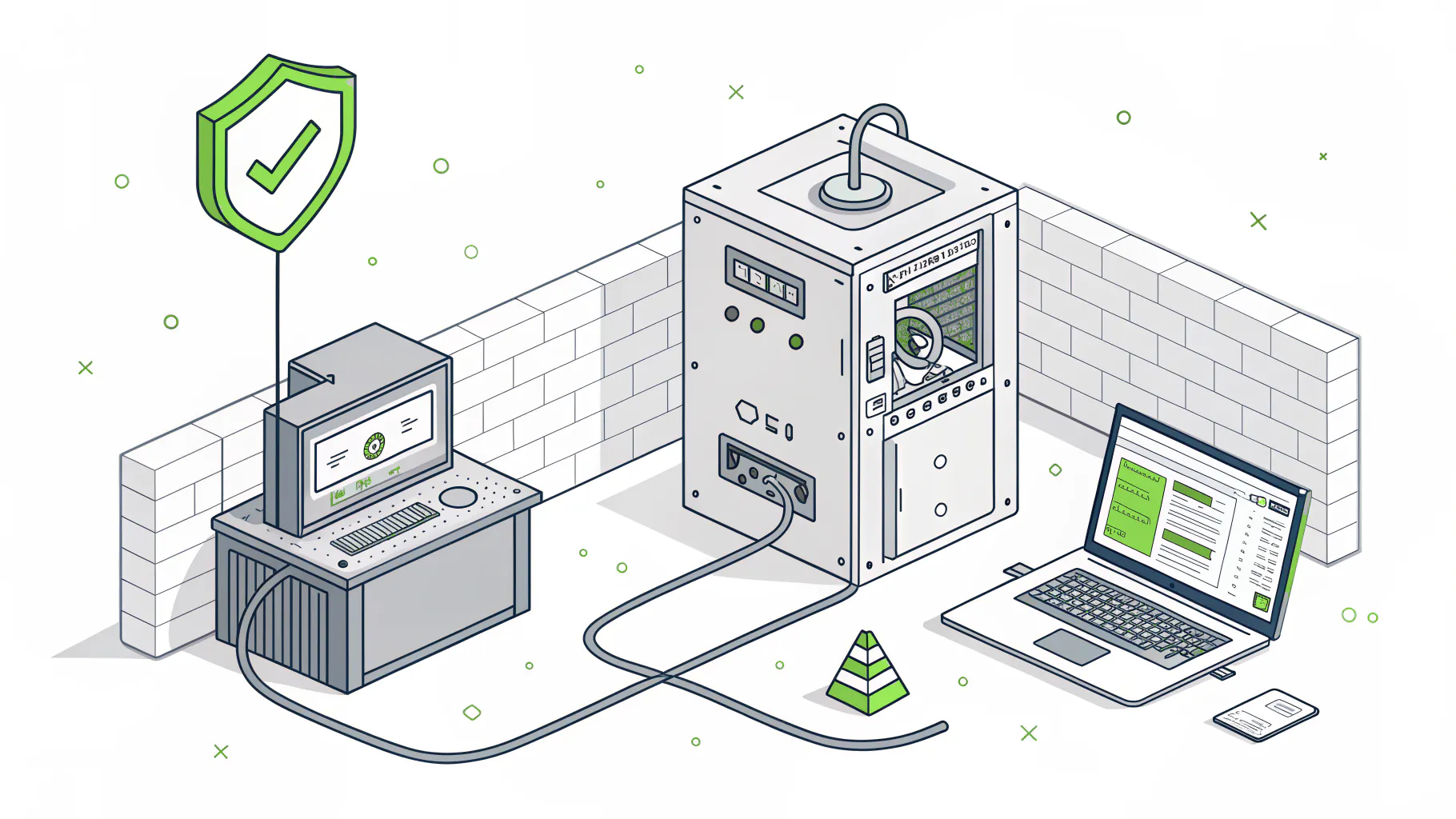
Inventory every one, put them on their own network segment, and decide machine by machine whether to upgrade, pay for extended updates, or wall it off. Leaving them sitting on the same flat network as the office is the one wrong answer.
Walk any South Bay machine shop and you'll find them. The PC bolted to a CNC machine. The inspection station running coordinate measuring software. The HMI, the touchscreen an operator uses to run a piece of equipment. A lot of these run Windows 10 or older, and not because anyone's lazy. The equipment vendor certified that version of Windows, and upgrading it can void support on a machine that cost more than the building's roof.
Some of those PCs will outlive the people who bought them.
Microsoft ended Windows 10 support on October 14, 2025. Businesses can buy Extended Security Updates at $61 per device for the first year, and Microsoft's rule is that the price doubles every year after that, for 3 years at most. So $61, then $122, then $244. The years stack, too. Buy in year two and you pay for year one as well. For 25 floor PCs that's a real line item. Not a rounding error. And it buys time. It doesn't fix anything.
Why does this matter so much? In the Sophos State of Ransomware in Manufacturing and Production 2025 study of 332 manufacturers hit by ransomware, exploited vulnerabilities were the top way in, behind 32% of attacks. An exploited vulnerability is a known software flaw that never got patched. Shop-floor PCs are where unpatched flaws go to live. Every plant has a few.
Segmentation is the fix most plants can actually afford. In plain terms, it means putting machine PCs on their own slice of the network, with a firewall rule that only lets the traffic they need in and out, so an infected laptop in accounting can't reach the CNC cell. NIST's guide to operational technology security, SP 800-82 Revision 3, lays out exactly this approach. Operational technology, or OT, is the equipment that runs physical processes, as opposed to the computers that run email and payroll.
An unpatched PC that nobody in accounting can reach is a risk you can live with for a while.
Warehouse Wi-Fi, scanners, and the WMS
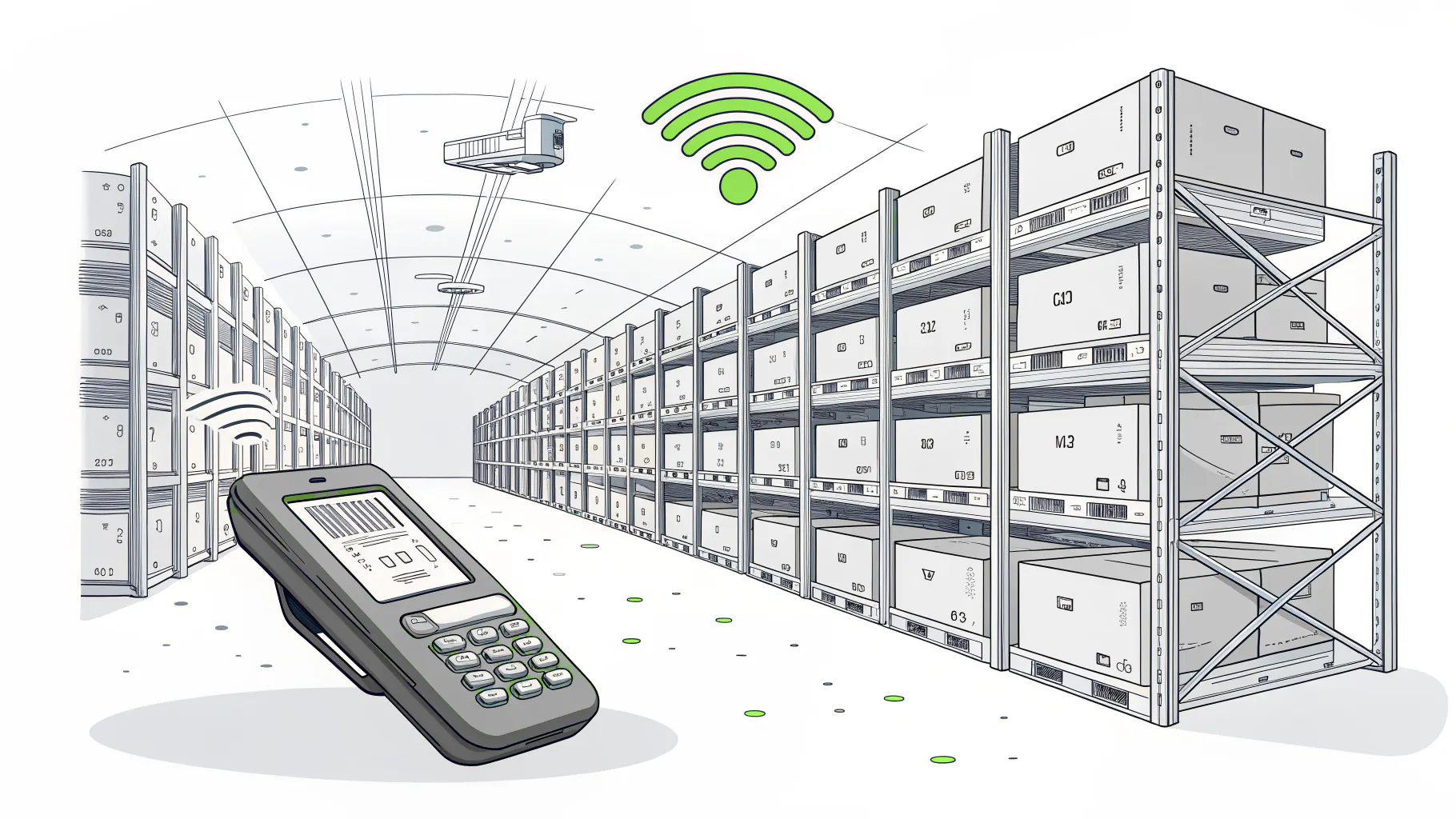
Picture a 200,000-square-foot tilt-up building in Rancho Dominguez. Concrete walls. Steel racking 30 feet high. In March the racks are half empty and the Wi-Fi tests fine. By September they're full of pallets for holiday orders, some of them cases of bottled drinks, and water soaks up Wi-Fi signal like a sponge. Same building, same access points, different network.
Then the complaints start. Scanners drop in aisle 14. A picker's WMS session times out halfway through an order and the pick starts over. Label printers at the pack stations go offline for 40 seconds at a time. Each one gets logged as its own little ticket, and nobody connects them. Classic.
The fix is rarely a better scanner.
When something on the warehouse floor misbehaves, these checks sort out the cause faster than swapping hardware:
- Same aisle every time? That's a coverage gap. Get a wireless site survey done with the racks full, not empty.
- Every scanner at once, across the building? Look upstream at the WMS server, the internet connection, or the link to the office.
- Fine for 10 minutes, then drops? Usually roaming, which is a scanner handing off badly from one access point to the next, or a session timeout set too tight in the WMS.
- Only the label printers? Check whether they're on fixed network addresses or fighting over the same one.
None of that shows up on a help desk dashboard as "the warehouse is slow." It shows up as overtime and late trucks. Distributors in Carson with a second building or a mezzanine pack area get the worst of it, and IT for distribution companies has to start with a walk of the floor, not a review of the ticket queue. Providers with a technician who can get to Carson quickly have an edge here that no remote tool replaces.
When the port schedule becomes your IT deadline
More than 20.1 million TEUs moved through the Ports of Los Angeles and Long Beach in 2025, the Los Angeles Business Journal reported, with Long Beach setting an all-time record at 9.88 million. A TEU is one 20-foot shipping container, the standard unit ports count in. A good share of those boxes ends up in warehouses in Carson, Rancho Dominguez, and Torrance within days of hitting the dock, which means the receiving schedule at those buildings is set by a ship's arrival, not by anyone's IT maintenance calendar.
That timing is unforgiving. Big retailers require EDI, or electronic data interchange, which is the structured file format that carries purchase orders, invoices, and advance ship notices between your system and theirs. If the ship notice doesn't go out before the truck arrives, plenty of retailer routing guides allow a chargeback, a deduction taken straight off what they owe you. The EDI failure itself is usually boring. An expired certificate. A mapping that broke after an update to the ERP, the system that runs orders, inventory, and accounting. A server that rebooted into a pending Windows update at 4 a.m.
Boring failures. Expensive ones.
Port authorities know what they're connected to. In May 2026 the Port of Long Beach opened a Cyber Defense Operations Center and said it blocks or stops an attempted cyberattack every 3 seconds on average. That's the port's network, not yours. But your freight forwarder, customs broker, and EDI provider all connect into the same chain, and attackers like a back door more than a front one.
Do your IT support hours match your shifts?
Get coverage hours written against your actual shift schedule. "24/7" on a proposal often means 24/7 monitoring, which is software watching for alerts. Whether a person answers the phone at 2 a.m. is a separate question, and it's the one a night shift cares about.
Ask four things, and get them in writing. What's the response time for a floor-down call versus a single-user problem? Are after-hours calls included or billed by the hour? Who's allowed to approve an emergency reboot of the WMS or ERP server when your IT contact is asleep? And does the person who answers have notes on your environment, the server names, the shift supervisor's cell number, and which machines are safe to restart mid-shift, or are they starting from zero with a stranger on the line at the worst hour of the night? Big difference.
Nobody asks the third one. Then it's 3 a.m., the server needs a restart, and the technician on the phone has no authority to do it.
Why are aerospace customers pushing CMMC down to small shops?
Defense requirements flow down the supply chain. A subcontractor handling controlled unclassified information for a defense prime needs CMMC certification at the level that data requires, and from November 10, 2026, Level 2 third-party certification can become a condition of contract award.
CMMC, the Cybersecurity Maturity Model Certification, is the Defense Department's program for proving a contractor protects sensitive government data. Controlled unclassified information, or CUI, is that data, things like technical drawings and specs that aren't classified but aren't public either. The Defense Department's final contracting rule (DFARS) put CMMC into defense contracts in phases. Phase 1 started November 10, 2025, with self-assessments. Phase 2 starts in 4 weeks.
Down here it hits harder than in most of the country. Prime contractors and large aerospace programs cluster around El Segundo and Hawthorne, and their purchase orders land on 20-person job shops in Gardena and Torrance making brackets, harnesses, and finished parts. The shop never signed a defense contract directly. It still gets the drawings, so it still gets the requirement. That's flow-down.
Two things to keep straight. First, compliance doesn't equal security. A shop can pass an assessment and still get hit, and a shop with strong security can fail an assessment for missing paperwork. Second, CMMC work is its own engagement. At Consilien, compliance is a separate service from managed IT, priced and scoped on its own. Managed IT keeps systems patched, monitored, and backed up the way an assessor expects to see them, and that work counts. The gap assessment, the system security plan, and the evidence program are a different project. If you're an aerospace supplier, CMMC for aerospace manufacturers covers what assessors look for, and the breakdown of ITAR vs CMMC vs NIST for manufacturers sorts out which rules apply to you.
No defense work at all? Skip this section. It isn't your problem yet.
Is a mid-sized South Bay manufacturer really a ransomware target?
Yes. Black Kite counted 1,183 manufacturing ransomware victims in the first 7 months of 2026, and the median victim brought in $42.9 million a year. That's a mid-sized plant or distributor, not a household name.
Those numbers come from Black Kite's Manufacturing and Distribution Ransomware Report 2026, covered by Cybersecurity Insiders in September. Manufacturing victims were up 39.7% over the same stretch of 2025, and 70.2% of the victims with known revenue fell between $10 million and $100 million. "We're too small to be a target" was never a great argument. It's now a wrong one.
Recovery is where the money goes. The same Sophos manufacturing study put the average recovery cost, not counting any ransom, at $1.3 million, and 51% of the manufacturers hit paid a ransom to get their data back. For a distributor running on thin margins, that's a year of profit gone over a weekend. One weekend. Why manufacturers get singled out comes down to pressure, and why manufacturing companies get ransomware walks through it. The short version is that a stopped line pays faster than a stolen spreadsheet.
Test the restore. Backups that have actually been restored, on a schedule, are what separate a bad week from a closed company. A manufacturing disaster recovery plan should name which systems come back first and how long the floor can run without them.
Two buildings, two ways of doing everything
South Bay companies that grew by adding buildings tend to end up in the same spot. The office is in Torrance. The warehouse is in Carson. Maybe there's a machine shop in Gardena that came with an acquisition. Each one got its IT set up by whoever was around at the time, so there are three firewalls from three vendors, two backup products, and a single site-to-site connection holding it all together. Duct tape, basically.
That connection is the weak point. If the ERP server lives in a closet in Torrance and the connection to Carson drops, the warehouse can't print a pick ticket. A second internet circuit at the warehouse, even an inexpensive cellular backup, costs less per month than one afternoon of a stopped dock. Cheap insurance.
Standardizing fixes most of it. Same firewall, same backup, same way of setting up a new hire, at every site, documented well enough that a technician who has never been to the Carson building can find the network closet and know what's plugged into what. We align IT management to our CIMS framework, the Consilien IT Maturity Standard, which measures each environment against the same target across security, performance, and resilience, so a gap at the Carson building shows up on the same report as a gap at headquarters. Companies looking for managed IT for manufacturing in Torrance, with satellite sites in El Segundo or Gardena end up with one standard instead of three improvised ones.
A floor-first checklist for your IT provider
Bring these to your current provider or anyone quoting the work. The answers tell you whether they've ever stood on a shop floor.
- Have you inventoried our shop-floor PCs and controllers, and what's your plan for each one that can't run Windows 11?
- Are our machines on a separate network segment from the office, and can you show me the rules?
- Who answers a floor-down call at 2 a.m., and how fast?
- When did you last restore our ERP or WMS from backup as a test, and how long did it take?
- Has anyone surveyed our warehouse Wi-Fi with the racks full?
- If we lose the link between buildings, what keeps working?
Listen for hedging. A provider who answers all six without it has done this before. Joel Poindexter, IT manager at Hixson Metal Finishing, a Southern California metal finisher that has worked with Consilien since 2010, wrote on Clutch that "Consilien has a great depth of knowledge and experience throughout their team." A relationship that has run since 2010 on one plant floor teaches a provider things a sales deck can't.
Skip all of this if your company is one office, no floor, no warehouse, and no shared devices. General managed IT will serve you fine. But if you're still calling someone only when things break, the signs that manufacturers outgrow break-fix IT will look familiar.
Where to start
Consilien is a managed IT and cybersecurity provider headquartered in Torrance that serves businesses nationwide, with manufacturing and distribution as core industries and compliance offered as a separate service. An assessment for a plant or warehouse should include time on the floor, not just the server closet, because the problems on this page don't show up in a ticket queue.
If any item on that checklist made you wince, speak to an IT expert about what your floor actually needs.