IT Support vs Managed IT Services: What's the Difference and Which Do You Need?
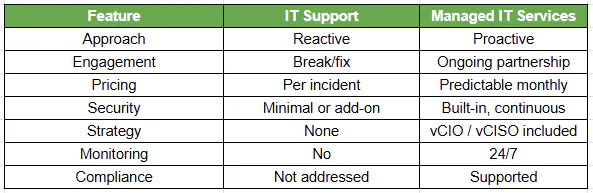
IT support is reactive: it fixes problems after they happen. Managed IT services are proactive: they monitor, secure, optimize, and plan your IT environment continuously. For most businesses past the small-shop stage, managed IT reduces risk and total cost.
Table of Contents
Pure IT support fits only very small environments with low complexity and minimal security exposure. Once you have multiple users, regulatory obligations, or cloud-dependent operations, the reactive model becomes the expensive option, not the cheap one. Co-managed IT splits the difference: your internal team handles day-to-day, the provider adds security, compliance, and 24/7 coverage.
What Are Managed IT Services?
Managed IT services, in contrast, are a proactive type of service that, through regular monitoring and maintenance of your IT environment, seeks to help you find ways to improve your business.
What Services Are Included in Managed IT Services?
Managed IT services encompass:
- Round-the-clock monitoring and alerting
- Cybersecurity based on the NIST Cybersecurity Framework
- Strategic direction, such as vCIO and vCISO
- Automated patching
- Compliance support, e.g., CMMC and SOC 2
IT Support vs Managed IT Services (Key Differences)
Reactive vs Proactive IT (Why It Matters)
Reactive IT creates gaps:
- Issues are discovered after impact
- Security threats go undetected longer
- Downtime lasts longer
According to IBM Security, organizations that have poor visibility and detection delays are at a much higher risk of incurring much more expensive breach costs (global study; by region and industry). Research by Uptime Institute indicates that downtime incidents may cost from thousands to millions, depending on size, especially in multi-site environments.
Bottom line: Reactive IT increases both risk exposure and recovery cost.
When IT Support Breaks Down
You've likely outgrown basic IT support if you're seeing:
- Recurring issues instead of permanent fixes
- No visibility into system health or risks
- Security tools implemented but not actively managed
- Increasing compliance pressure (audits, insurance)
- Internal IT team overwhelmed with tickets
- Multiple locations with inconsistent systems
When Managed IT Services Make Sense
Managed services become necessary when:
- Downtime impacts revenue or operations
- You handle sensitive or regulated data
- Cyber insurance requires stronger controls
- You need predictable IT costs
- Your internal IT team lacks bandwidth for strategy
Guidance from the Cybersecurity and Infrastructure Security Agency emphasizes continuous monitoring and proactive defense as baseline practices not optional upgrades.
The Missing Model: Co-Managed IT (Where Consilien Wins)
Most businesses don't need to replace internal IT; they need to augment it.
Co-managed IT delivers:
- Internal team handles day-to-day support
- Consilien provides:
- Security operations
- 24/7 monitoring
- Compliance alignment
- Strategic leadership (vCIO, vCISO)
This solves the real issue: internal IT overload, not capability.
How to Choose (Decision Framework)
Choose IT support if:
- You have <20 users
- Minimal compliance requirements
- Low operational dependency on IT
Choose managed IT services if:
- Downtime affects revenue
- You operate across multiple locations
- You must align with frameworks like the NIST Cybersecurity Framework
- Security and compliance are business risks
Cost Comparison: IT Support vs Managed Services
Important:
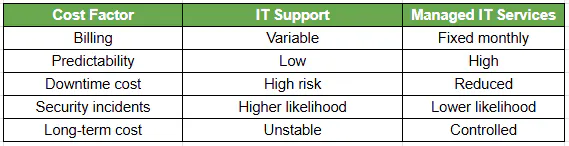
Break/fix often looks cheaper until you factor in:
- Downtime losses
- Security incidents
- Emergency remediation