Lift and Shift vs Refactor: How to Choose a Cloud Migration Strategy
Lift and shift vs refactor isn't really a choice between two options. It's a sorting exercise across six, run one workload at a time. Rehost anything that will look the same in two years. Refactor what won't. Retire whatever nobody has touched in 90 days. AWS and Microsoft publish contradictory advice on this, and the contradiction itself turns out to be the most useful thing in the debate once you understand what causes it.
Table of Contents
Lift and shift moves an application to the cloud unchanged. Refactor rewrites it to use cloud-native services. Rehost when a workload will stay stable for two years or more. Refactor when it won't.
Two quotes for the same project. One provider says 90 days and a fixed fee. The other says nine months and wants a discovery phase before they'll give you a number. Both are quoting a cloud migration. The gap between them is lift and shift vs refactor, and it's the biggest cost variable in the whole project.
Almost every article on this treats the answer as a coin flip. Fast and cheap on one side, slow and thorough on the other, pick your temperament. It's the wrong frame. That's why so many cloud migration projects land over budget with a bill that never comes back down.
There's a better way to decide, and it comes from an odd place. AWS and Microsoft both publish official guidance on this question. They tell you opposite things. Not slightly different things. Opposite. Reading the two side by side is more useful than any vendor comparison chart, because the contradiction points straight at the variable that actually settles it.
What's the Actual Difference Between Lift and Shift and Refactor?
Lift and shift copies an application into the cloud without changing its code or architecture. Refactor rewrites the application to run on cloud services. One moves the box. The other rebuilds what's inside it.
AWS calls lift and shift rehosting, and its prescriptive guidance on migration strategies defines it as moving applications "without making any changes to the application." Refactor, in the same document, means you "modify its architecture by taking full advantage of cloud-native features." Same destination. Wildly different amounts of work, risk, and money.
In practice, a rehost means your Windows Server 2019 box running SQL Server becomes a virtual machine in Azure or AWS running the same Windows Server 2019 with the same SQL Server on it. Same patches. Same quirks. Same 40GB of log files nobody has opened since 2021. You're renting infrastructure as a service instead of owning hardware. The application has no idea anything happened.
A refactor is a different project wearing the same word. The database moves to a managed service the cloud provider operates for you. The application gets split apart or rewritten so it can grow and shrink with demand instead of sitting at one fixed size all year, which is where the cloud actually earns its price premium over a server you already own and have already paid for. Code changes. Deployment changes. Your developers are involved, and if you don't have developers, you're about to hire some.
That's why the two quotes look nothing alike.
Why Does the Same Application Cost More in the Cloud After a Lift and Shift?
Because you sized those servers for peak load years ago, and the cloud bills that headroom by the hour. On premise, unused capacity was already paid for. In the cloud it becomes a line item that arrives every month, sized to the busiest hour your business has ever had rather than the load it actually carries on an ordinary Tuesday afternoon.

This is the part that surprises finance. A server bought in 2021 was a capital purchase, depreciated over four or five years, and whether it ran at 12% or 80% utilization made no difference at all to this quarter's number or to anyone's variance report. Move that same specification into a cloud instance and the idle capacity becomes an operating expense. Monthly. Forever.
How much idle capacity are we talking about? Research from Anthesis Group and Stanford's Jonathan Koomey in 2015 put 30% of physical servers in the comatose category, meaning powered on and drawing electricity while doing nothing measurable for anyone. The Uptime Institute's 2014 industry survey landed closer to 20%. Both numbers are a decade old and virtualization has tightened things up considerably since. Not enough to alter the math on a rehost, though, and a server inventory with no named owner against a third of the rows is still the ordinary starting condition for a migration project.
Cloud bills confirm it. Flexera's 2026 State of the Cloud Report, based on 753 cloud decision-makers, found wasted cloud spend rose to 29%, the first increase in five years. Nearly a third of every cloud dollar buys nothing.
None of this makes lift and shift wrong. It makes an unadjusted lift and shift wrong. There's a difference. Right-sizing instances before cutover, not after the first invoice arrives, separates a rehost that saves money from one that quietly costs more than the data center did. If you want the fuller picture on where the money goes, we broke down what a migration actually costs separately, and there's a companion piece on cutting cloud spend after the move.
The Two-Year Test
Microsoft publishes the sharpest single rule in this entire debate. It's buried in documentation almost nobody outside a migration team reads.
From the Azure Cloud Adoption Framework, on when to rehost. "Rehosting is suitable only when you're confident that the workload remains in its current state for at least two years. If modernization is likely, consider refactoring or rearchitecting instead to avoid duplicate effort."
Two years. That's the test.
Nobody can forecast two years of application roadmap with confidence, so don't try. Look backward instead. Has this application changed meaningfully in the last 24 months? Has anyone asked for a feature, an integration, a new report? If the answer is no, and no business reason is about to change that, rehost it. The thing has reached its final form. If the answer is yes, and a vendor is quoting you a rehost on it, you're going to pay for that workload twice. Once now. Once again later.
Microsoft adds a second warning worth repeating. Rehosting doesn't fix problems. A slow application stays slow in the cloud, running on faster hardware you're now renting by the hour, which produces the most awkward conversation in the whole project when someone asks what the six figures actually bought. A fragile one stays fragile. The framework is blunt about it, noting that migrating problem workloads without modernization "can carry forward technical debt and require rework later."
AWS Says Rehost First. Microsoft Says Don't. Who's Right?
Both are. AWS is advising organizations moving hundreds of servers against a data center exit deadline. Microsoft is advising a team deciding what to do with one application. Different questions. Portfolio size is the variable that settles which advice applies to you.
Read AWS's position directly and it's striking how far it goes. Refactor, the guidance says, "is not recommended for large migrations because it involves modernizing the application during the migration." Rehost, relocate, or replatform instead, and modernize once the migration is finished. Microsoft's framework looks at the same workload and reaches the opposite conclusion, on the straightforward grounds that touching an application twice costs more than touching it once, which is true right up until the portfolio gets large enough that touching everything once is no longer a schedule anyone can hold.
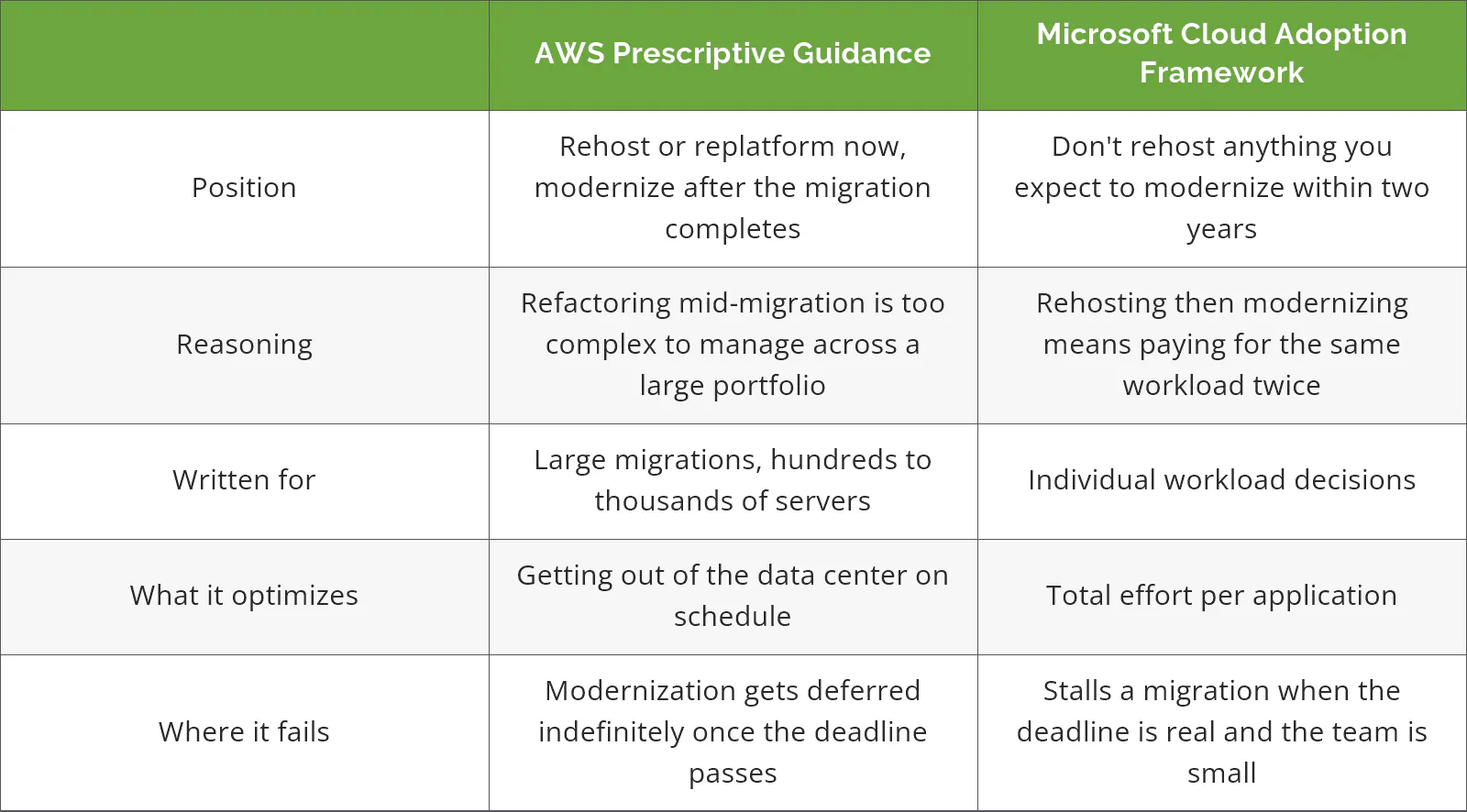
Running 20 to 500 users, you're almost never in AWS's scenario. You have 30 or 60 servers, not 3,000. There's no forcing deadline unless a lease is expiring. And you have the one thing AWS's guidance quietly assumes away, which is enough time to look at each workload on its own and decide what it actually needs, rather than sorting a portfolio too large to reason about one application at a time.
So Microsoft's rule wins for companies your size. With one honest exception. If your data center lease ends in five months, get everything out on a rehost and modernize next year. A deadline you cannot move outranks a framework every time.
What About Replatform, the Option Nobody Quotes You On?
Replatform moves a workload to the cloud and swaps out the expensive infrastructure underneath it, without rewriting the application. It's the middle option. For a lot of companies it's the one that actually pays.
Picture a SQL Server database sitting on a virtual machine, and now picture it as Azure SQL Database instead. Same data, same queries, no server underneath it that anyone has to patch on a Sunday. A self-managed MySQL instance becoming a managed one is the same move. Microsoft's modernization guidance puts it plainly, describing replatforming as "moving workload components to platform-as-a-service (PaaS) offerings with minimal code changes." Platform as a service, in plain terms, means the provider handles the patching, backups, and failover you're currently doing by hand.
It rarely appears in a quote, and the reason is unglamorous. Replatform is harder to scope than a rehost and less lucrative than a refactor. Somebody has to open your specific database and work out whether it runs on a managed service without code changes, which is a day of real effort before anyone can attach a number to it. A provider quoting fast defaults to rehost. A provider quoting big defaults to refactor. Nobody defaults to the middle.
Ask for it by name. On a typical estate three or four workloads are replatform candidates, and they tend to be the same three or four consuming the most attention from whoever handles patching, backup verification, and the failover test that keeps getting pushed to next quarter.
Licensing Is the Cost Lever, Not Instance Size
Everyone argues about instance sizing. Wrong argument. The Windows Server and SQL Server licensing embedded in your cloud bill is frequently the larger number, and it's the line most migration comparisons skip entirely.
A Windows Server virtual machine in Azure bundles two things into one hourly rate. The compute, and the Windows license. If you already own that license with active Software Assurance, you're quietly paying for the same thing twice, once through the agreement your finance team renews every year and again inside a cloud meter that nobody itemizes. Azure Hybrid Benefit removes the second charge, and Microsoft publishes savings of up to 40% on the VM rate. For SQL Server, where licensing dwarfs compute, the savings reach up to 85% when combined with reserved instances.
That's not a rounding error. On an estate with a handful of SQL workloads, it decides whether the migration pays for itself inside two years or never does.
Use it as a test on whoever is quoting you. Ask how the proposal handles your existing Windows Server and SQL Server licenses. A provider who has actually costed the migration answers in one sentence. A provider who priced it off a spreadsheet of VM sizes will need to get back to you. Watch which one you get.
Which Workloads Shouldn't Move at All?
Some of them. More than you'd guess. AWS defines a zombie application as one averaging under 5% CPU and memory, and an idle application as one running between 5% and 20% over a 90-day window. If nothing has connected to it in 90 days, it gets retired, not migrated.
Retirement is the cheapest strategy on the list, and no vendor leads with it, for reasons that don't need spelling out. Every server you decommission before the project starts is one you don't pay to move, don't pay to run, and don't patch for the next five years. On a first pass through a 50-server estate, finding six or eight of these is routine. Sometimes more.
Then there's retain, which means the workload stays where it is. Genuinely stays. AWS lists the cases, and they're recognizable to anyone running a real environment.
- Data residency or compliance rules that require the data to sit somewhere specific
- Applications tied to specialized hardware with no cloud equivalent, like machines on a plant floor
- Mainframe, mid-range, and non-x86 Unix systems. IBM AS/400 and Oracle Solaris are the usual suspects, and both need careful assessment before anyone touches them
- Anything upgraded in the last 12 months, where the depreciation hasn't run out yet
- Systems with a handful of internal users and no growth story, where migrating costs more than it returns
If most of your estate lands in those categories, you don't need a migration at all. You need a hardware refresh and better backups. Any provider who looks at that inventory and still quotes a full cloud migration is selling a project rather than solving a problem, and the tell is that the proposal arrives before anyone has asked what the AS/400 is running or when the plant floor controllers were last touched. We've written about keeping workloads on premise for exactly this situation.
Does Hybrid or Multi-Cloud Change the Answer?
Not really. It changes where each workload lands, not how you decide. The two-year test and the retire filter work the same whether the destination is Azure, AWS, or a rack you still own.
Hybrid is the normal condition now, not a transitional state. Flexera's 2026 survey found 73% of organizations running hybrid environments, and a good share of those never chose it on purpose. They inherited it. An acquisition, a SaaS purchase, a project that stalled at 60% and got quietly absorbed into the budget line for something else. If you're weighing the architecture itself, we compared the hybrid and multi-cloud tradeoffs in more depth.
One practical note. Spreading workloads across two providers roughly doubles the operational surface your team has to know, monitor, and secure. That cost is real. It's rarely in the business case.
A Decision Path You Can Run Per Workload
Work down the list in order. First yes wins. Stop there and move to the next workload.

- Has nothing connected to it in the last 90 days? Retire. Decommission it before the project starts.
- Does it require specific data residency, or depend on hardware with no cloud equivalent? Retain. Leave it where it is and manage it properly.
- Is there a mature SaaS product that does the same job? Repurchase. Buy the subscription, migrate the data, retire the server.
- Is the database or operating system the expensive, fragile part, while the application code is fine? Replatform. Move to a managed database or a supported OS version.
- Will this application look roughly the same in two years? Rehost. Right-size the instance before cutover, not after.
- Is the architecture itself limiting what the business can do? Refactor. Budget for developers and a longer timeline.
Run this honestly across a 40-server estate and the output is a mix rather than a strategy. A plausible shape is a dozen retires, a couple of retains, the bulk of the rest rehosted, three or four replatformed, and one refactor scheduled for next year. Never one answer. A single-strategy quote covering an entire estate is the clearest signal that nobody has done this exercise.
The hardest part isn't the decision. It's knowing what depends on what. Flexera's respondents named understanding application dependencies as their top migration challenge at 54%, well ahead of assessing technical feasibility at 44% and comparing on-premises to cloud costs at 43%. Discovery tooling maps most of it. What takes the extra week is the undocumented scheduled task on a server nobody remembers commissioning, pointing at a share that stopped resolving correctly some time during the last office move. There's more on sequencing that work in our guide to building the migration plan itself.
Where This Leaves You
Consilien is a managed IT and cybersecurity provider working with companies of 20 to 500 users across manufacturing, distribution, professional services, and real estate, nationwide. On migrations we refuse to quote a single strategy for a whole estate. Every environment gets a per-workload assessment first. A number produced any other way isn't really a number. It's a guess with a decimal point.
If you're holding two quotes that don't match and can't tell which one is honest, speak to a cloud expert and walk the estate before you sign either. Bring the server list. Thirty minutes usually settles it. And if the answer is that you shouldn't migrate at all, we'll say so. Our migration assessment and planning work starts with exactly that conversation.