Local MSP vs National IT Provider: Which Is Better for Your Business?
Neither wins by default. A local MSP is better when on-site speed and one steady team matter most. A national provider is better for multiple sites and 24/7 security coverage. Judge either on response commitments, escalation depth, and ownership.
Table of Contents
I'd push back a little on the question itself. Remote tools now handle the everyday work of managed IT services from anywhere, so the gap between a local MSP and a national IT provider only shows up in two places. One is the morning something physical breaks. The other is the year your provider gets sold.
The question usually lands on someone's desk after a bad week. A company opens a second office in Dallas, or the current provider takes two days to answer a ticket about a frozen label printer, and somebody in leadership wonders out loud whether a bigger firm would do better. Or the reverse. The national help desk keeps routing calls to people who've never seen the network, and the CFO starts wondering whether a shop across town would just know them by now.
Both instincts are reasonable. Neither one settles it.
What I'd do instead is sort the work into two piles, the stuff that needs a person in the room and the stuff that doesn't, and then ask who's handling each pile. Do that and local and national stop being labels. They turn into things you can check in a contract.
What Does a Local MSP Actually Give You?
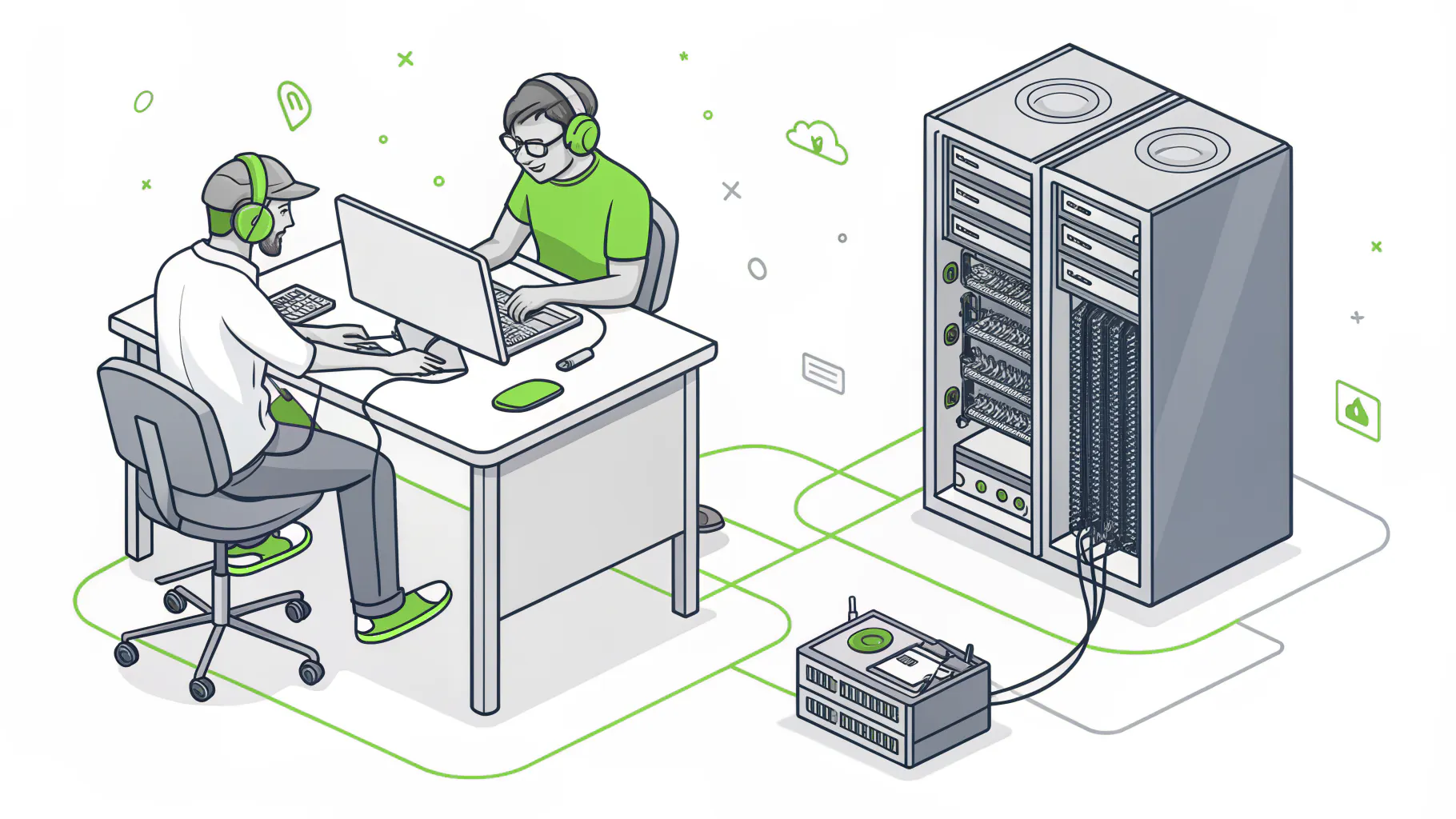
A local MSP's real advantage is physical presence. Someone can be in your building within hours to replace a failed switch, trace a bad cable, build out a new office, or sit next to an employee who's stuck. Remote work? Distance barely matters.
Look at what fills a normal week of tickets. Password resets. A Microsoft 365 license for the new hire in accounting. A laptop that won't talk to the VPN from a hotel in Reno. Tuesday night's patches. All of it runs through a remote monitoring and management tool, the software that lets a technician see and fix a computer without touching it. Not one of those needs a car.
Then there's the short pile. A switch dies in the server closet. The internet provider needs to swap its box on the wall, and somebody has to unlock the door. A warehouse needs its wireless mapped before the racks go up, or a shop-floor PC running a machine controller just stops booting at 6 a.m. Those jobs need hands. On those days, drive time is the whole story.
I think of it like a doctor's patient portal versus the emergency room. You use the portal all the time and never wonder where its servers live. The ER you need rarely. When you do, distance is all you care about.
Local providers also tend to bring continuity. The same two or three technicians handle your account for years, and they know which printer always jams, why the CFO's laptop has its own VPN profile, and which vendor to call when the phone system acts up on a Monday morning. That familiarity is real. It saves hours.
But it mostly lives in people's heads, not in documentation. It starts as a reasonable shortcut, because why write down what everyone already knows? Then it compounds. When that one senior technician leaves or retires, a surprising chunk of your environment walks out with them, and the next person spends a month rediscovering it. So when a local provider talks about how well they know you, ask to see the written version.
Where National Providers Come Out Ahead
Scale buys things a small shop can't easily afford. The clearest one is a staffed security operation running around the clock.
Security operations centers, or SOCs, are teams whose whole job is watching your systems for signs of an attack and responding when something looks wrong. Running one 24/7 means paying analysts to sit through the overnight shift whether anything happens or not. A 12-person local MSP usually can't justify that cost, so after-hours alerts go to whoever's on call that week, who might be asleep, at dinner, or halfway through a server move for another client when the phone buzzes. Sometimes that works fine. Sometimes the alert waits until morning.
Your provider's own security matters more than people expect. In 2022, CISA and its counterparts in the UK, Canada, Australia, and New Zealand issued a joint advisory on threats to MSPs and their customers, warning that attackers target providers specifically because one breach can cascade into every client they manage. Your MSP holds administrator access to your systems. Their breach becomes yours. The IBM Cost of a Data Breach Report 2026 found that a breach through a business partner was the single largest factor driving breach costs up, adding $227,250 on average.
Every provider sells security now. Kaseya's 2025 Global MSP Benchmark found 67% of MSPs count it among their five fastest-growing revenue lines. The better question is who's actually staffing it at 2 a.m. on a Sunday.
National providers also tend to win on two more fronts.
- Multiple locations. One standard setup, one ticket queue, and one contract across offices in Phoenix, Chicago, and Atlanta, instead of three local vendors who've never spoken to each other.
- Specialists on the bench, like a cloud architect for an Azure migration or a firewall engineer, rather than one senior person who's expected to know everything.
The trade-off is attention. You're one account among hundreds, the first person you reach is often reading from a script, and the account manager you met during the sale may be gone by the second renewal. Nobody's being careless. Scale just spreads attention thin unless the provider deliberately builds against it.
Local MSP vs National IT Provider, Side by Side
Individual providers vary, so treat every row below as something to confirm in writing.
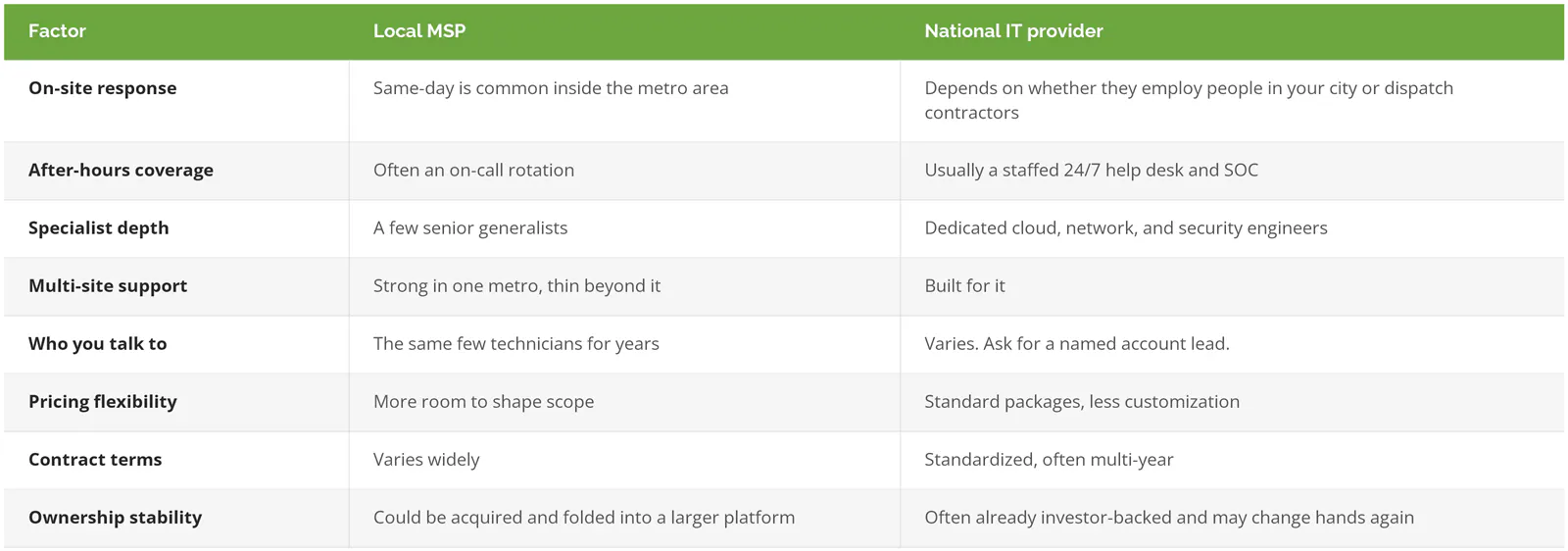
Buyers skip that last row.
Will Your Local MSP Stay Local?

Not necessarily. Omdia tracked 169 publicly announced MSP acquisitions in 2025, with private equity involved in 69% of the disclosed deals. The local provider you sign with this year can belong to a national platform by next year.
This year hasn't slowed it down. In the first quarter of 2026, MSP and managed security deals rose 73% year over year to 64, and outside investors took part in 80% of them, according to Channel Dive's reporting on Omdia's data. Omdia analyst Jessica Davis put the appeal simply. "ARR is what attracted private equity to the managed services space. It's nice because it's so predictable." ARR is annual recurring revenue, meaning your monthly contract.
So what changes after a deal closes? On day one, nothing. That's part of why people don't notice. The changes come over the following year, and they follow a fairly predictable path. The new parent moves everyone onto its own ticketing system and remote management tools, because standardizing is how a roll-up, a buyer that stitches many small MSPs into one company, makes the numbers work, and the help desk folds into a central queue in another state. And the technician who knew your network well gets reassigned or promoted, or decides to leave.
None of that is sinister. Some acquired providers get better, with more security staff and more money for tools. But look at what clients care about most. When CRN surveyed 129 MSP clients in Australia in 2022, unresponsiveness was the top complaint at 24.7%, and responsive service was the top compliment at 23.2%. It's a small, older sample from another country, but the pattern is hard to argue with. Responsiveness is the thing clients notice first, and it's also the thing most exposed during an ownership transition.
Your contract decides how much any of this matters. Look for a change-of-control clause, which gives you the right to renegotiate or leave if the provider is sold. Without one, you're bound by the original term and its exit fees. Scott & Scott LLP, a firm that drafts contracts for MSPs, recommends an early termination fee of 50% of the fees remaining in the term. Run that on a hypothetical 3-year agreement at $8k a month. Leave after the first year and the fee is $96k. Ouch.
That's a big number to discover after a sale you had no say in, which is why the clauses inside an MSP contract are worth reading line by line before you sign, especially the ones about renewal, assignment, and what happens to your pricing when the provider's parent company changes its standard rate card.
What Should a Multi-Location Business Do?
Don't pick a side. Split the job. Centralize the things that benefit from scale, like monitoring, security, standards, and the help desk. Then make sure every site has a named way to get hands on hardware, with a response time written into the agreement for each city.
Picture a distributor with headquarters in Los Angeles and warehouses in Dallas and Atlanta. Three local MSPs would give it three different firewall setups, three backup approaches, and three invoices, with nobody accountable for the whole picture. One national provider with no people in Atlanta would give it consistency, plus a long wait when a warehouse switch fails during a shipping rush. Neither works. What holds up is boring. One standard environment, one provider accountable for all of it, and on-site coverage confirmed city by city, in writing. There's more on how that gets built on our page about IT for multi-location businesses.
Some sites already have an IT person. Keep them. A co-managed IT arrangement lets your own staff handle the local, hands-on work while the provider covers monitoring, security, and the overnight hours your team can't.
Where do you land?
- One office with a server closet, a printer fleet, or production equipment. Lean local, or go national only if they'll write same-day coverage for your city into the agreement.
- Two or more metros? National, or one provider backed by a vetted on-site partner in each city.
- If you hold regulated data and nobody in-house is watching security, a staffed 24/7 SOC outranks geography every time.
- Fully remote, no office gear at all. Honestly, stop paying extra for proximity.
7 Questions That Matter More Than the Address
An hour of downtime now costs more than $300,000 for over 90% of mid-size and large companies, according to ITIC's 2024 survey of more than 1,000 firms. Smaller businesses lose less per hour. They also have less cushion. These questions get at whether a provider can actually shorten those hours, wherever its office happens to be.
- What's your written on-site response time in our city? You want a number in the agreement, not a promise to get someone out there. Our guide to managed IT service level agreements (SLAs) covers what good targets look like.
- When the first-level technician can't fix it, who gets it next, and are they your employees or a subcontractor?
- Who owns your company? Has that changed in the last 3 years, and does our contract say what happens if it changes again?
- Who's our named account lead, and how long have they been with you?
- At 2 a.m. on a Sunday, does a security alert reach a staffed SOC or someone's phone?
- If we leave, what do we get back, and how fast? Documentation, admin passwords, and network configurations should all be on the list.
- Can we talk to a client in our industry, ideally one in a different city from your headquarters?
Question 3 makes salespeople pause. Pay attention to that pause. For the full pre-signing list, see these 15 questions to ask an MSP before signing.
How Consilien Is Set Up
Consilien is a security-first managed IT provider headquartered in Torrance, California, serving businesses nationwide. It's independently owned. Day-to-day monitoring runs through a network operations center (NOC) staffed in the U.S. and overseas, and the security operations center runs 24/7/365 from multiple U.S. locations. You can see the cities we serve on our locations page.
Agreements carry a 1-year opt-out with 60 days' notice, which takes some of the sting out of question 3. If the relationship isn't working after a year, you aren't stuck paying out the rest of the term. Ask any provider for theirs.
In practice, the proof is usually a phone call. Human Touch, a consumer products company in Long Beach, described a typical help desk call in a Clutch review. They had a ticket number in 3 minutes, a technician on the phone within 15 minutes, and the problem resolved in under 15. The technician also showed the employee how to handle it next time and left written steps on that computer. "They are easy to reach and we have very little downtime," said Catherine Taylor, Product Support Manager.
No one drove anywhere.
Still, if you run a single office that needs someone on-site every week, and a provider can't put a person in your building within a few hours, keep looking. That applies to us too. Ask how on-site work gets handled in your specific city before you ask about anything else.
If you're weighing a switch and want someone to look at your current contract, coverage, and ownership terms with you, speak to an IT expert.