Microsoft 365 Email Security: Native Controls vs. Third-Party Gateways
Microsoft 365 email security starts with Exchange Online Protection in every tenant. Defender for Office 365 Plan 1 adds link, attachment, and impersonation protection. A third-party gateway is a second layer, not a fix for unconfigured policies.
Table of Contents
The question usually shows up as a buying decision. Do we need Mimecast, or Proofpoint, or one of the newer API tools, or is what Microsoft gives us enough? It's a fair question, asked in the wrong order. Before you compare vendors, find out what your Microsoft 365 email security is actually set to do today, because the license you pay for and the protection you're running are two different things.
The stakes are money, not spam. The FBI's 2025 Internet Crime Report put business email compromise losses at $3.05 billion for the year, up from $2.77 billion in 2024. Business email compromise, or BEC, is the scam where someone poses as your CFO or a supplier and asks for a payment. Often there's no malware and no link. Just a believable email and a new bank account number.
And the emails keep getting better. Microsoft's 2025 Digital Defense Report found AI-written phishing emails got a 54% click-through rate, against 12% for the conventional kind, one of several numbers worth knowing in our 2026 phishing statistics. The FBI separately counted more than $30 million in 2025 BEC losses from scams that used AI.

What Does Microsoft 365 Include for Email Security Out of the Box?
Every Microsoft 365 tenant, meaning your company's own Microsoft 365 environment, with cloud mailboxes gets Exchange Online Protection, or EOP. It checks sender reputation, blocks known malware, filters spam and spoofed senders, and pulls bad messages back out of inboxes after delivery.
Microsoft's documentation lays out the order. Connection filtering rejects most spam on sender reputation alone. Malware goes to quarantine, where by default only admins can see it. Then your mail flow rules run (the if-this-then-that rules an admin writes for email), followed by anti-spam and anti-phishing filtering. The default policies cover every mailbox in the tenant, from the CEO's down to the shared inbox the front desk uses for deliveries. You can override them. You can't turn them off.
The pull-back feature is called zero-hour auto purge, or ZAP. If Microsoft learns a message was malicious after it landed, ZAP moves it out of the mailbox. Microsoft also publishes service-level numbers for EOP, promising better than 99% spam effectiveness, fewer than 1 false positive in 250,000 messages, and 100% of known viruses blocked. Those are strong numbers, and the word carrying them is "known." EOP is built to catch what somebody has seen before, and a first-time lure from a lookalike domain, or a polite invoice request from a real supplier's hacked mailbox, isn't on anyone's blocklist yet.
What Does Defender for Office 365 Add?
Defender for Office 365 Plan 1 adds Safe Links, which checks URLs when someone clicks, Safe Attachments, which opens files in a sandbox before delivery, and impersonation protection against lookalike executives and domains. Plan 2 adds investigation, hunting, automated response, and phishing simulations.
A sandbox is a sealed test machine. The file gets opened there first, and if it tries to do something a PDF has no business doing, it never reaches the inbox. Plan 1 also extends that protection to Teams, SharePoint, and OneDrive, so a poisoned file shared in a Teams chat gets the same treatment as one sent by email.
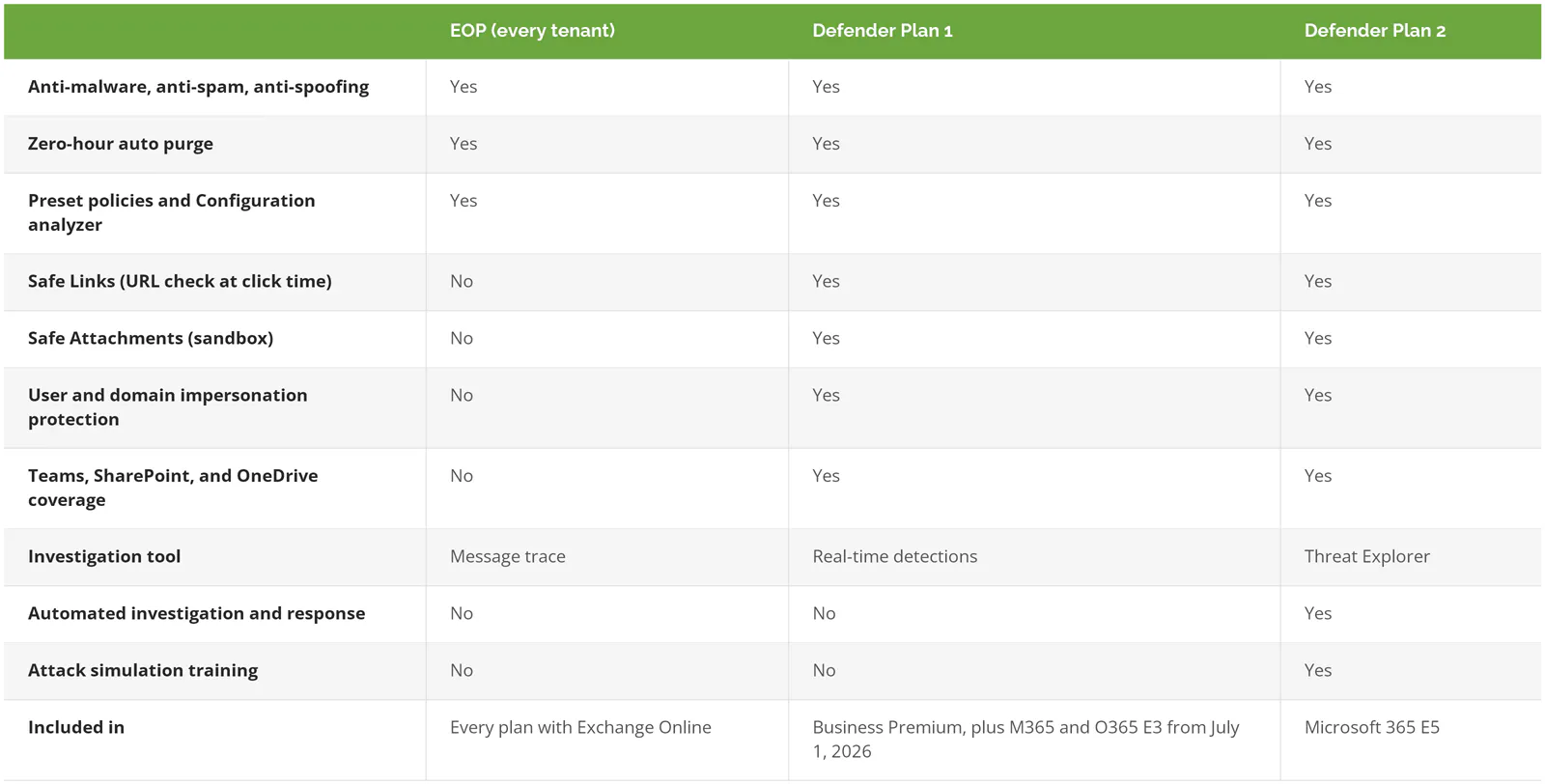
Plan 2 is built for a team that investigates. Threat Explorer shows where a malicious message went and lets an admin delete every copy from every mailbox at once. Automated investigation and response, or AIR, runs that playbook on its own when an alert fires. Nobody opening those tools on a Tuesday? Then Plan 2 is mostly shelfware.
The July 2026 Change: E3 Now Includes Plan 1
If you're on Microsoft 365 E3 or Office 365 E3, check your tenant. Under Microsoft's 2026 packaging update, both suites include Defender for Office 365 Plan 1 as of July 1, 2026, with rollout finished by August 1. The Defender for Office 365 service description is plain that this is Plan 1 only. No Threat Explorer. No automated response.
What switches on by itself is the Built-in protection policy, which applies Safe Links and Safe Attachments to anyone not covered by a stricter policy. It's the lowest setting on the dial. Built-in protection checks links through a behind-the-scenes lookup instead of rewriting them, it needs a supported Outlook client, and impersonation protection isn't part of it at all. That part waits for someone to assign a Standard or Strict policy.
A company that renewed E3 this summer and also budgeted for a separate gateway may now be paying twice for link and attachment scanning. Worth a line-by-line look before the next renewal.
Where Native Controls Stop Short
Owning Plan 1 isn't the same as running it, and email fraud lives in that gap.
Start with impersonation. Microsoft's preset security policies cap user impersonation protection at 350 named people and 50 custom domains. Your own domains are covered automatically, and a feature called mailbox intelligence watches everyone's normal contacts, so 350 names is plenty for the CFO, the controller, accounts payable, and the executive team. The cap isn't the real limit. The same documentation says user impersonation protection doesn't flag a sender the recipient has emailed with before.
The attacker who breaks into your supplier's real mailbox isn't impersonating anyone. They are the supplier, writing from the address your AP clerk has used for 3 years, often replying in the same thread, asking to update bank details before Friday's payment run. SPF, DKIM, and DMARC, the DNS records that prove a message came from the domain it claims, all pass, because it did come from that domain. If you haven't finished SPF, DKIM, and DMARC setup, do it anyway. It stops the cheaper version of this attack, where someone spoofs your own domain. It won't stop this one.
No filter, native or third-party, has a clean signal to act on here. Some API tools sell behavioral analysis for exactly this case, and they deserve a trial against your own mail, not a datasheet review. What reliably stops the wire is a process. Any change to payment details gets verified by phone at a number already on file. Microsoft's Digital Defense Report found BEC was a more frequent attack outcome (21%) than ransomware (16%). A phone call costs less than either.
Then there's configuration drift. Microsoft's defense-in-depth guide tells admins to deal with 2 kinds of overrides before turning on any extra protection:
- Mail flow rules that set the spam confidence level to -1, which tells Microsoft 365 to skip spam filtering for matching mail
- IP Allow List entries in the connection filter policy, which skip spam filtering for anything from a listed address
Both get added for good reasons. The marketing platform's newsletters kept landing in junk. The office scanner that emails PDFs got blocked once. Then the rule stays, the sender it trusted changes hands or gets compromised, and filtering you're paying for never runs on that traffic.
One more gap sits outside email entirely. If an attacker signs in as your controller, the fraudulent email comes from inside your own tenant, with every authentication check passing. That's an identity problem, and it's what conditional access policies are built to stop.
What Are the Three Ways to Add a Third-Party Email Security Layer?
A third-party tool connects to Microsoft 365 in one of three ways. A gateway sits in front and receives your mail first. An API tool connects inside the tenant and scans after delivery. In-and-out routing sends mail out of Microsoft 365 to another service and back again, and Microsoft advises against it.
A secure email gateway works by changing your MX record, the DNS entry that tells the internet where to deliver your company's email, so mail lands at the vendor before Microsoft sees it. API tools skip that step. They connect through the Microsoft Graph API, Microsoft's programming interface for reading and acting on data in a tenant, and scan messages once they're in the mailbox.
Microsoft's guidance on integrating non-Microsoft services takes a position on each. A gateway in front is fully supported, as long as it's set up with Enhanced Filtering for Connectors. API tools are allowed, with a warning worth reading twice. The integration "typically requires granting the non-Microsoft service full access to mailboxes." In-and-out routing, where Microsoft 365 receives mail, hands it to another service, and takes it back, gets the strongest language on the page. Microsoft says it "strongly" recommends avoiding it, because returned messages are treated as brand-new mail, get counted twice in reporting, trip spoofing false positives, and weaken the machine learning that Defender relies on.

What Breaks When You Put a Gateway in Front of Microsoft 365?
Sender identity, first. With a gateway in front, every message reaches Microsoft 365 from the gateway's IP address, so Microsoft can't check whether the original sender was allowed to send for that domain. Enhanced Filtering for Connectors, sometimes called skip listing, tells Microsoft 365 to look past the gateway to the real source. Skip it and spoof detection quietly degrades.
Banners break things too. If the gateway stamps an "external sender" warning on each message or rewrites anything in it, the original authentication results can fail. Microsoft's fix is trusted ARC sealers. ARC, short for Authenticated Received Chain, lets a service in the middle vouch for what the authentication checks said before it touched the message.
Links get messy. Both products want to rewrite every URL so they can check it at click time, and a link wrapped twice can't be checked properly by Safe Links. Double wrapping can also burn one-time-use links, like password resets, before anyone opens them. Microsoft recommends turning off link rewriting in the other product. So you end up choosing whose link protection you trust, and paying for both.
Your users now have 2 quarantines. The defense-in-depth guide suggests tagging the vendor's catches with a custom header and routing them into Microsoft's quarantine, which works, if someone builds it.
And every layer adds false positives. Microsoft's own integration page says the rate of good mail marked as bad goes up as more products are added, and adds that "no matter how many layers of email protection exist, total protection never reaches 100 percent." None of which rules out a second layer. Count what it costs before you sign, though, in more than the license fee. Another admin console, another quarantine to explain to staff, another vendor to call when an invoice from a real customer disappears.
Native, API Layer, or Gateway: Which Fits Your Business?
Stay native if you own Plan 1 or better, have someone running it, and verify payment changes by phone. Add an API layer when wire fraud risk is high and you want a second opinion inside the inbox. Put a gateway in front only when mail has to be filtered before it reaches Microsoft, whether that's because several email systems share one filter or a contract demands it.
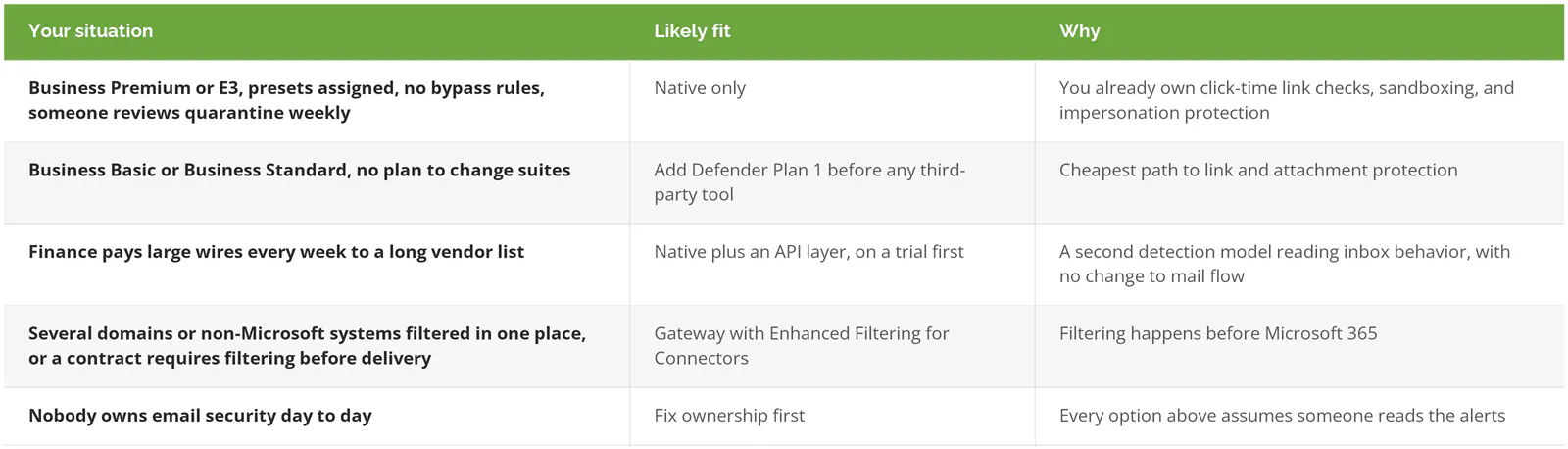
Skip the extra tool if you're on Business Premium or E3, Standard and Strict policies are assigned, your mail flow rules are clean, and a call-back rule covers payment changes. At that point a third-party layer is mostly a budget line. The same money buys more protection as a few hours a week of someone actually reviewing quarantine and user reports.
If a second layer does make sense, our ranking of email security tools compares 8 options, Defender included. Going the other way, and retiring a gateway you already have? Microsoft publishes a migration guide that covers tuning Defender before the MX record moves.
What to Fix Before You Buy Another Email Security Tool
None of this costs anything beyond what you already license for M365 email security. Work through it in roughly this order.
- Assign every user to the Standard preset security policy, and finance, executives, and IT admins to Strict. Presets update themselves when Microsoft changes its recommended settings, which custom policies don't.
- Run Configuration analyzer. It lists every setting that's weaker than Standard or Strict.
- Export your mail flow rules. Delete any that set spam confidence to -1 without a written reason. Same for IP allow entries.
- Tag the CFO, controller, and accounts payable staff as priority accounts, so their alerts are easy to filter. On Plan 2, the tag also turns on extra detection tuned to executives.
- Confirm automatic forwarding to outside addresses is blocked. A forwarding rule quietly copies every message to an outside address, which is exactly what an attacker wants after taking over a mailbox.
- Move DMARC to enforcement.
- Turn on the built-in Report button in Outlook and send reports to a mailbox someone checks daily. Then teach staff how to spot phishing so the button gets used.
- Put the call-back rule for payment changes in writing, with the controller's name on it.
For an outside yardstick, CISA publishes a secure configuration baseline for Defender, and its free ScubaGear tool checks a tenant against it automatically. It was written for federal agencies. The settings apply just as well to a distributor with 80 mailboxes.
The license tier gets the attention because it's on the invoice. The settings never show up anywhere a CFO looks. Pull the list of who's assigned to Standard and Strict, your mail flow rule export, and the last 30 days of user-reported messages. If those look clean and wire fraud still keeps you up at night, trial an API layer. If they don't look clean, a new vendor adds a second set of settings nobody's watching.
Consilien is a managed IT and cybersecurity provider that configures and runs Microsoft 365 email security for businesses nationwide as part of its managed IT service. Here's how managed Azure and Microsoft 365 support works. If you want someone to walk through your tenant with you, Speak to an Email Security Expert.