How Much Do Microsoft 365 Managed Services Cost in 2026?
Microsoft 365 managed services cost $100 to $250 per user per month as part of full managed IT, plus Microsoft's license at $7 to $60 per user. Tenant-only management, with no help desk or device work, costs far less.
Table of Contents
Business Premium is the one Microsoft 365 plan that didn't go up on July 1, 2026. It's still $22, while Standard went to $14, Basic to $7, E3 to $39, and E5 to $60.
Your IT invoice won't show any of it. Quotes for Microsoft 365 managed services tend to roll the Microsoft license and the provider's fee for running your tenant (the users, mailboxes, files, and security settings that make up your company's piece of Microsoft 365) into one line, and backup, security add-ons, and billing-term charges may or may not be inside it. For where this fits in a larger cloud setup, see cloud managed IT services for Azure and Microsoft 365. Below is the cost side only, from Microsoft list prices I checked on November 10, 2026, plus a sample budget that isn't a quote.
Key Takeaways
Full managed IT with Microsoft 365 inside it runs $100 to $250 per user per month, with the license (anywhere from $7 for Business Basic to $60 for E5) as a separate charge. Business Premium is now $8 over Standard and replaces about $18 of tools a Standard tenant buys separately, and paying an annual term by the month adds 5%. A 40-user business on Premium lands near $8,000 a month, or $200 a user.

What does Microsoft 365 managed services cost per user?
Budget $100 to $250 per user per month when Microsoft 365 is managed as part of full managed IT, with standard coverage landing near $150 to $200. Tenant-only management, where the provider runs the cloud side and someone else handles laptops and help desk calls, is a much smaller fee that rises with the amount of security work included.
It's the same band as our outsourced IT support cost per user guide. Tenant-only prices are a different story. Few US providers post them, and the best public reference I found is a February 2026 UK guide that puts basic Microsoft 365 support at "roughly £3-£8 per user per month," a mid tier with monitoring and backup at £8 to £18, and full managed service at £18 to £35 or more.

Licenses sit outside all three rows unless your provider says otherwise in writing.
What do Microsoft 365 licenses cost after the July 2026 increase?
Business Basic is $7 per user per month on an annual commitment, Business Standard is $14, and Business Premium is $22. Microsoft 365 E3 is $39 and E5 is $60. If you're an existing customer, you keep the old price until your first renewal after July 1, 2026.
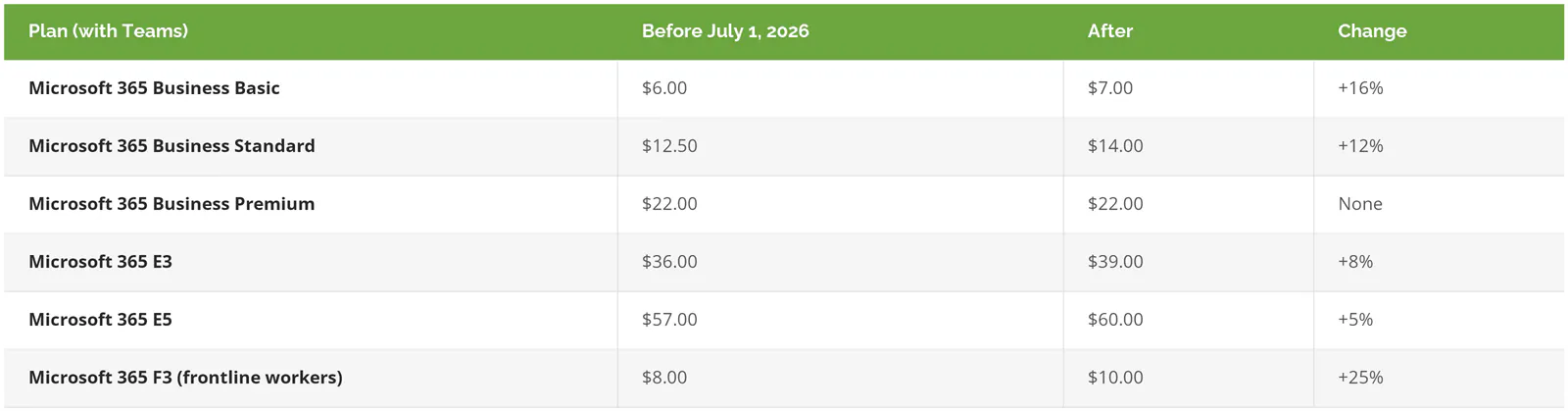
Those are from Microsoft's July 2026 pricing and packaging update, which says "Existing customers remain on current pricing until renewal." A spring renewal means the new price hasn't hit you yet. E3 got Defender for Office Plan 1 (Microsoft's email threat protection) and Intune Plan 2 in the same update, E5 got Microsoft Security Copilot, and Basic and Standard got "+50GB email" and "URL time-of-click protection," which checks a link when someone clicks it.
Copilot is extra. It needs a base license under it, the enterprise add-on is $30 per user per month, and the permission cleanup tends to cost more than the seats, since Copilot answers from whatever files a user can already reach (our post on Copilot security and governance covers that work).
Why Business Premium can lower the total bill
Business Premium includes Intune (the system that lets IT manage, lock, and wipe company laptops and phones remotely), Entra ID P1 (the identity layer behind conditional access, meaning rules about who can sign in from where and on what device), and Defender for Business (endpoint protection). Bought on their own at list, those run roughly $8, $7 after Entra's own July increase, and $3 per user, about $18 together, against an $8 gap between Standard and Premium. A business on Standard that pays for even two of them separately, or pays a provider for third-party tools that do the same jobs, is spending more for less coverage.
So start from your current invoice. Write down what you pay per user for device management, endpoint protection, and sign-in controls, from anyone. Compare that to $8.
The controls aren't abstract either. Conditional access policies are what keep a stolen password from turning into a stolen mailbox, and the FBI's 2025 Internet Crime Report counted $3,046,598,558 in reported business email compromise losses, the scam where a criminal takes over or imitates a mailbox to redirect a payment.
There's a ceiling, though. Microsoft positions Premium "for businesses with up to 300 users" on its Business Premium documentation, and past that point the comparison moves to E3, which now carries Defender for Office and Intune Plan 2 at $39.
What does a Microsoft 365 management fee cover, and what doesn't it?
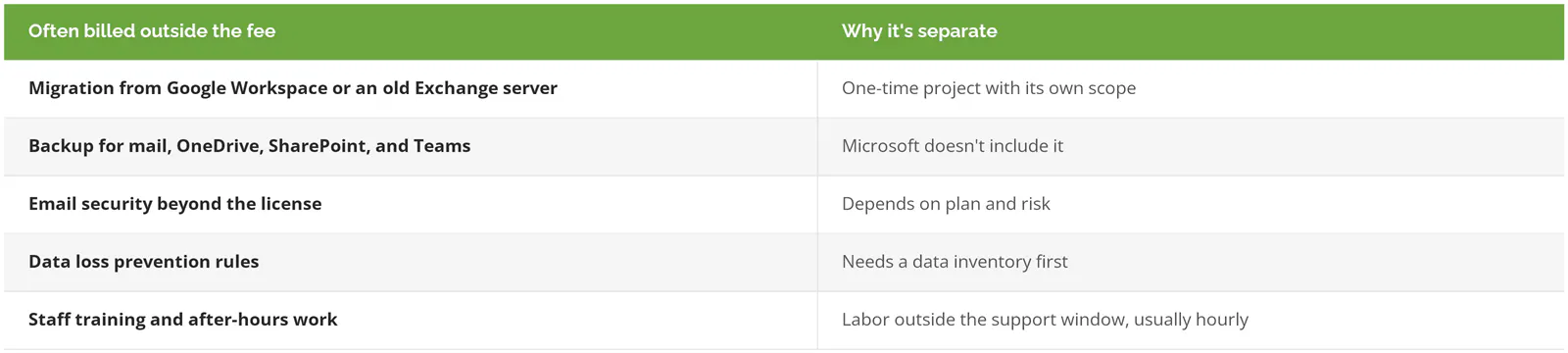
A management fee normally covers user changes, license assignment, mailbox and Teams settings, security policy upkeep, and alert handling. It normally leaves out migrations, backup, after-hours project work, training, and Copilot rollouts, which get quoted as their own lines.
The exclusions deserve more attention than the inclusions, because Microsoft draws the same line. Its shared responsibility documentation says that "for all cloud deployment types, you own your data and identities," and it spells out that you're responsible for "managing user accounts, including creating, managing, and removing user access" and for access controls including "multifactor authentication, and conditional access policies." Microsoft keeps the service running, but whether you can restore the finance folder someone deleted four months ago depends on decisions made on your side of that line.
Migrations have their own market (our list of Microsoft 365 migration services covers who does that work), email protection beyond the license is walked through in Microsoft 365 email security, and data loss prevention, the rules that stop a spreadsheet of Social Security numbers from leaving by email, is in what Microsoft's DLP covers.
The line items that don't show up in the per-user quote
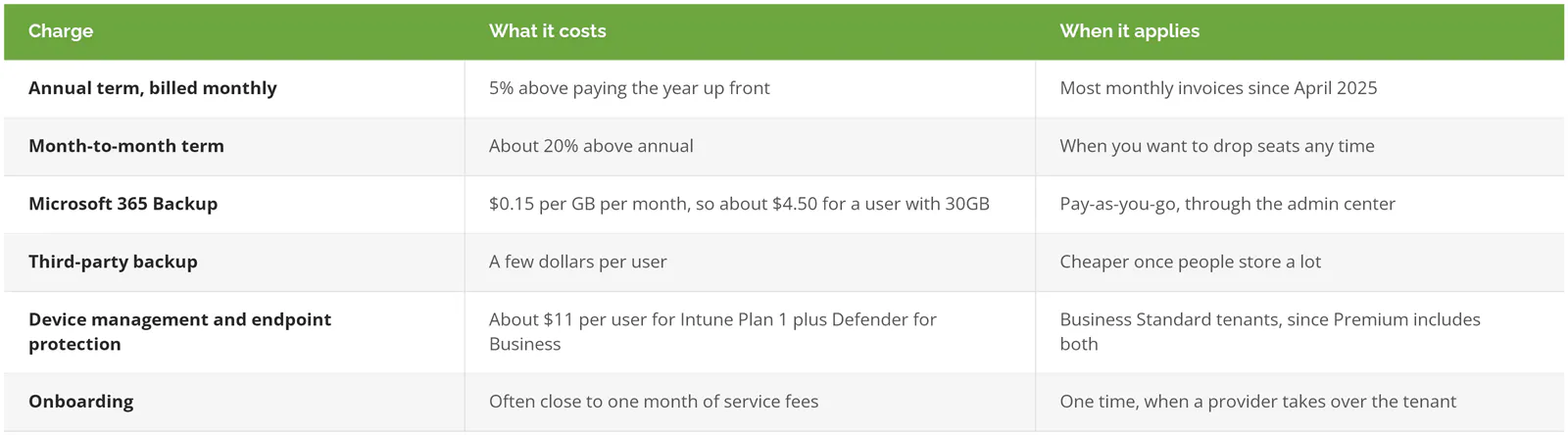
Six charges usually sit outside the per-user number. Microsoft has priced annual subscriptions paid monthly 5% above the same subscription paid up front since April 1, 2025, which a Microsoft community manager confirmed for new commerce subscriptions in this Microsoft Tech Community thread, and Microsoft calls its own Microsoft 365 Backup "a pay-as-you-go consumption-based service" at "$0.15/GiB/month of protected content."
Worked example: a 40-user business, three ways
This is a hypothetical 40-person business, not a Consilien quote. It uses Microsoft list prices from November 2026, a $175 per-user managed IT fee (the middle of the national range), and third-party backup at $3 per user.
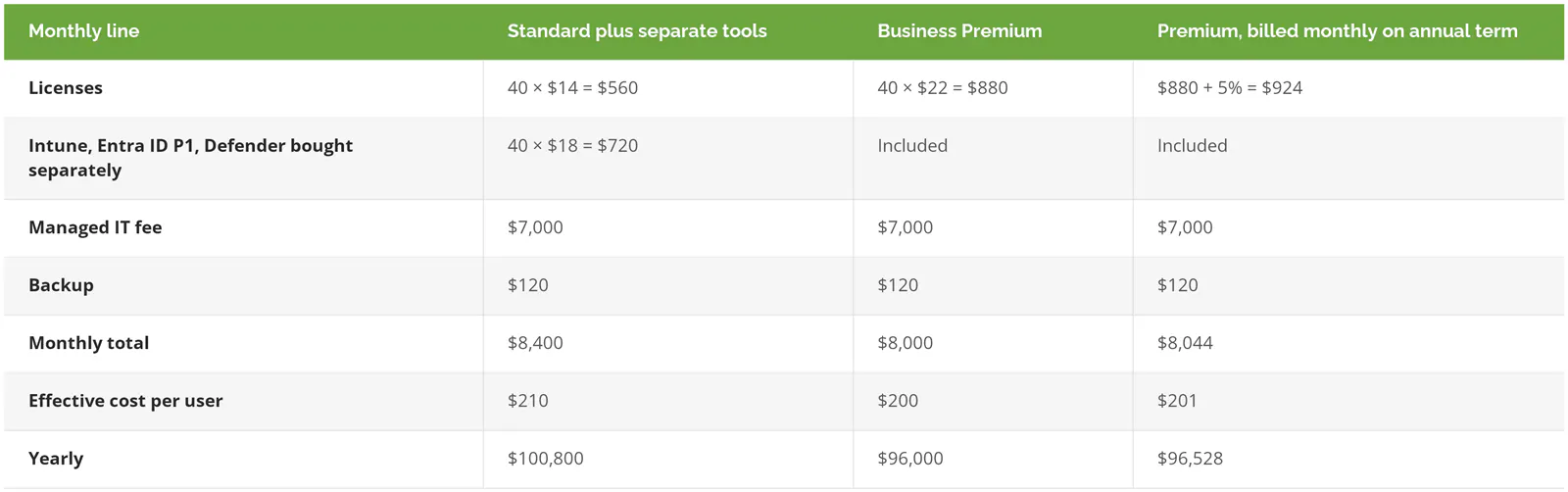
Premium wins by $400 a month, or $4,800 a year, on the plan with the higher sticker price. And the managed IT fee is 87.5% of the Premium total. The licenses get the argument, but they're the small number.
Are you paying to manage licenses nobody uses?
Probably some. CoreView's license analysis, drawn from more than five million users, found 40% of Microsoft 365 licenses were unassigned, inactive, or larger than the person needed, and since CoreView sells license management software, treat that as the high end.
The waste lands twice, because plenty of providers count "users" by licensed mailboxes. If 4 of your 40 seats belong to people who left in the spring, that's $88 a month in Premium licenses plus, at $175 per licensed user, another $700 a month in management fees for accounts nobody signs into.
Checking takes ten minutes. In the Microsoft 365 admin center, the active users report lists each account's last sign-in, and anything older than 30 days is worth a question. Shared mailboxes don't need a license for most uses, which surprises the people paying for them.
Is in-house Microsoft 365 administration cheaper than a managed service?

Below a few hundred users, rarely. The BLS median for network and computer systems administrators was $99,130 in May 2025. Wages are 70% of private-sector employee compensation, so the loaded cost is about $141,600, and that's before the admin has any tools.
For comparison, the 40-user Premium budget above is $96,000 a year, and it buys help desk, devices, and the tenant. One hire buys one person's 2,080 working hours a year, minus vacation.
Skip full managed IT if you already employ a capable IT generalist who handles laptops and new hires. A narrow tenant tier, or a co-managed setup where your person keeps the daily work and an outside team owns security policy, costs far less than paying $175 a user for help desk coverage you already staff. Our comparison of in-house versus outsourced IT costs runs that math in more detail.
What to ask before you sign a Microsoft 365 management quote
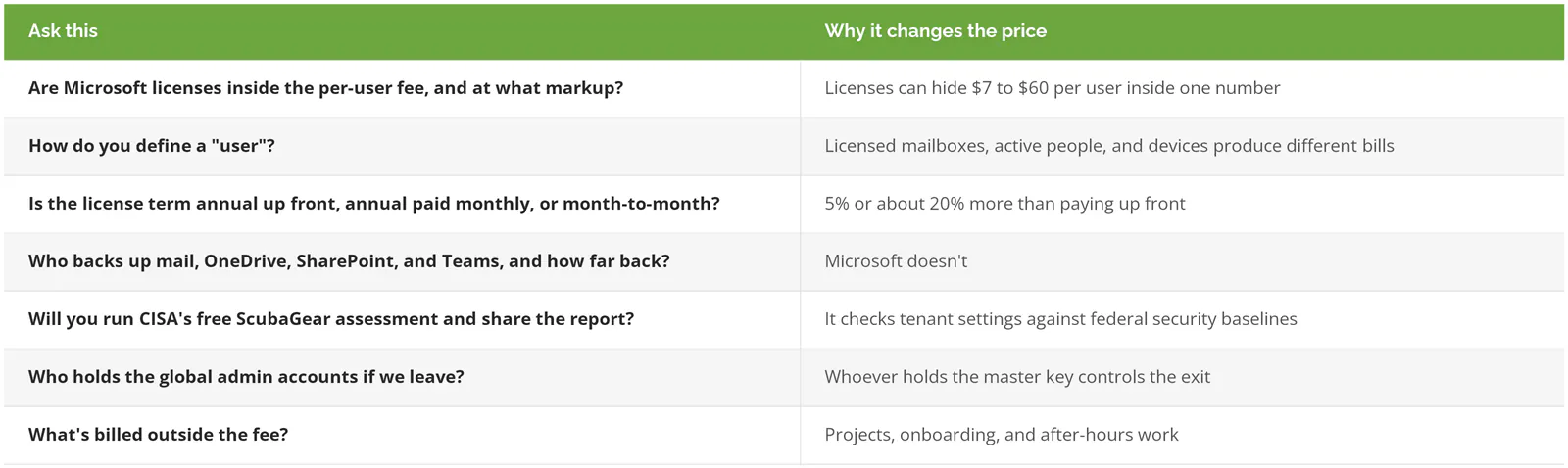
Seven questions settle most quotes, and the answers belong in the contract rather than the sales email. The fifth refers to CISA's free ScubaGear assessment, a tool that checks a tenant's settings against the federal government's Microsoft 365 security baselines.
Consilien is a managed IT and cybersecurity provider that serves businesses nationwide, and as a Microsoft Cloud Solution Provider it resells and manages Microsoft 365 licenses alongside the service itself. If you'd like a second read on a quote you already have, speak to a Microsoft 365 expert and bring the license list.