Onsite vs Remote IT Support in Los Angeles: What Each Covers
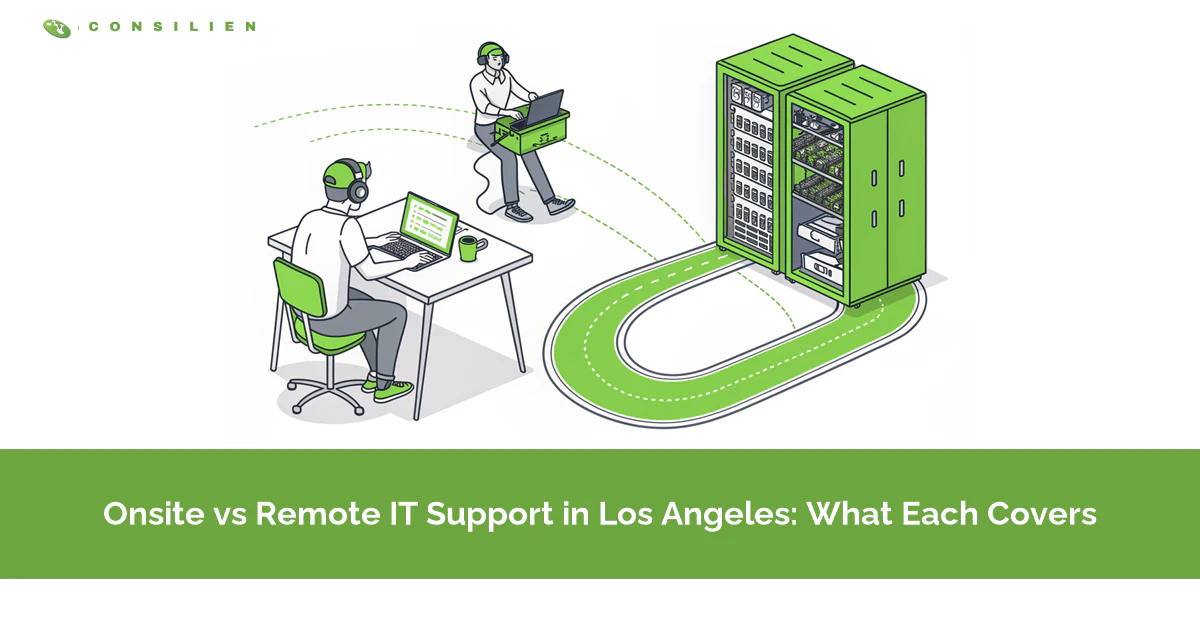
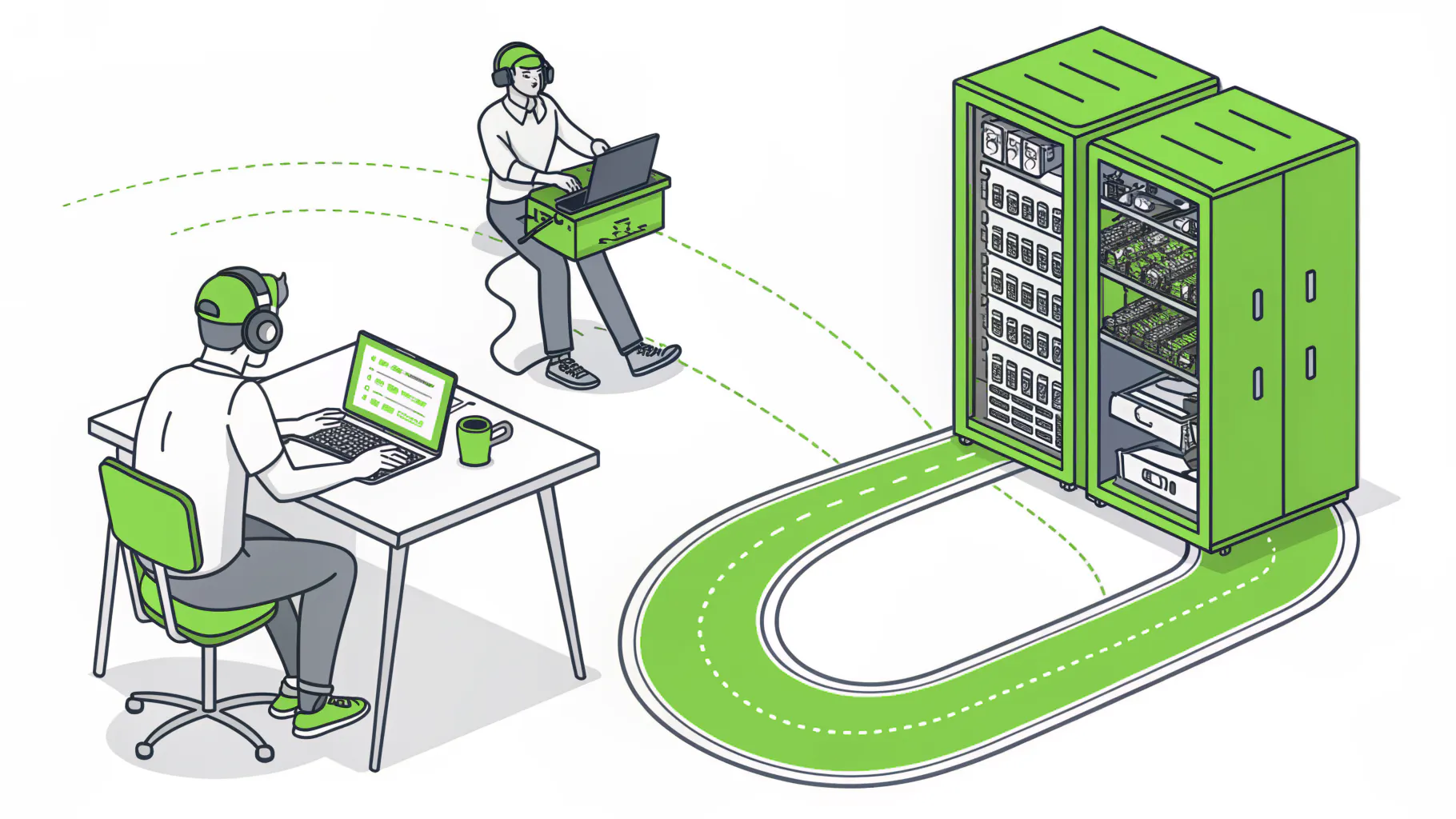
Remote IT support covers software, accounts, email, security alerts, and most network problems, usually within minutes. Onsite support covers what needs hands: dead hardware, cabling, printers, new desks, and office moves. Los Angeles businesses usually need both, written into one contract.
Table of Contents
INRIX's 2025 Global Traffic Scorecard, released December 1, 2025, lists the most congested U.S. cities as Chicago (112 hours), New York City (102), Philadelphia (101), and "Los Angeles (87 hours)," which is the number I'd keep in mind when an IT provider promises to "send someone out." A technician who spends an hour on the 405 to reset a password is an hour of your money spent in a car, and a technician who can't reach a failed firewall in Burbank until after lunch is a different and more expensive problem. Choosing an IT support provider in Los Angeles mostly comes down to knowing which of those two problems you have, and how often.
The first contact settles most tickets anyway. MetricNet data cited by ScreenMeet puts "the average First Contact Resolution rate for IT service desks" at "approximately 70% to 75%," and says "high-performing desks reach 85% and above," and that first contact is a call, a chat, or a remote session, so nobody drove anywhere.
Key Takeaways: Remote support handles the everyday work, from locked accounts and Outlook trouble to patching and security alerts, and a good help desk resolves roughly 70% to 85% of tickets on first contact. Onsite visits are for hardware, network closets, printers, new workstations, and moves. Ask how onsite work is billed before you sign, because travel is where surprise charges hide, and treat the remote access tool itself as a security decision.
What does remote IT support actually cover?
Remote support covers anything a technician can fix through your network or the cloud, including passwords and account lockouts, Microsoft 365 and email problems, software installs and updates, slow computers, security alerts, backups, and most firewall and Wi-Fi settings. It starts in minutes because nobody has to drive.
The tool behind most of it is remote monitoring and management software, usually shortened to RMM, a small program on each computer and server that lets the help desk see the machine's health and take over the screen when someone calls. CISA's Guide to Securing Remote Access Software, published June 6, 2023 with the NSA and FBI, says this software lets help desks and providers handle "gathering data on network and device health, automating maintenance, PC setup and configuration, remote recovery and backup, and patch management." Microsoft's monthly Windows security fixes, released on Patch Tuesday, go out overnight that way to every machine at once, including the laptop in someone's kitchen in Silver Lake.
Who answers matters as much as the tool. HappySignals' Global IT Benchmark 2026, published May 2026, found "outsourced first-line service desks resolve 60% of incidents on first contact, compared with 44% for internal desks." Remote support has one hard limit, though. It needs a working connection to the device, so when the internet circuit drops, the switch dies, or a laptop won't power on, the remote tools go dark with it.
Is remote access a security risk?
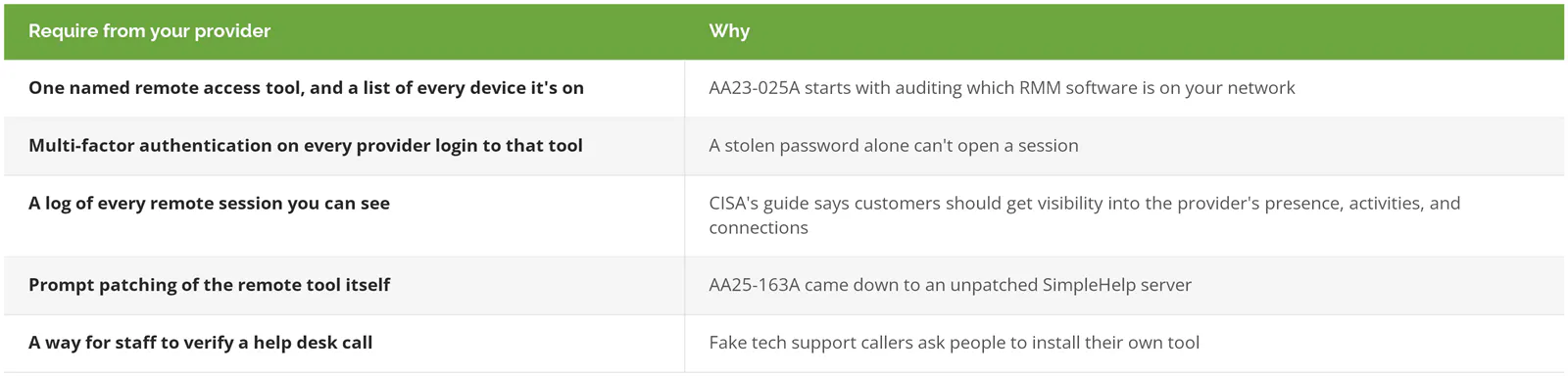
It can be. The software that lets your help desk fix a laptop from across town will let an attacker do the same, so treat the remote access tool as part of your security setup. Know which tool your provider uses, who can log in to it, and whether every session is recorded.
In January 2023, CISA and the NSA issued a joint advisory, AA23-025A, on criminals using legitimate RMM software against federal agencies, and told organizations to "audit remote access tools on your network to identify currently used and/or authorized RMM software." In June 2025, advisory AA25-163A described ransomware actors using an unpatched copy of SimpleHelp, a remote support tool, "to compromise customers of a utility billing software provider." One weak remote tool at a provider became a door into its customers.
Then there's the fake help desk. The FBI's 2025 IC3 Annual Report logged 47,794 tech support scam complaints with $2,134,675,818 in reported losses, the third largest loss category after investment fraud and business email compromise. Many of those scams start with someone talking an employee into installing a remote access app. If your staff know exactly which tool your real IT provider uses, a caller asking them to install something else stands out.
Which jobs still need a technician in the room?
A technician needs to be onsite when the problem is physical or when the remote connection is the thing that broke. That means failed hardware, network closets, cabling, printers and scanners, conference room equipment, new workstations, office moves, and a full internet outage.
How often that happens depends on how much equipment sits in the building. Fixify's 2026 IT Help Desk Benchmark Report analyzed more than 50,000 tickets from 30-plus organizations over 14 months, and "a greater proportion of tickets in larger companies concerned hardware problems, too," Computerworld noted in its coverage of the study. An office that runs on laptops and Microsoft 365 might need a technician a few times a year, while one with a file server, plotters, a phone system, and a room full of video equipment can need someone every week or two.
We covered the response-time side of this, what a fair arrival window looks like and how to read the contract clock, in our post on IT support in Pasadena. The same rules apply anywhere in the county.
Which IT tasks are remote, which are onsite, and which cost extra?
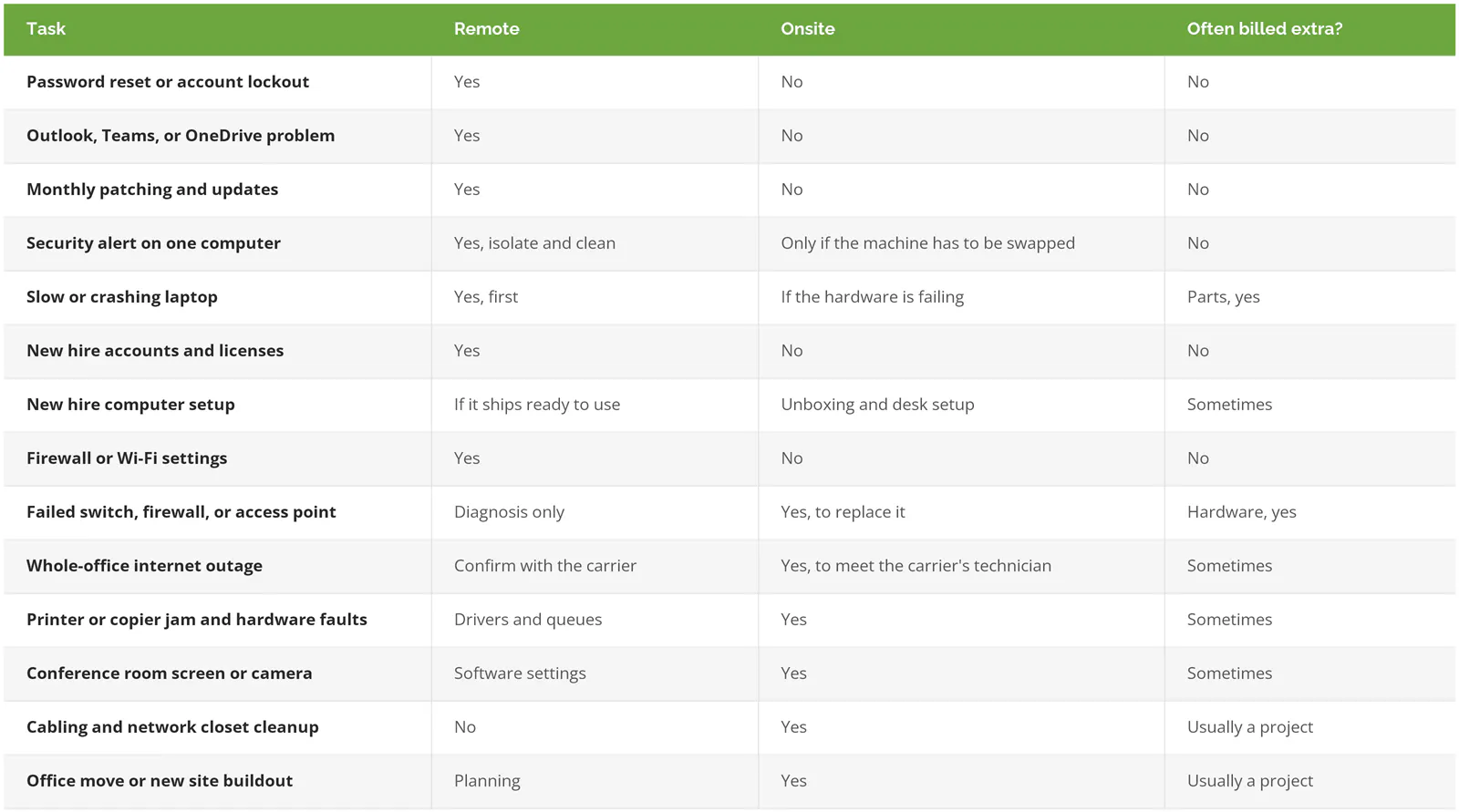
Software, accounts, patching, and security alerts are remote work and almost never cost extra under a managed plan. Hardware swaps, cabling, printers, and moves are onsite work, and that's where parts, project fees, and travel charges show up on the invoice.
How is onsite work billed in a managed IT contract?
Onsite work gets billed four common ways: included in the monthly fee for routine fixes, a flat trip charge per visit, actual time and mileage, or a prepaid block of hours. Projects such as moves and cabling are almost always quoted separately, whichever model you're on.
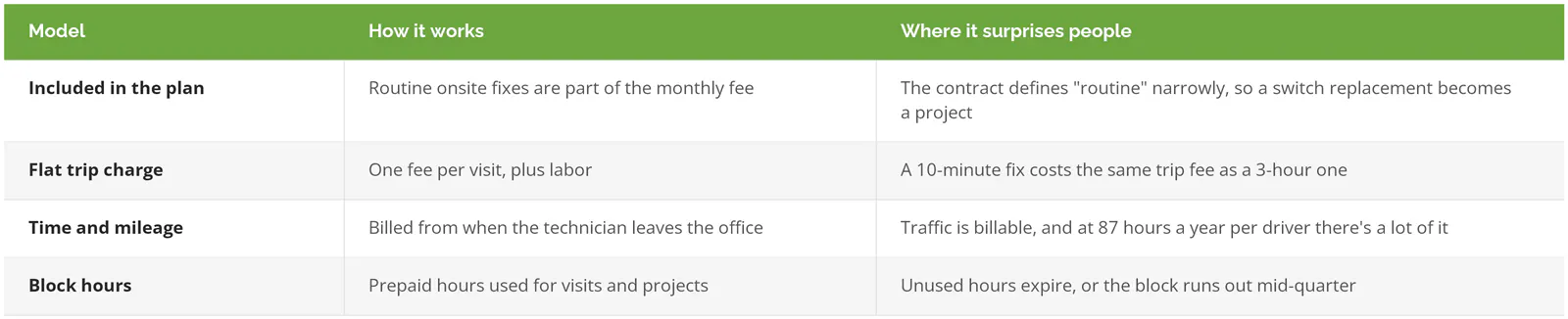
Traffic is the reason the time-and-mileage model exists. In a 2018 post for MSPs on N-able's blog, Eric Anthony, then at SolarWinds MSP, weighed a "standard trip charge" against "billing for actual time or mileage" and wrote that "my preference is to charge for time, because traffic can be a big factor," which is an honest answer from the provider side and the most expensive one for a Los Angeles customer, since a run from Torrance to the San Fernando Valley at 4 p.m. can take longer than the repair.
Public-sector buyers pin this down in writing. On August 21, 2026, the City of Isle of Palms, South Carolina answered a bidder on its managed IT contract who asked "whether unlimited help desk support includes unlimited onsite labor and travel," and Addendum 7 to RFP 2026.09 says "routine onsite labor and ordinary travel necessary to troubleshoot or resolve an issue that is otherwise within the Base Monthly Support scope should be included in the base monthly fee and should not be separately billed solely because onsite service is required." The same answer leaves projects, migrations, and extended emergency work to be priced separately, which is a fair split for any Los Angeles agreement.
Price ranges for all of this are in our Los Angeles managed IT pricing guide.
Does Los Angeles geography change the answer?
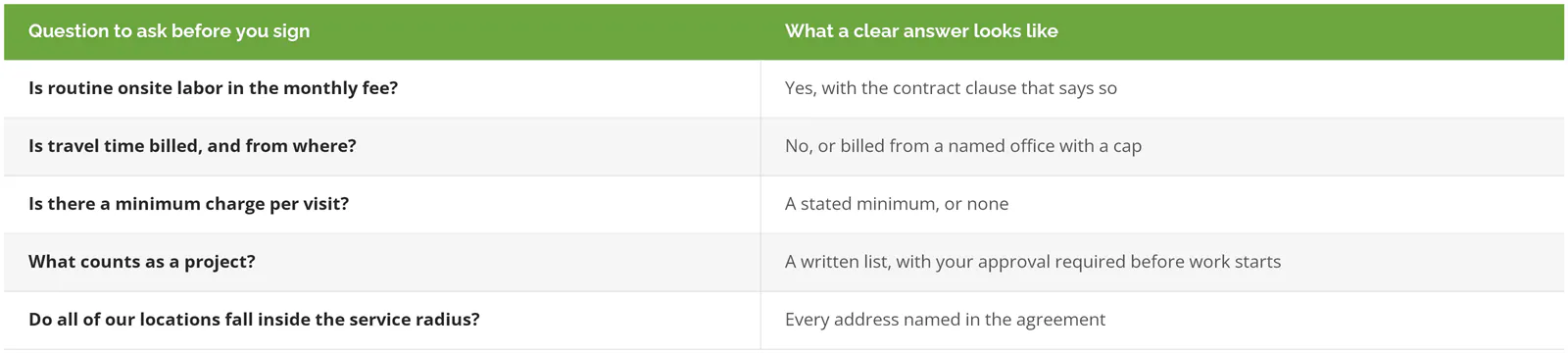
Yes. Los Angeles County covers about 4,058 square miles of land, per the Census Bureau, and at 87 hours a year lost per driver, a routine visit costs more time here than in a compact city, which pushes more work toward remote support. A contract that says "onsite within 4 hours" applies only to the addresses written into it, so list every office, warehouse, and branch by name.
Consilien's office is at 21250 Hawthorne Boulevard in Torrance, so for a client in Santa Clarita, "onsite" means a long drive north on the 405 and the 5, and the contract should give a real arrival window for that address. Our older piece on local IT support or remote outsourcing in Torrance covers the case for a provider down the street.
When is remote-only IT support enough?
If your business runs on laptops and Microsoft 365, your internet provider manages the router, and there's no server, phone system, or network closet to look after, remote-only support plus an hourly rate for the rare visit will usually cost less than a plan built around onsite coverage you'd barely use. A 12-person consultancy that works mostly from home is a good example. Add a server, a warehouse, or a front desk that can't open without the network, and the math changes.
How does a Consilien ticket move from remote to onsite?
Remote first. Consilien's IC24 managed IT plan pairs 24/7/365 monitoring and remediation with help desk services and local team support, and our co-managed IT service lists "same-day on-site support where available," which is exactly the kind of phrase to turn into a named arrival window for each of your addresses. Human Touch, a consumer products company in Long Beach, described a March 2025 ticket in its review on Consilien's Clutch profile that got a ticket number within 3 minutes, a live technician on the phone within 15, and a fix in under 15 minutes after that, with nobody driving anywhere. You can see how that support is scoped on our IT support services page, and the providers we compete with are ranked in our list of the best managed IT services in Los Angeles.
If you're not sure which of your sites your current contract actually covers onsite, speak to a Los Angeles IT expert and bring the agreement along.