Ransomware Recovery Playbook: The First 72 Hours
A ransomware recovery plan is the set of decisions, owners, and steps that take your business from the moment ransomware is found to clean, running systems. The first 72 hours decide how long the rest takes.
Table of Contents
Those 72 hours aren't mostly technical work. They're a string of decisions made by people who haven't slept: what to unplug, who to call first, whether the backups can be trusted, whether to pay. Companies that settled those questions in advance spend the window executing. Everyone else spends it in a conference room arguing about who's allowed to shut off the ERP (the system that runs orders, inventory, and billing). CISA's response checklist and NIST's incident response guidance put those decisions in roughly the same order, and it's the order Consilien's ransomware protection and recovery services are built around.
Recovery is getting faster for the companies that prepare. In the Sophos State of Ransomware 2025 survey of 3,400 IT and security leaders, 53% fully recovered within a week, up from 35% the year before. The gap between the fast half and the slow half rarely comes down to software. It comes down to what was decided before hour zero.
What Does a Ransomware Recovery Plan Actually Need to Answer?
A ransomware recovery plan answers four questions before an attack happens. Who can take systems offline, who gets called first, how you'll prove a backup is clean, and which systems come back in what order.
It's narrower than an incident response plan, which covers every kind of security event, and wider than a backup plan, which only covers copies of data. NIST's SP 800-61 Rev. 3, finalized in April 2025, ties incident response to the CSF 2.0 functions instead of treating it as a standalone IT procedure. Our breakdown of the NIST incident response lifecycle covers the framework side.
Restoring files is the part everyone pictures. Recovery is bigger. It means proving the attacker is gone, rebuilding the accounts they used, and bringing systems back in an order that matches how the business makes money. A company that restores its file server before resetting the admin passwords the attacker stole hasn't recovered. It has restored the attacker too.
A plan also doesn't make the disruption disappear. When Data I/O, a semiconductor programming manufacturer in Redmond, found ransomware in August 2025, it activated its incident response plan, took systems offline, and brought in outside experts. Shipping, receiving, and manufacturing still stopped, and systems came back over a period of weeks. We walked through that timeline in what happens when ransomware hits an electronics manufacturer. The plan didn't prevent the outage.
Hours 0 to 4: How Do You Contain Ransomware Without Destroying the Evidence?
Cut the attacker's reach without wiping or powering off anything. Disconnect affected machines from the network, shut down remote access, and preserve memory and logs, since that evidence later tells you whether data was stolen.
- Isolate at the network, not the power button. CISA's ransomware response checklist says to take networks offline at the switch level when many systems are hit, or unplug a single machine's cable and drop it off Wi-Fi. Power a device down only "if you are unable to disconnect them from the network." A running machine holds memory that investigators need. Turning it off erases it.
- Close the doors. VPN, remote desktop tools, single sign-on (the one login that opens many apps), and anything facing the internet. CISA lists every one of them.
- Get off your own systems to talk. CISA recommends out-of-band communication, such as phone calls, so the attacker doesn't see the response coming. If they're in your email, they're reading your incident thread. A printed sheet of personal cell numbers feels old-fashioned right up until email is the thing that's down.
- Photograph the ransom note. Don't reply to it.
- Start a written log. Time, person, action, system touched. Your insurer, your investigators, and your lawyers will all ask for it, and nobody remembers hour two accurately by hour forty.
What nobody does in this window matters just as much. No wiping a server. No reinstalling Windows. No restoring from backup. Each of those feels productive, and each one destroys evidence or rebuilds onto a network the attacker may still control.
One name has to be decided long before any of this. Whoever makes the isolation call at 2 a.m. needs the authority to take the ERP offline without first reaching the CFO. If that person doesn't exist on paper, the first hour gets spent looking for permission.
Hours 4 to 24: Who Do You Call After a Ransomware Attack, and in What Order?
Call your cyber insurance carrier and an incident response firm before anyone starts recovery work, then breach counsel, then federal law enforcement. Order matters, because many policies only pay for responders the carrier approves.
The carrier's claims hotline usually routes you to a panel of pre-approved forensics firms, negotiators, and lawyers, and if you hire your own forensics firm before making that call, you may end up paying for the investigation out of your own pocket. Breach counsel, a lawyer who specializes in incident notification, figures out what you're legally required to tell customers, regulators, and business partners, and on what clock. Then law enforcement. CISA's checklist tells victims to consult federal law enforcement about available decryptors and to report the incident to CISA, the local FBI field office, the FBI's Internet Crime Complaint Center (IC3), or the Secret Service.
While those calls happen, the technical team is scoping. Two questions outrank the rest.
Did data leave? Encryption is only half the playbook for modern ransomware crews. In Sophos's 2025 data, 28% of organizations that had data encrypted also had it stolen, which sets up a second demand to keep the data off a leak site. Whether files left the building decides your notification obligations, and the only way to answer it is the evidence you preserved in hour one.
Are the backups intact? Attackers go after backups on purpose. In a Sophos study of 2,974 ransomware victims, 94% said the attackers tried to compromise their backups, and 57% of those attempts succeeded. Assume nothing about the backup console until someone has checked it from a clean machine.
Who Decides What in the First 72 Hours
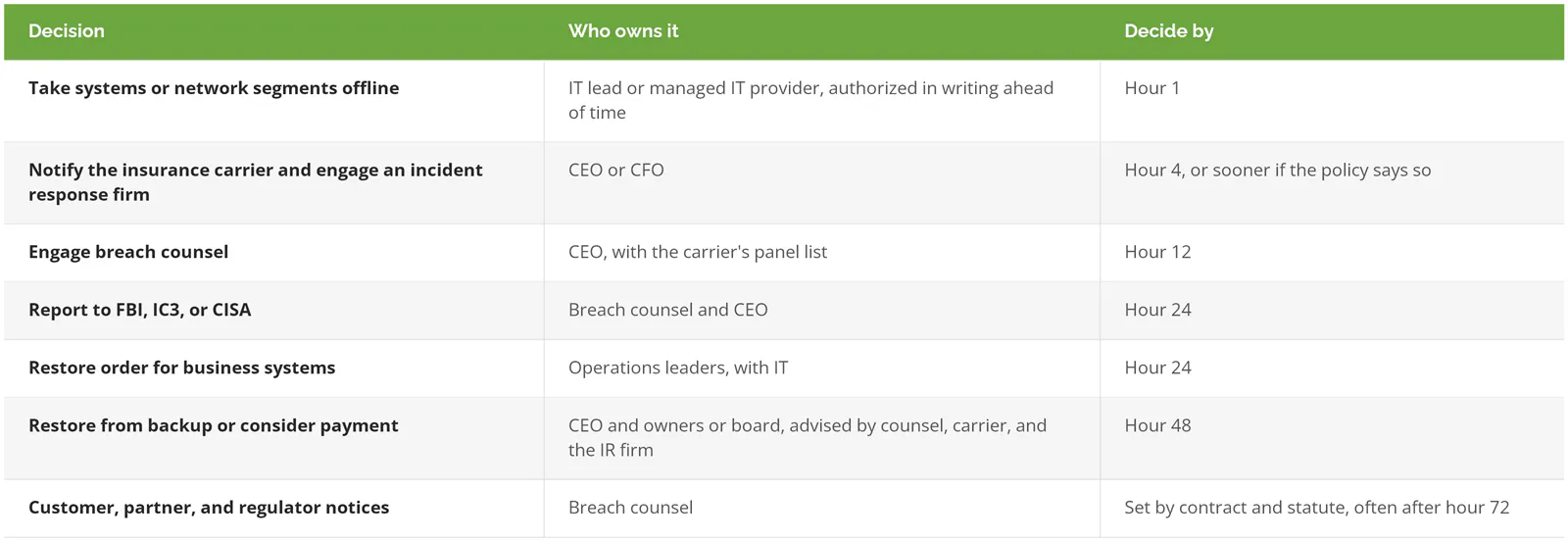
The deadlines are ours, not a regulation's. They're there so no decision drifts into day four because nobody owned it.
Hours 24 to 48: Should You Restore From Backup or Pay the Ransom?
Restore from backup whenever the backups are intact and clean. Paying is a last resort for when they aren't, and it carries sanctions risk, no guarantee the decryption works, and a recovery bill that arrives either way.
Sophos's 2025 numbers show how often companies end up on the wrong side of that choice. Only 54% of victims used backups to restore encrypted data, the lowest rate in six years, and 49% paid. The median payment was $1M. Mean recovery cost, excluding the ransom, was $1.53M. Paying doesn't replace the recovery bill. It sits on top of it.
And the backups decide more than anything else. In the Sophos backup study, organizations whose backups were compromised were almost twice as likely to pay (67% vs. 36%), and their median recovery cost was $3M against $375K for companies whose backups survived. That's 8 times the cost, driven by a decision made months or years before the attack. The payment question at hour 36 is really a backup question you answered when you picked a backup design.
Then there's the legal exposure. The Treasury Department's Office of Foreign Assets Control (OFAC) says in its ransomware advisory that it "strongly discourages all private companies and citizens from paying ransom or extortion demands." OFAC can impose civil penalties on a strict liability basis. A company can be liable for paying a sanctioned group even if it had no idea who was on the other end. OFAC treats steps like offline backups and an incident response plan as a significant mitigating factor if enforcement ever comes up.
Payment belongs in the conversation only when all of these are true:
- The backups are gone, encrypted, or can't be proven clean.
- The data can't be rebuilt from other sources, and losing it threatens the business itself.
- Counsel has run sanctions screening on the threat actor, and the carrier is involved.
If you run entirely on Microsoft 365 and SaaS apps with no servers of your own, much of this section shrinks for you. Your exposure looks more like account takeover and deleted cloud data, and recovery runs through each vendor's retention settings and your own SaaS backup.
Hours 48 to 72: What Gets Restored First?
Identity comes first. Reset the credentials the attacker could have used and confirm the backup is clean before you restore a single business system, then bring systems back in the order the business needs them.
Start with the accounts. CISA's checklist calls for resetting all passwords on affected systems once the environment is clean. In practice that means every admin account, every service account (the non-human logins that apps use to talk to each other), and a fresh enrollment in multi-factor authentication (MFA, the second login step like a phone prompt) for anyone whose phone or authenticator might have been exposed. If you run Active Directory, the directory that controls who can log into what on a Windows network, Microsoft's forest recovery guide has you reset the krbtgt account, the key that signs every login ticket. You reset it twice, at least 10 hours apart. Skip it and a stolen ticket can keep working after everyone's passwords change.
Next, prove a backup is clean before you trust it. Attackers get in well before they encrypt anything, which is why CISA tells responders to hunt for precursor malware like QakBot and Emotet, the tools that open the door. The newest backup might hold their foothold. Restore one priority system into an isolated network, scan it, check it against what the investigators found, and only then restore the rest from the same point in time. CISA also recommends rebuilding systems from standard, known-good images instead of cleaning infected ones.
Then restore in business order:
- Identity and security tooling, including EDR (endpoint detection and response, the monitoring agent on each machine), so you can see if the attacker tries again.
- Core network and firewall rules, rebuilt with the attacker's paths closed.
- The system that makes money. Order entry, the ERP, production scheduling, the practice management database.
- Email, file shares, and everything else.
Operations leaders should own that list, not IT, because an IT team left to its own judgment will restore email first while everyone's yelling about email, even though the business can live without email for a day far more easily than it can live without orders. The loading dock can't ship without order entry.
What Won't Be Finished at Hour 72?
Full recovery, usually. Sophos found that 16% of victims were fully recovered within a day and 53% within a week, and 97% were back within three months. Companies with compromised backups lag well behind, with 26% recovered inside a week against 46% for those whose backups held up.
Notifications run on their own clocks, too. State breach laws kick in if personal data was taken, customer contracts often carry their own notice windows, and defense contractors handling controlled information have to report to the Department of Defense within 72 hours of discovery under DFARS 252.204-7012. Counsel tracks those. The bill keeps arriving for months, and the real cost of a ransomware attack goes well past the ransom line.
The last piece is the one companies skip once the systems are up. NIST's Rev. 3 treats lessons learned as part of the whole cycle, not a closing meeting held once the systems are back and everyone would rather forget the week, which is exactly when it gets skipped. How did they get in, why wasn't it caught sooner, and which decision took longest? The answers become the next version of the plan.
Which Ransomware Recovery Decisions Should You Make Before an Attack?
Every decision in the table above can be made now, in daylight, by people who've slept. Write down the names, the phone numbers, and the thresholds, and test the parts that can be tested.
- The person who can take systems offline without approval, plus a backup for when they're on a plane.
- Your carrier's claims hotline, policy number, notification window, and approved responder list, printed and stored somewhere that isn't your file server.
- A breach counsel you've already spoken to once.
- Offline or immutable backups (copies nobody can alter or delete, not even an admin) for every system on the restore list, with a restore actually tested this year. Our guide to disaster recovery testing covers how.
- A restore order signed off by operations.
- A written position on ransom payment, decided before anyone's under pressure.
If your team already has an incident response plan, check it against that list. Plenty of plans cover malware in general and go quiet on backups, payment, and restore order, the three places ransomware actually hurts. Our piece on why you need an incident response plan covers the wider document.
With a full-time security team, a tested disaster recovery (DR) site, and a retained IR firm, you've likely got this covered already. Consilien works with businesses that don't. We set up the offline backups through our backup and disaster recovery service, monitor for the early signs of an attack, and write the recovery plan with real names and phone numbers in it. If yours still has blanks, speak to a ransomware recovery expert.