Should You switch from google (g suite) to Microsoft 365?
If your company is growing and you need tighter security, better scalability, and more operational control, Microsoft 365 is often the stronger long-term platform. Businesses dealing with file sprawl, inconsistent permissions, onboarding gaps, or rising compliance pressure usually benefit from switching. But this isn’t just a data copy project. Identity, shared drives, integrations, and user adoption should be planned carefully to avoid disruption.
For growing organizations, this decision is less about features and more about risk tolerance.
Table of Contents
AI Considerations: Copilot vs Gemini
AI is now part of the platform decision. But it shouldn’t be the only reason you switch.
Microsoft 365 Copilot is deeply integrated into Outlook, Teams, Excel, Word, and SharePoint. It works best when your files, permissions, and Teams structure are clean and intentional. If your environment is well organized, Copilot can surface insights across meetings, email, and documents in a powerful way.
Google Gemini integrates tightly with Gmail, Docs, Sheets, and Meet. It performs well in document-centric, browser-first environments where collaboration lives primarily in Docs and Drive.
The real issue is governance. AI reflects your data structure. If your permissions are messy or files are scattered, both platforms will amplify confusion.
Executive takeaway: AI rewards structure. If you’re switching platforms for AI, make sure you’re also ready to fix governance.
Who Should Switch to Microsoft 365
If your company is growing and facing more security reviews, compliance requirements, or operational complexity, Microsoft 365 tends to offer stronger long term structure. It provides deeper identity control, richer auditing, and more mature governance as complexity increases.
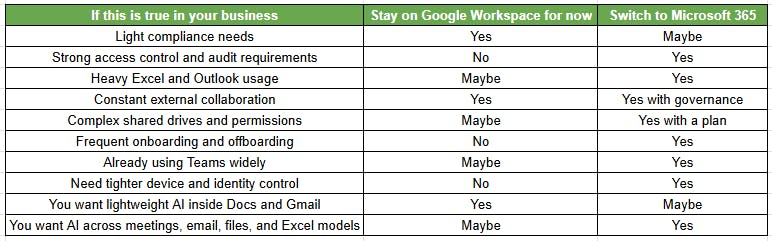
You Should Seriously Consider Switching If
- You need consistent MFA and conditional access policies
- Customer or vendor security reviews are increasing
- You’re preparing for SOC 2, HIPAA, or similar compliance
- You struggle with file ownership and Drive sprawl
- Onboarding and offboarding create risk
- Your teams rely heavily on Excel, Outlook, and Teams
- You’re integrating systems after an acquisition
You Probably Shouldn’t Switch Yet If
- Your workflows are deeply tied to Google native add ons
- Your team can’t absorb change right now
- You’re unwilling to clean up file ownership and structure
- You don’t have an internal owner for adoption
Switching platforms introduces change. If the business isn’t ready, even the best migration will feel disruptive.
Microsoft 365 Switch Readiness Scorecard
Answer yes or no to each question:
- Are security reviews increasing from customers or partners?
- Do you struggle to track who has access to sensitive files?
- Is onboarding and offboarding inconsistent?
- Do you rely heavily on Excel models or Outlook workflows?
- Are shared drives disorganized or hard to audit?
- Do you need stronger device and identity controls?
- Are you planning growth, acquisition, or restructuring?
- Do you need clearer retention and audit policies?
If you answered yes to 5 or more: You likely need the stronger governance model Microsoft 365 provides.
If you answered yes to 2 to 4: You may benefit from tightening controls first, then evaluating a structured migration.
If you answered yes to 0 to 1: You may not need to switch platforms yet.
Why Companies Leave Google Workspace as They Grow
Security and Identity Maturity
As companies grow, access control becomes harder. You move from a small team with shared trust to multiple departments, contractors, and external vendors.
Microsoft 365, especially with Business Premium or E3 level licensing, provides stronger identity controls through Microsoft Entra ID, conditional access, and deeper audit logs. For companies under regular security review, that maturity makes a difference.
Compliance and Governance
Retention policies, eDiscovery, and centralized auditing become important when:
- You handle regulated data
- Customers ask for proof of controls
- You respond to legal or HR matters
Google can support compliance. But many growing firms find Microsoft’s governance model aligns better with structured compliance programs.
Standardization Across Devices
If most of your company runs Windows PCs, Outlook, and Excel, Microsoft 365 often reduces friction. Integration across desktop apps, Teams, and SharePoint becomes more seamless at scale.
The Hidden Cost of Drive Sprawl
Google Drive works well early on. But over time:
- Files are owned by former employees
- Shared drives lack structure
- External sharing links are everywhere
- No one knows who has access to what
That sprawl increases risk. And it’s one of the most common reasons companies call us.
What Usually Breaks During a Google to Microsoft Migration
Most migration failures aren’t technical. They’re planning failures.
If identity and permissions aren’t mapped properly, users lose access, links break, and productivity drops.
Email Cutover Problems
- DNS timing and propagation delays
- Mobile devices not updating correctly
- Outlook profiles needing reconfiguration
- Delegates and shared mailbox confusion
Email migration itself is usually predictable. The cutover experience is what determines user perception.
Drive and Shared Drive Permission Mismatches
This is where complexity lives.
- Files owned by inactive users
- Nested permissions that don’t translate cleanly
- External links that stop working
- Shared drives that need to map to SharePoint sites
- Naming and path conflicts
Without discovery and cleanup first, file migration becomes messy.
Google Groups and App Integrations
Many companies forget about:
- Distribution lists
- Google Groups used for access control
- Third party apps using Google login
- OAuth permissions that must be re consented
If you don’t inventory integrations before migration, business systems can break on Monday morning.
Common Migration Failure Points

Google Workspace vs Microsoft 365
This comparison focuses on executive level priorities, not feature lists.
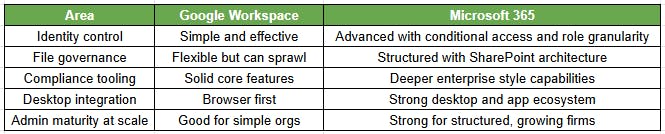
The decision often comes down to governance maturity, not collaboration features.
Licensing and Cost Reality Check
Switching isn’t just a technical move. It’s also a financial decision.
What Most Companies Actually Need
For many firms, Microsoft 365 Business Premium provides:
- Exchange Online
- Teams
- OneDrive and SharePoint
- Basic device management
- Security baseline features
But if compliance requirements are increasing, you may need E3 level licensing or additional security components.
You also pay for overlap during transition. For a short time, you may run both platforms in parallel.
Migration Services and Tooling Costs
Expect costs in three buckets:
- Migration tools
- Professional services
- Internal time and training
The cheapest migration is rarely the least disruptive. And disruption costs more than licensing.
Do You Need a Third-Party Migration Tool?
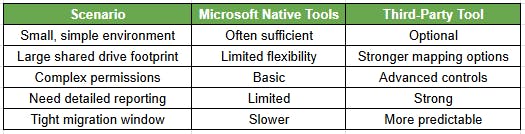
Tool selection should match environment complexity, timeline pressure, and reporting requirements.
A Practical Migration Plan for Businesses
A low risk migration follows four structured phases.
Phase 1 Discovery and Readiness
- Inventory users, domains, and aliases
- Map identities and groups
- Review Drive structure and external sharing
- Identify orphaned files
- Inventory third party apps using Google login
- Design SharePoint information architecture
- Define Teams structure
This phase reduces 80% of avoidable problems.
Phase 2 Pilot
- Select 5 to 10 users across departments
- Migrate mail, calendar, and files
- Validate permissions
- Capture training gaps
The pilot reveals real world issues before full rollout.
Phase 3 Pre-Stage Migration
- Pre-stage mailbox data
- Pre-stage Drive content
- Validate permission mapping
- Prepare user communications
This minimizes downtime at cutover.
Phase 4 Cutover and Stabilization
- Switch MX records
- Reconfigure devices
- Provide day one floor support
- Monitor and resolve issues
- Conduct follow up training
For most companies, this process takes three to six weeks depending on complexity.
Post Migration Security Baseline You Shouldn’t Skip
Switching platforms doesn’t automatically make you secure.
Identity and Access Baseline
- Enforce MFA for all users
- Implement conditional access
- Configure emergency access accounts
- Review admin roles
Data Protection Baseline
- Restrict external sharing by default
- Implement retention basics
- Review guest access
- Align Teams and SharePoint permissions
Monitoring and Audit Readiness
- Enable alerting for suspicious activity
- Define review cadence for logs
- Document role based access control
Many companies migrate, but never harden the environment. That leaves value on the table.
Communication Plan You Shouldn’t Skip
Seven days before cutover
- Notify users of timeline
- Provide FAQ
- Set expectations for device updates
One day before
- Reminder email
- Confirm login instructions
- Reinforce support contact
Day of migration
- Step-by-step login instructions
- Clear note about Outlook and mobile updates
Week one
- Daily issue summary
- Short training refresh sessions
Most technical migrations succeed. Most perception failures happen because of poor communication.
How to Choose the Right Migration Partner
Questions to Ask Before You Sign
- What does your discovery process include?
- How do you handle shared drive permissions?
- How do you inventory third party apps?
- What is your cutover support plan?
- What security hardening is included?
- What is out of scope?
If the proposal only mentions moving mail and files, it’s incomplete.
What a Good Statement of Work Includes
- Defined discovery deliverables
- Documented SharePoint architecture plan
- Identity and group mapping plan
- Communication timeline
- Post migration support window
Security baseline configuration
The Consilien Approach to Google Workspace to Microsoft 365 Migration
At Consilien, we treat migrations as business risk projects, not technical copy jobs.
We start with structured discovery. Then we build the future state design before moving a single mailbox. We pilot with real users. And we include security hardening as part of the project, not an afterthought.
For growing companies, that approach reduces disruption and protects productivity.
If you’re evaluating a switch, start with a migration readiness assessment with Consilien. It will clarify cost, timeline, licensing requirements, and risk before you commit.