Tax Season IT for Accounting Firms: Uptime, Remote Access, and Backups Before April
Tax season IT for accounting firms comes down to three systems that can't fail from late January to April 15: the machines running your tax software, secure remote access, and backups you've actually restored. Finish all three by mid-January.
Table of Contents
Tax season rarely breaks a firm's IT on its own. What it does is find the weak spot that was already there, the file server that's been slow since October or the VPN password three people share, and it finds it in the one stretch of the year when an hour offline is an hour nobody can bill. A fix that takes an afternoon in November can eat a whole weekend in March.
Compliance (the written information security plan, the FTC Safeguards Rule, Reg S-P) has its own financial services IT compliance guide, so what follows sticks to the systems that keep preparers working. Both sit under Consilien's IT services for financial and accounting firms.
Key Takeaways
- The IRS stops accepting e-file submissions at 11:59 a.m. Eastern on December 26, 2026, and MeF reopens in January.
- Pick a change-freeze date for late January. Whatever isn't finished by then waits until April 16.
- MFA on every remote login is a legal requirement under the FTC Safeguards Rule, and the small-firm exemption doesn't cover it.
- A backup counts once you've timed a full restore.
- Seasonal accounts get an end date on the day they're created.
What does tax season actually do to an accounting firm's IT?
It squeezes load, people, and attackers into roughly 11 weeks. Every preparer is in the tax application at the same time, seasonal staff log in from home, clients email scanned W-2s and K-1s, and criminals send fake "new client" emails built to steal the firm's e-file credentials. Weaknesses you could live with in October stop being survivable.
Those credentials are the EFIN (the firm's IRS e-file ID), each preparer's PTIN, and CAF numbers (the IRS record that a preparer is authorized to represent a client). With them, a thief can file fraudulent returns under your firm's name. In its September 2026 closing release for the Security Summit series, IR-2026-111, the IRS listed the signs that usually mean a practice has already been breached:
- "Unusual computer activity, slow performance, or being locked out of systems."
- "Client e-filed returns being rejected because a Social Security number was already used."
- Unexpected IRS authentication letters or e-file acknowledgments.
- IRS notices about clients the firm doesn't represent, or a compromised CAF number.
Look at the first item. "Slow performance" is also what an overloaded server looks like in February, which is why firms with no baseline for normal speed can't tell an attack from a busy week until the rejections start.
The countdown: what has to be done by when, before April 15, 2027
Work backward from two dates the IRS has already set. Federal e-file submissions stop at 11:59 a.m. Eastern on December 26, 2026, per the IRS MeF shutdown notice, and the individual filing deadline is Thursday, April 15, 2027. The 2027 opening day hasn't been announced, though the 2026 season opened January 26.
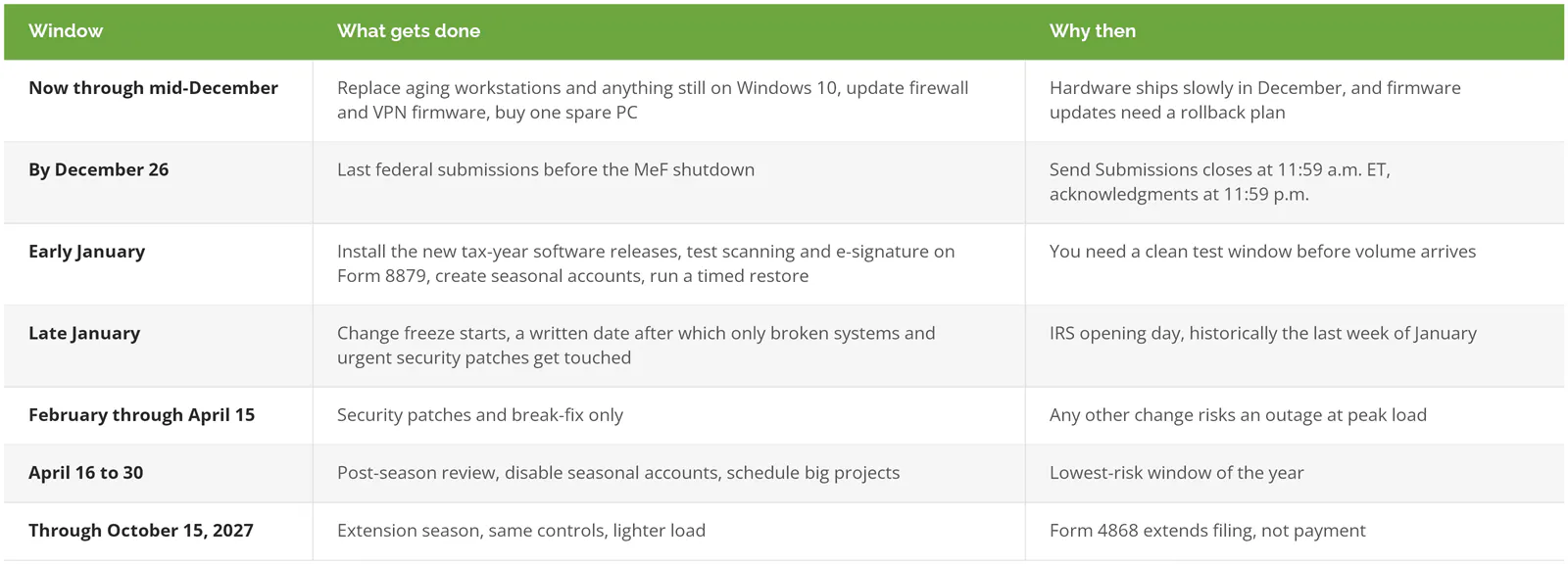
Windows 10 left Microsoft support on October 14, 2025. A workstation still running it is either paying for Extended Security Updates or going unpatched, and a firm with neither answer for a given machine should treat it as a December replacement.
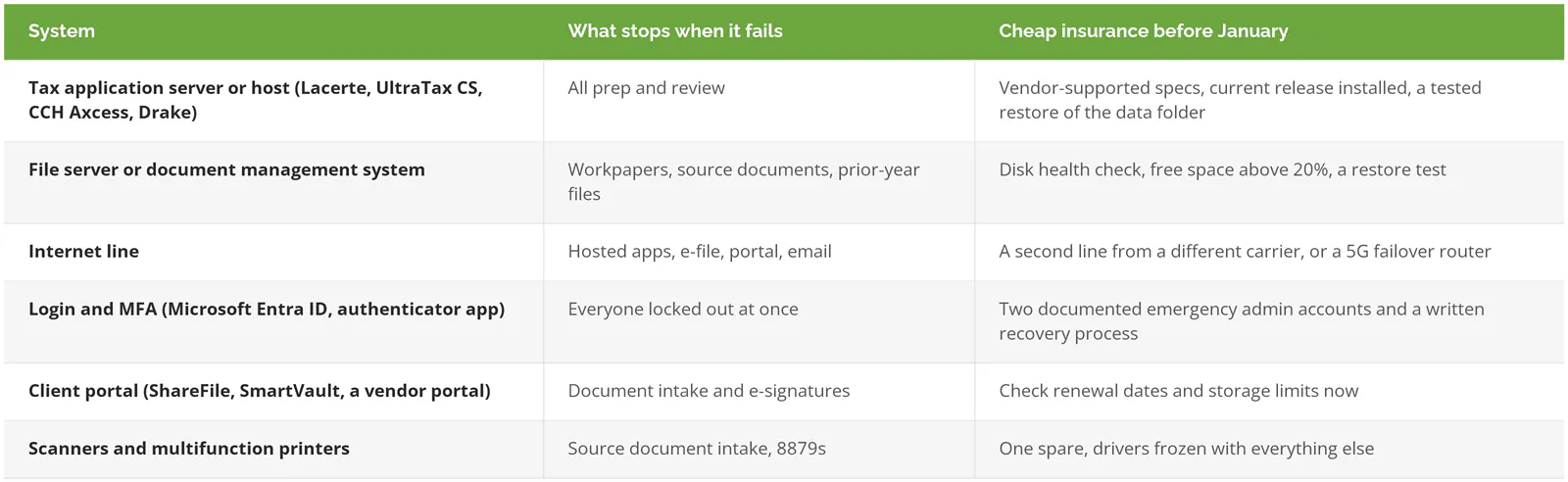
Uptime: which systems actually stop the work?
The tax application gets all the attention, but return prep also stops when the file server, the internet line, the Microsoft login service, the client portal, or the scanner by the front desk goes down. Before January, each of those needs a fallback with a name on it (a specific spare, a second line, or a person who knows the recovery steps).
A firm with 12 preparers that loses one four-hour afternoon in late March loses 48 preparer-hours of work, and those hours don't come back, because the April deadline doesn't move and the backlog lands on the same people. Compare that to what the fix would have cost in November.
If your preparers work Saturdays and evenings from February on, an IT contract that answers the phone 8 to 5, Monday through Friday, leaves every one of those evening and weekend shifts without a person to call. Our guide to managed IT service level agreements explains how to read response-time commitments, which matter more in March than at any other time of year.
Remote access: VPN, remote desktop, or hosted tax software?
All three can work, and none of them moves MFA, user access, or the laptops off your plate. A VPN puts remote preparers on the office network, remote desktop gives them a session on an office server, and hosting moves the tax application to a provider's data center. The right one depends on how many people work remotely and who patches what.

The VPN option carries a specific risk that deserves a number. The VPN gateway is usually the firewall itself, and several of the most common small-office firewall brands are also the ones attackers go after. As of CISA's Known Exploited Vulnerabilities catalog dated November 4, 2026, Fortinet, Ivanti, and SonicWall products account for 89 vulnerabilities that attackers have used in real attacks, 21 of them added in 2026 alone, and 39 linked to ransomware campaigns. CISA has also warned specifically about ongoing exploitation of Ivanti's remote access gateways. If your firewall model shows up on that list and hasn't been updated since spring, it moves to the top of the December work.
MFA isn't optional for a tax practice, either. The FTC Safeguards Rule, which treats tax preparers as financial institutions, requires firms to "implement multi-factor authentication for any individual accessing any information system" unless the firm's designated Qualified Individual approves an equivalent control in writing. Firms holding customer information on fewer than 5,000 consumers get a partial exemption under 16 CFR 314.6. It covers the written risk assessment, the continuous monitoring or penetration testing requirement, the written incident response plan, and annual reporting to the board. MFA isn't on that list.
A firm that's already fully hosted, with a provider that patches the servers and runs the backups, can skip a lot of this section. Your share shrinks to MFA, who has an account, and the laptops people use to log in. For firms comparing newer options to a traditional VPN, our breakdown of SASE vs SD-WAN vs VPN covers what each one changes.
Backups: the test that matters is a timed restore
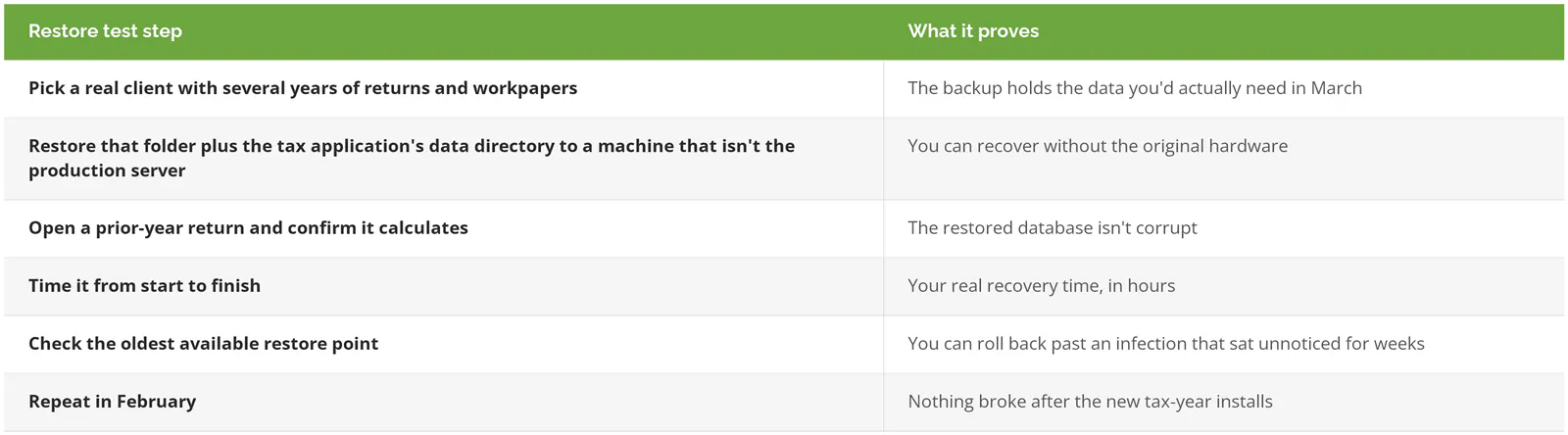
A backup is only proven once you've restored from it and timed how long that took. Before January, restore one full client folder and the tax application's data set to a spare machine, open a return, and write down the hours. If the number comes out longer than a business day, you've found your December project.
Sophos put numbers on what happens when backups don't hold. Its survey of 2,974 organizations hit by ransomware, run by Vanson Bourne in early 2024, found that "94% of organizations hit by ransomware in the past year said that the cybercriminals attempted to compromise their backups during the attack." Where the attackers got to the backups, median recovery costs reached $3M, which Sophos calls "eight times higher" than the $375K paid by organizations whose backups were left alone, and just 26% of them were fully back within a week, against 46%.
Email in Microsoft 365 needs separate attention. Microsoft's own documentation says "the default deleted item retention period for Exchange Online is 14 days," and an admin can stretch that to 30. That's retention, closer to a recycle bin on a timer than a backup you control, so client correspondence deleted in February is out of reach by April unless a separate backup captured it.
Aim for the 3-2-1 rule (three copies of the data, on two kinds of storage, with one kept off site), with at least one copy immutable, meaning it can't be altered or deleted even by someone holding admin passwords. Consilien's backup and disaster recovery services page describes how that gets set up and tested, and our comparison of BaaS vs traditional backup covers the cloud-hosted option for firms without a server closet.
Seasonal staff and access
Who sets up the seasonal preparer who starts on February 2, and what do they have by 8 a.m. that morning? If the honest answer is "whoever's free, and a shared login until the real one comes through," that shortcut tends to outlive the season by years.
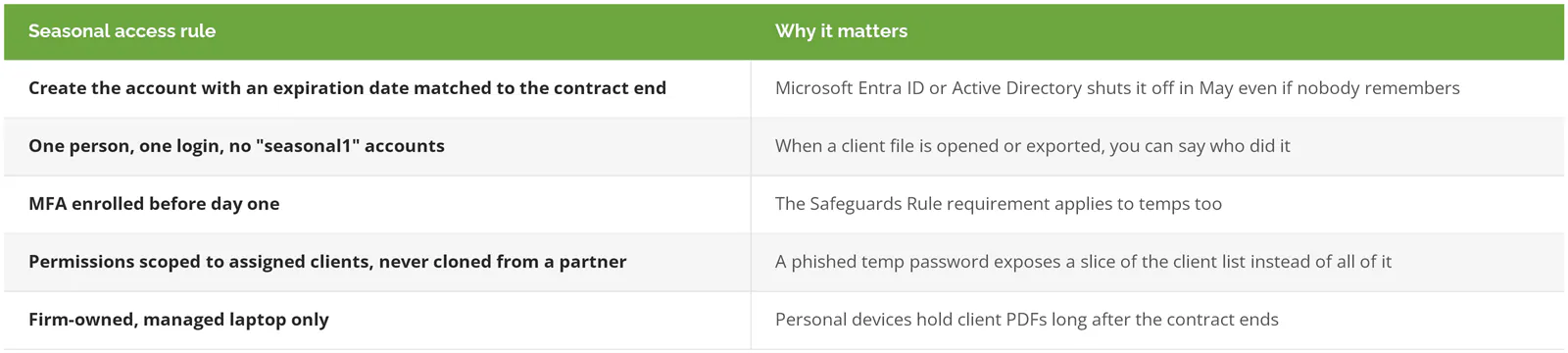
The IRS treats this as a legal obligation rather than a preference. Its August release IR-2026-92 says "Federal law requires tax and accounting professionals to create and maintain a Written Information Security Plan," and who gets access to client data, and how it's taken away, is part of what that plan documents. Publication 5708 is the IRS's WISP template for smaller practices and Publication 4557 is its longer checklist for safeguarding taxpayer data. The same release notes that a security event affecting 500 or more people generally has to be reported to the FTC within 30 days of discovery. Our financial services IT compliance guide covers the full requirements, and writing or reviewing a WISP is a compliance engagement of its own, separate from the IT support that keeps the season running.
What to do the week after April 15
Hold a 30-minute review while everyone still remembers what went wrong. List every outage, slowdown, and lockout from the season, how long each lasted, and what fixed it, then turn that list into next season's December project plan. Disable the seasonal accounts that didn't expire on their own.
April 16 is also the right moment to look at whether your IT arrangement held up. If the season ran on one person's weekends and a lot of luck, compare what full coverage would actually cost against the hours you lost. Our guide to what managed IT costs financial services firms gives the ranges, and our ranking of the best MSPs for accounting firms compares providers that work with tax practices.
Whatever you decide about providers, decide the freeze date this week. Everything on the December list depends on it, and it's the one item that costs nothing.