The Real Cost of Managed IT Services in California: What SMBs Actually Pay
The cost of managed IT services in California is $100-$250 per user, per month or $2,000-$25,000+ monthly based on the company’s size and security requirements. The higher prices are associated with the state’s labor rates and cybersecurity readiness, as well as compliance regulations, including the California Consumer Privacy Act (CCPA).
Table of Contents
What Do Managed IT Services Cost in California?
Managed IT services pricing is usually structured as a monthly recurring fee based on users, devices, and included services.
In California, costs trend higher than national averages due to:
- Higher IT labor costs (per U.S. Bureau of Labor Statistics data)
- Increased compliance requirements
- Greater cybersecurity risk exposure
What SMBs Actually Pay
Monthly Cost Ranges (List Snippet)
- Small (10–25 users): $2,000–$6,000/month
- Mid-size (25–75 users): $5,000–$15,000/month
- Larger SMB (75–200 users): $12,000–$25,000+/month
These are real-world ranges, not entry-level pricing.
What changes the number:
- Security stack maturity
- Compliance requirements
- Number of locations
- Internal IT involvement
Managed IT Pricing Models Explained
Common Pricing Models:
Per User
Predictable
Most common for SMBs
Per Device
Lower upfront cost
Can scale unpredictably
Flat-Rate
Fixed monthly fee
Often bundled services
Tiered Packages
Basic → Advanced → Premium
Security and compliance vary widely
What You’re Actually Paying For
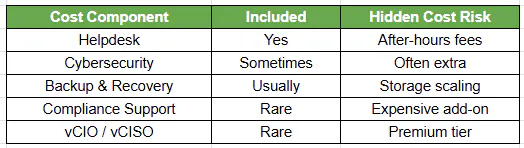
Most MSPs advertise support, not risk reduction.
Why Managed IT Costs More in California
Key Cost Drivers:
Labor market pressure
Higher salaries for engineers and security professionals
Regulatory environment
CCPA / CPRA enforcement by the California Privacy Protection Agency
Industry concentration
Healthcare, SaaS, manufacturing → higher compliance burden
The Hidden Costs Most MSPs Don’t Tell You
This is where budgets break.
- Onboarding and setup fees
- Projects billed separately (migrations, upgrades)
- Security tools sold as add-ons
- Incident response billed hourly
- Compliance consulting outside the scope
The “cheap” provider often becomes the most expensive over time.
Cheap vs Security-First Managed IT
Cheap MSP:
- Reactive support
- Minimal cybersecurity
- Focus on tickets, not risk
Security-First MSP:
- Proactive risk management
- Integrated security stack
- Executive-level oversight
Why this matters: According to IBM Security, the average cost of a data breach is ~$4.45M globally (2024).
Note: varies by industry and region.
Co-Managed IT vs Fully Outsourced IT
Co-Managed IT
- Internal IT handles daily operations
- MSP provides:
- Security
- Strategy
- Escalation support
Fully Outsourced IT
- MSP handles everything
- Less internal control
- Often less strategic alignment
Co-managed = better performance + cost control
How to Evaluate Managed IT Pricing
Checklist
- What’s included vs extra?
- Is cybersecurity built-in or an add-on?
- Are compliance needs supported?
- Are after-hours services included?
- Is strategic leadership (vCIO/vCISO) included?