What Does Managed IT Services Include? The Full Breakdown
Managed IT services include help desk support, 24/7 monitoring, patch management, endpoint security, backup, Microsoft 365 administration, and IT strategy for a flat monthly fee. Projects, hardware, licenses, and compliance programs usually sit outside that fee.
Table of Contents
That's the short answer. The useful one is about where the line sits. Every managed IT services agreement splits your technology into three buckets: the work the monthly fee runs, the projects it doesn't build, and the services sold on their own. Once you know which bucket a task lives in, you can read a quote, compare two providers honestly, and see the month-four invoice coming before it arrives.
On paper, managed IT includes almost everything. The provider's website lists help desk, monitoring, security, backup, cloud, and strategy, and the proposal says "fully managed." Then you open a second location, or a few dozen laptops age out, and a separate invoice shows up.
That invoice isn't a trick. It's scope.
Monthly managed IT pays someone to keep your environment running, patched, and supported. It rarely pays for changing that environment. Companies get this backward in a predictable way. They line up two proposals, compare the monthly number, pick the lower one, and learn a year later that the cheaper plan left out after-hours coverage, endpoint detection, or restore testing, the things they assumed every plan had. Cheap IT gets expensive. Usually in year two.
What Does Managed IT Include?
Managed IT is an arrangement where an outside provider, usually called a managed service provider (MSP), takes ongoing responsibility for running, securing, and supporting your technology for a fixed monthly fee. A typical managed IT plan includes these core services:
- Help desk support. Your staff call, email, or open a ticket for password resets, Outlook problems, printer jams, and the laptop that won't join the Wi-Fi.
- 24/7 monitoring and alerting. Small software agents on your servers, firewalls, and laptops report their health around the clock, so a failing drive or a full disk gets flagged before anyone notices it.
- Patch management. The security fixes Microsoft and other vendors release every month get tested and installed on a schedule, not whenever someone remembers.
- Endpoint security. Antivirus at minimum. Better plans include endpoint detection and response (EDR), which watches each device for suspicious behavior and can cut it off from the network.
- Backup monitoring and restore testing. A backup nobody has restored from is a guess.
- Microsoft 365 or Google Workspace administration, covering user accounts, mailboxes, licenses, and who can see which Teams and SharePoint files.
- User onboarding and offboarding. New hires get a working laptop and accounts on day one. People who leave lose access the same afternoon.
- Asset and license tracking, so you know what you own, how old it is, and what you're paying for.
- Vendor coordination. The MSP calls the internet provider, the copier company, or the vendor behind your ERP (business management) system so your office manager doesn't have to.
- IT strategy. A virtual chief information officer (vCIO) builds a technology roadmap and budget with your leadership team. Some providers include this. Plenty charge for it separately, so ask.
That list is close to universal. Where plans actually differ is security and backup. Kaseya's 2026 State of the MSP report, a survey of more than 1,000 providers, found 71% grew their cybersecurity revenue over the prior year and 50% grew backup and disaster recovery revenue. Providers are selling more of both, so the same two words, "security included," can describe very different amounts of work depending on whose proposal you're reading.
What Usually Isn't Included in Managed IT?
Hardware purchases, software licenses, and project work usually aren't included. That covers office moves, new site buildouts, cloud migrations, network redesigns, cabling, and large device refreshes. Providers quote these separately because each one has a start date, an end date, and a defined deliverable.
A simple test works for nearly everything. If it has a finish line, it's a project.
Replacing one employee's broken laptop is routine support, and the setup labor is normally covered. Replacing 75 laptops because Microsoft ended Windows 10 support on October 14, 2025 is a refresh project with a plan, a schedule, and a quote. Same task, different scale, different bucket.
The rest of the usual exclusion list looks like this:
- The hardware and software themselves. Your provider can source a laptop or a firewall for you, but you pay for the device.
- On-site visits beyond what the plan allows. Remote-first plans often cap or bill trips to your office.
- After-hours work that isn't an emergency, like a server upgrade you want done on a Sunday.
- Your line-of-business software. If your ERP or accounting system breaks inside its own code, that's the software vendor's problem. The MSP handles the server it runs on, the user access, and the call to the vendor.
- Formal compliance programs (more on that below).
None of these exclusions are unreasonable. The problem is finding them after you sign.
Where Does the Monthly Fee Stop and Project Work Start?
The monthly fee covers running what you already have. Projects change it. Standalone services, like compliance or a dedicated security operations center, are separate engagements with their own scope, even when the same provider delivers them.
Call them Run, Build, and Separate. Every IT task you can think of falls into one of the three, and a good proposal says which one, in writing.

Read a proposal against that table and the gaps show up fast. If a task you care about isn't named anywhere, assume it's billed. Then ask for the exclusion list in writing. The clauses in an MSP contract that define scope are the ones worth reading twice.
Is Cybersecurity Part of Managed IT?
Baseline cybersecurity is part of any credible managed IT plan: patching, endpoint protection, multifactor authentication, email filtering, and firewall management. Round-the-clock threat monitoring by a security operations center (SOC) is usually a higher tier or a separate managed security service.
That distinction matters more than the price difference between tiers. Antivirus on every laptop isn't a security program. Tools don't equal protection. Somebody has to read the alerts those tools generate, decide which ones are real, and act, and the question that separates plans is who that somebody is at 2 a.m. on a Saturday.
IBM's 2026 Cost of a Data Breach study put the global average breach at $4.99M, up 12% in a year, and the full report puts the US average at $11.5M, the highest of any region.
So when a proposal says "security included," ask three things. Which tools, specifically? Who watches them after hours? And what's that person allowed to do without calling you first, like isolating a laptop or disabling a compromised account? If the honest answer is "we'll email you an alert," you have monitoring. You don't have response. The difference between an MSP and an MSSP (a managed security service provider) mostly comes down to that question, and our breakdown of MSP vs MSSP coverage walks through where each one stops.
Why Isn't Compliance Included in Managed IT?
Compliance is a program, not a task. Frameworks like CMMC, SOC 2, PCI DSS, and NIST require gap assessments, written policies, evidence collection, and someone to sit with the auditor. Managed IT produces some of that evidence. It doesn't own the program.
Think about what an auditor actually asks for. Patch reports and backup logs, yes, and a good MSP generates those every month. But also a written access control policy, a risk assessment signed by leadership, an incident response plan someone has rehearsed, and proof that the controls on paper match the controls in production. None of that comes out of a help desk.
The frameworks themselves have moved in this direction. NIST's Cybersecurity Framework 2.0 added a Govern function, and CISA's Cybersecurity Performance Goals 2.0, released December 11, 2025, added governance as well. Both place accountability with leadership, not with whoever runs the servers.
And compliant doesn't mean secure. A business can pass a SOC 2 audit in March and get breached in May through a control that was documented perfectly and configured badly.
If a provider tells you compliance is included in its managed IT plan, ask which framework, who writes the policies, and who's in the room with the auditor. Often the answer turns out to be "we'll help." Help isn't ownership. At Consilien, compliance readiness for NIST, CMMC, PCI, and SOC 2 is a separate engagement from managed IT, with its own scope and deliverables.
Managed IT vs. Co-Managed IT vs. Break-Fix: What Does Each Cover?
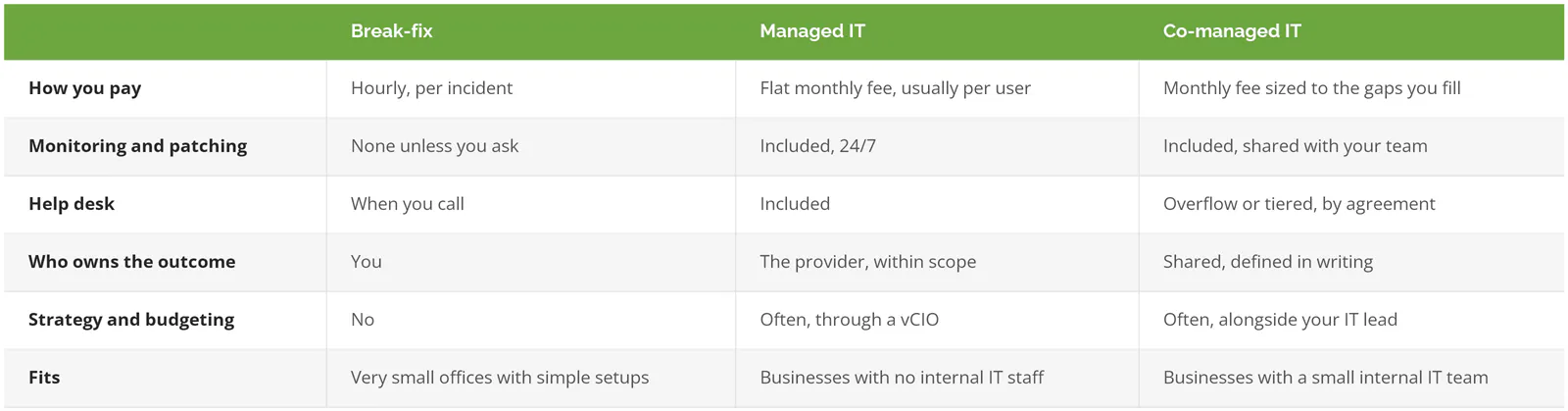
Fully managed IT isn't always the right call. If you already employ a capable IT manager, replacing them makes little sense. What usually breaks in that setup isn't the person. It's coverage. One or two people can't watch alerts overnight, take vacation, and also keep up with cloud security, identity management, and backup testing. ISC2's 2025 Cybersecurity Workforce Study found 95% of security professionals reported at least one skills gap on their team, and 59% called theirs critical or significant, up from 44% a year earlier. That's what co-managed IT services are built for. Your team keeps the work it knows best. The provider covers nights, depth, and tooling.
Break-fix still works for a five-person office with a cloud email account and nothing else. Past that, the lack of monitoring tends to show up as a very expensive Monday.
How Do You Check a Provider's Scope Before You Sign?

Ask for the exclusion list, the service level agreement (SLA), and the exit terms in writing, before you sign. A provider who can hand over all three quickly has a defined service. One who can't is still deciding what they'll do for you.
CISA's Risk Considerations for Managed Service Provider Customers makes the same point at federal scale. It tells customers to settle service level agreements, incident handling terms, and data handling commitments before the contract is signed, and to keep IT operations and security services separate in those terms. The agency's joint advisory on threats to MSPs explains why. An MSP's remote access tools reach into every client it serves, which makes the provider itself a target.
The questions that pin scope down:
- What's excluded from the monthly fee, and what's your hourly rate for it?
- What are your response times by priority, and are they in the contract or only the brochure?
- Who handles security alerts after hours, and what can they do without reaching me?
- When did you last test a restore of our kind of data, and can I see the result?
- How do you protect your own admin access to our systems?
- How do I leave, and who owns our passwords and documentation when I do?
Response times are easy to promise and easy to check. A product support manager at Human Touch described Consilien's help desk in a Clutch review: a ticket number and issue description within 3 minutes, a live person on the phone within 15, and the whole issue resolved in under 15 minutes. That's what a response-time commitment looks like when someone tests it.
Exit terms deserve the same scrutiny. Consilien's standard agreement runs 3 years with a 1-year opt-out on 60 days' notice, so a client isn't locked in if delivery falls short. Compare that clause across every proposal you get. Our checklist of questions to ask an MSP covers the full set, and our guide to outsourced IT support cost per user shows how scope moves the per-user price.
Consilien is a security-first managed IT provider that serves businesses nationwide. A vCIO is part of the managed IT service, not an upsell, so the roadmap and budget conversations happen alongside the day-to-day support instead of in a separate contract. If you've got a proposal on your desk and can't tell which bucket half of it falls into, bring it to a 30-minute call. Speak to an IT Expert and we'll walk through it line by line.