What Is a Managed Service Provider? What an MSP Does, What It Costs, and What You Still Own
A managed service provider (MSP) is an outside company that runs your IT for a recurring monthly fee, covering monitoring, patching, help desk, backups, and security basics under a contract that sets response times and responsibilities.
Table of Contents
What is a managed service provider, really? Ask a room of business owners and somebody will say "the people we call when the printer dies." That's the help desk. It's the part of an MSP you can see. The contract is the part that matters, because it decides what gets watched at 2 a.m., who picks up when something breaks, and who's accountable when it stays broken.
If you're comparing providers right now, this is how our managed IT services team runs it. The rest of this page applies to any MSP, ours or someone else's.
Why do companies hire one in the first place? Usually because IT outgrew whoever was handling it on the side. In Barracuda's 2025 survey of 2,000 IT and security decision-makers, 73% said they already work with an MSP, and 52% wanted help managing a growing pile of disconnected security tools and vendors. Sounds about right. A business that ran on a dozen laptops and a shared drive in 2019 now has Microsoft 365, a cloud ERP (the system that runs orders, inventory, and accounting), 30-plus cloud app logins, a VPN for remote staff, and an insurance carrier asking whether MFA is turned on for every account.
Nobody planned for that. It just piled up.
What is a managed service provider, in plain terms?
An MSP is a company you pay a flat monthly fee to keep your technology running, patched, and supported. You pay for ongoing coverage instead of per repair, so the provider makes money by preventing problems.
That pricing flip is the whole idea. A break-fix shop bills by the hour when something fails, so its revenue goes up when your systems go down. An MSP's margin runs the other direction. Every outage it heads off is money it keeps. Simple incentive.
The rules of the arrangement live in the service level agreement (SLA), the document that spells out what's covered, how fast the provider has to respond, and what happens when it misses.
Two proposals can look identical on paper. Both list help desk, monitoring, backups, and "security." Same list. The service underneath? Often nothing alike. The difference hides in the work that doesn't fit on a feature list: whether anyone looks at your environment when nothing's on fire, whether backups ever get test-restored, whether someone warns you that the firewall hits end of life in 8 months instead of after it already has. A help desk answers tickets. It won't tell you what next year's IT budget should be. Plenty of providers sell the first thing and call it managed.
IT support isn't IT strategy. Leaders who confuse the two end up surprised by their own technology.
What does an MSP actually do day to day?

An MSP watches your systems with monitoring software, installs security updates, answers employee tickets, runs and tests backups, manages vendors and hardware, and, at the better ones, plans your IT budget and roadmap with leadership.
Monitoring and patching
Small software agents on every laptop and server report to the MSP's remote monitoring and management (RMM) platform, a dashboard that flags a full disk, a failed backup, or a server that quit responding at 3 a.m. Patching uses it too. Updates get tested, scheduled overnight, pushed out, and the machines that refused them get chased down the next morning.
Tedious work. It's also exactly the work attackers count on you skipping.
Help desk
Employees call, email, or open a ticket. Password lockouts. An Outlook profile that won't load. A new hire who needs a configured laptop by Monday. The bulk of it gets solved remotely, and someone drives out when the problem is physical, like a dead switch in the network closet or a conference room display that only works when you jiggle the cable.
Backup and recovery
Ask a prospective MSP how often they test-restore your backups. If the answer is "we get a success email every night," that's a report. It isn't a restore.
Security baseline
Endpoint protection on every device, email filtering, MFA (a second login step, usually a code or prompt on your phone) enforced across Microsoft 365, and someone actually reading the alerts. Deeper security, like a 24/7 security operations center, is often a separate service, sometimes from a separate company.
Vendors and the hardware lifecycle
Who calls the internet provider when the connection drops? Who knows the server warranty runs out in March? A decent MSP tracks hardware age, renews licenses before they lapse, and sits on hold with the phone company so your office manager doesn't have to, which turns out to be a surprisingly large share of what keeps a small office running.
Planning
This is where a provider turns into a partner, or doesn't. A virtual CIO (vCIO) is a senior advisor who works with your leadership part-time, meeting every quarter to review risk, spending, and what needs replacing next year. Not every MSP offers one, and some charge for it separately. Ask early. We laid out what managed IT includes line by line if you want the full scope.
How do MSPs charge for their services?
MSPs usually charge a fixed monthly fee per user or per device. Some sell tiered bundles or one all-inclusive rate. Projects like a migration or a new office buildout are typically billed separately, on top of the monthly fee.
The models you'll run into:
- Per user. One price per employee, covering every device that person touches. It's become the default now that everyone carries a laptop and a phone.
- Per device, where each laptop, server, and firewall carries its own fee. Handy for a production floor with shared workstations.
- Tiered bundles, sold as bronze, silver, and gold. Look hard at what moves between tiers. After-hours coverage and security tools are the usual suspects.
- All-inclusive. One flat number for everything in scope.
- Monitoring only? It exists. It's cheap, and it means someone sees the problem and you still fix it.
Published price ranges online are scattered, and almost all of them come from providers selling the service. Treat them loosely. We put real per-user cost figures in a separate guide.
Before you compare two quotes side by side, read what the SLA promises. Response time and resolution time aren't the same thing, and our managed IT SLA guide covers how to tell which one you're being sold. Then find the exclusions. Onsite visits, after-hours work, new-hire setups, and anything labeled "project" are where the surprise invoices come from, usually in the same month you were trying to hold the budget flat.
How does an MSP compare to break-fix, in-house IT, and an MSSP?
An MSP takes ongoing responsibility for running your IT for a monthly fee. Break-fix bills per repair, in-house IT puts the job on your payroll, and an MSSP focuses only on security monitoring and threat response.
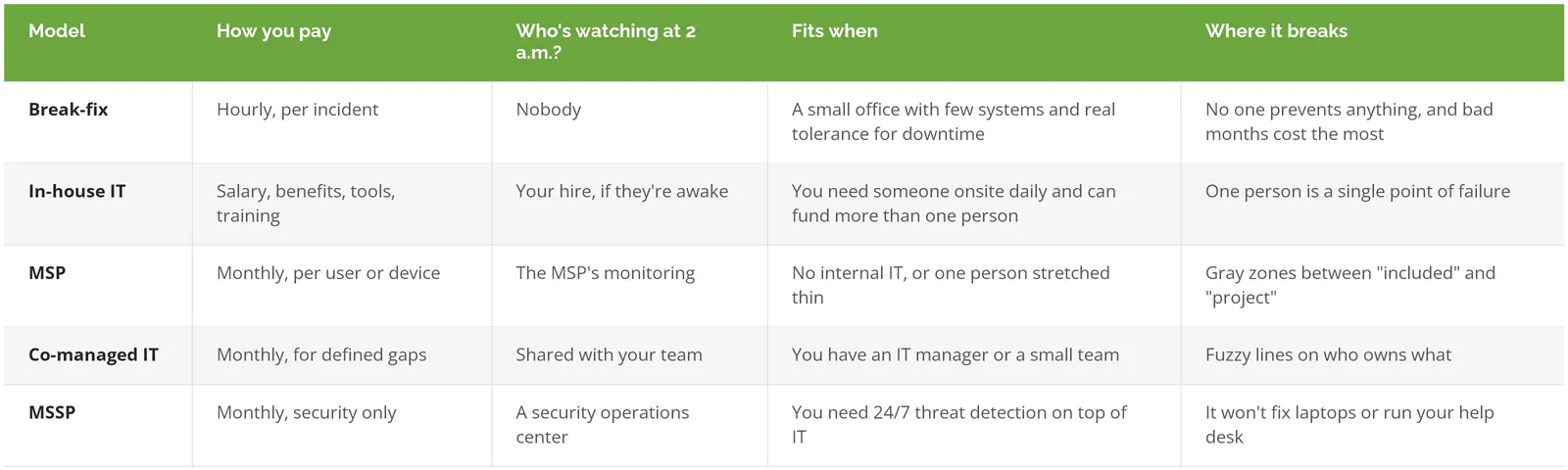
The MSP vs. MSSP line trips people up because the acronyms differ by one letter. Different jobs entirely. An MSP keeps your IT running. A managed security service provider (MSSP) hunts for attackers inside it. Plenty of businesses need both, and we compared MSP vs. MSSP and managed IT vs. break-fix in their own posts.
What doesn't an MSP take off your plate?

You can outsource the work. The accountability stays with whoever signed the contract.
July 2021 made that concrete. Attackers exploited a flaw in Kaseya VSA, a remote management tool used by many MSPs, and pushed ransomware through those providers into their customers' networks, prompting joint CISA and FBI guidance for MSPs and their customers. The customers hadn't done anything wrong. Their provider's tool was the way in.
The following year, CISA, the NSA, the FBI, and their counterparts in the UK, Australia, Canada, and New Zealand published a joint advisory on threats to MSPs and their customers. Its customer guidance reads like a contract checklist. Spell out whether you or the MSP handles hardening (locking down settings so systems are harder to break into), detection, and incident response. Require MFA on every MSP account that touches your environment. Keep your own visibility into what the provider does on your network.
And the cost when it goes wrong? IBM's 2026 Cost of a Data Breach research ranks supply chain compromise, which includes attackers coming in through a vendor, as the second most common way breaches start, averaging $4.96 million per incident. Not a rounding error.
None of that means don't hire an MSP. It means 4 things stay on your side of the table:
- The admin keys. Your company should own the top-level admin accounts for Microsoft 365, the firewall, and your domain, with the MSP using admin rights you grant and can take back.
- Risk decisions. Whether to replace a 9-year-old server this year or next is a business call. Your MSP should bring the options and the price, and you pick.
- The contract terms, including how you leave. We walked through the clauses that matter in what's in an MSP contract.
- Compliance. Meeting CMMC, PCI DSS, or SOC 2 requirements is its own body of work, and at Consilien it's a separate service from managed IT. Ask any provider what "we handle compliance" means in writing. Sometimes it means turning on the settings an auditor asks about, which is not the same as being secure.
For the step-by-step version of keeping control, see our IT outsourcing guide.
Is it cheaper to hire an IT person than to use an MSP?
Not usually, once you count what one salary actually buys. The Bureau of Labor Statistics puts median pay for a network and computer systems administrator at $99,130 for 2025, and a computer support specialist at $62,890. Both figures are before benefits, payroll taxes, tools, and training.
Salary isn't the problem. Coverage is. One person brings one skill set and roughly 40 hours a week, and that same person takes vacations, gets sick, sits in traffic, and sleeps, so your coverage has holes shaped exactly like their calendar. Who handles the ransomware alert at 2 a.m. on Thanksgiving weekend? Usually nobody. Who knows the passwords when they resign with two weeks' notice?
Hire the strong IT manager. Expecting that person to be a whole department is the mistake. Companies with a capable internal person often keep them and add an MSP for the parts one human can't cover, an arrangement called co-managed IT.
When you probably don't need an MSP
With an internal IT team that already covers nights and weekends, keeps patching current, and has someone who can talk budget with your CFO, skip a full MSP. You might need a partner for a one-time migration, or a security provider for 24/7 monitoring. That's a narrower purchase.
Same goes for a small office running entirely in Google Workspace with no servers, no regulated data, and no customers sending security questionnaires, where the biggest IT event of the year is someone forgetting a password. A break-fix tech you trust may be enough for now.
Revisit it when that changes. Usually, insurance forces it.
How do you tell a good MSP from a help desk with a contract?

Ask to see the SLA, the onboarding plan, and a sample quarterly review before you sign. Good ones won't hesitate. Then confirm who owns the admin accounts and what leaving looks like.
A few checks that separate the two:
- Who holds global admin on Microsoft 365? It should be you.
- Ask for a quarterly business review deck from a current client, names blacked out. No deck usually means no planning layer.
- Read the SLA for "response" versus "resolution." A 15-minute response guarantee can still mean a 3-day fix.
- Find the exit. How much notice, and do documentation, passwords, and configurations come with you on the way out?
- Security monitoring, done by them or by a subcontractor? Either can work. You should know which.
There's a longer list in our questions to ask before signing with an MSP.
Consilien is an MSP headquartered in Torrance, California, serving businesses nationwide since 2001. We run day-to-day IT, security, and IT planning for companies that want technology decisions tied to business decisions, and we offer compliance as its own separate service. You can see how Consilien's managed IT is structured.
Not sure whether you need an MSP, or whether yours is managing anything at all? Speak to an IT expert and bring your current contract.