What Is CSPM? Cloud Security Posture Management Explained
CSPM tells you what's wrong with how your cloud is set up. It won't tell you who's going to fix it, and that second question is where the money goes. What follows covers what these tools check, what the native options cost, what they miss, and where cloud posture work belongs inside your broader managed cloud services plan.
Table of Contents
CSPM, or cloud security posture management, continuously checks your cloud configuration against security benchmarks and flags misconfigurations like public storage or open admin access. It finds setup mistakes. It does not fix identity or runtime risk.
On October 27, 2026, Microsoft stops switching on free cloud security posture management by default for new Azure subscriptions. The free tier isn't going away. It just stops arriving unasked, so every subscription created after that date starts with nobody watching the configuration until somebody decides to look.
Small change. Ugly shape. Companies don't find a gap like that on a quiet Tuesday. They find it when a customer sends over a security questionnaire, when an insurance renewal asks what monitors cloud configuration, or when a storage container that was supposed to be internal turns out to have been readable from the open internet since March.
So what is CSPM, and do you need to buy one? For a company between 20 and 1000 users, the honest answer is that you probably already own a usable version, you're probably not running it, and the reason has nothing to do with the tool.
What Does CSPM Actually Do?
CSPM continuously compares your cloud settings against a security benchmark, then reports each gap as a finding with a severity rating and a suggested fix. It's a configuration auditor that never sleeps.
Every cloud platform carries thousands of settings. Who can reach a database. Whether a storage location is readable by the public. Whether logging is switched on. Whether an administrator account requires multifactor authentication, meaning a second login step beyond the password. A benchmark is a published list of how those settings should be set. It checks yours against that list, on a schedule, forever.
Benchmarks aren't proprietary. Your auditor already knows these names. CIS Benchmarks are the most widely used. AWS Security Hub ships prepackaged standards including the CIS AWS Foundations Benchmark, AWS Foundational Security Best Practices, NIST SP 800-53 Rev 5, and PCI DSS. Microsoft grades Azure, AWS, and Google Cloud against the Microsoft Cloud Security Benchmark and folds the result into a single secure score, where a higher number means less identified risk. That score is what your IT manager screenshots for the board. It's also the number that can sit in the low 60s for months on end, because the rest of it needs somebody to change something in production. Nobody's fault, exactly. Just nobody's job.
A working scan hands you five things.
- An inventory. Everything you're running, including the test environment somebody stood up in 2023 and never turned off.
- Findings, scored by severity and mapped to the specific benchmark control they violate.
- A score that trends over time. Boards like this part.
- Remediation steps, sometimes with a one-click fix attached, sometimes ending in a paragraph that amounts to a polite suggestion you ask your architect.
- Evidence you can hand an auditor without assembling it by hand.
None of that secures your cloud. Configuration is one layer of what cloud security covers, and the tool watches that layer closely while ignoring the others by design.
Why Cloud Misconfiguration Keeps Happening
You didn't misconfigure your cloud. Eleven people did, across four years, each one making a defensible decision on a Wednesday afternoon with a deadline behind it.
That's the part the category name hides. Misconfiguration sounds like a mistake, singular and fixable. What happens in practice is drift, and drift accumulates. Somebody opens a port so a vendor can test an integration, and the change never gets reversed. A developer grants a service account broader rights than it needs because narrowing them takes an hour nobody has. A cloud migration lifts 40 servers into a new account with their old settings intact, including the ones that were only ever safe because the old network was closed to the outside world. Nobody signed off on any of it.
Cloud settings are easy to change. That's the selling point. And nobody notices a change that doesn't break anything.
The Cloud Security Alliance's 2026 Top Threats report, built on a survey of 507 security professionals, ranks misconfiguration and inadequate change control fifth out of eleven cloud threats, at 7.77 out of 10. Inadequate identity and access management sits first at 7.95. Config mistakes are common, they're serious, and they're no longer the thing most likely to end your quarter, which is worth knowing before you sign a platform contract sold on the premise that misconfiguration is the whole problem.
NIST named this discipline 15 years ago. Information security continuous monitoring, defined as maintaining ongoing awareness of security, vulnerabilities, and threats to support risk decisions. The publication was written for federal agencies, and its six-step cycle of define, establish, implement, analyze, respond, and review still describes a functioning CSPM program more accurately than any vendor page does. Notice where respond sits. Fifth. Four steps of decisions before anyone touches a setting.
Do You Buy CSPM, or Do You Already Own It?
In most cases you already own one. Azure, AWS, and Google Cloud all ship CSPM tools at their free or base tier, and the paid upgrades add attack path analysis, agentless scanning, and compliance reporting.
Costs and limits, side by side.
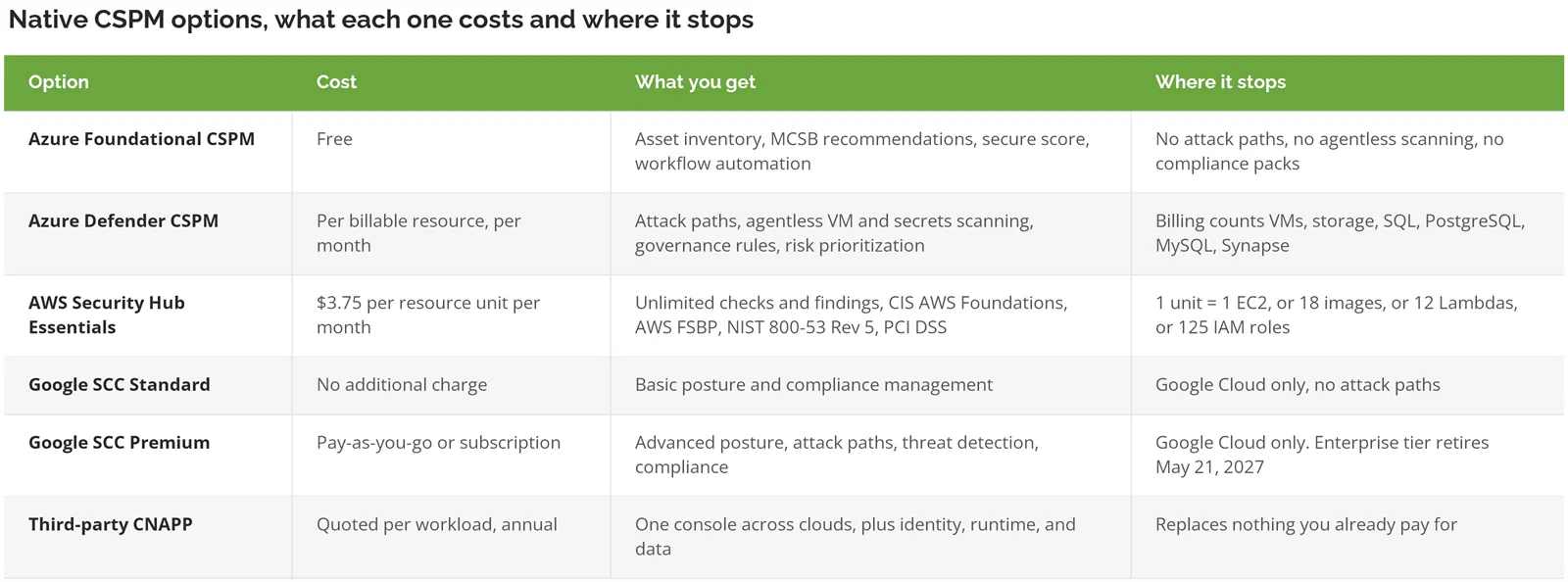
Microsoft doesn't publish a flat number for Defender CSPM. It bills per billable resource, which means the only honest figure comes from running your own resource count through the Azure pricing calculator rather than from any article quoting a per-month price.
AWS changed its pricing model here, and it's worth knowing before you budget from an old quote. Security Hub CSPM no longer bills per security check. It folded into the Security Hub Essentials plan at a flat resource rate with unlimited checks and findings, which means the finding volume that used to scare finance out of enabling it costs nothing extra now. At that rate, 30 EC2 instances and 200 IAM roles work out to roughly $120 a month, which is a different order of conversation from the annual platform contract a third-party vendor tends to open with. Worth a fresh quote.
Google is moving in the other direction on its top tier. The Security Command Center Enterprise tier retires on May 21, 2027, and organizations on it get moved down to Premium, which covers Google Cloud only. If your multi-cloud posture strategy currently runs through SCC Enterprise, that's a 2027 project you can start scoping now rather than a surprise. Not urgent. Not nothing, either.
What Changes on October 27, 2026
Foundational CSPM moves to an opt-in model that day. New Azure subscriptions won't have it enabled by default. Existing subscriptions keep it unless somebody turns the plan off, and AWS and GCP onboarding is unaffected. Same free plan. Different default.
Which companies does this catch? The ones that create subscriptions without a review step. A new entity after an acquisition. A subscription spun up for a single project, then inherited by whoever is left. A developer who needed somewhere to test and had the rights to make one. Those subscriptions have always been the weak spot in cloud inventory, and until now they at least arrived with a free set of eyes on them.
Two things to do before the date. Pull your list of Azure subscriptions and find out who can create a new one, because that permission is usually broader than the CFO assumes. Then write down, somewhere a person will actually see it, that enabling the free plan is part of standing up any new subscription. Both take an hour.
What CSPM Won't Catch
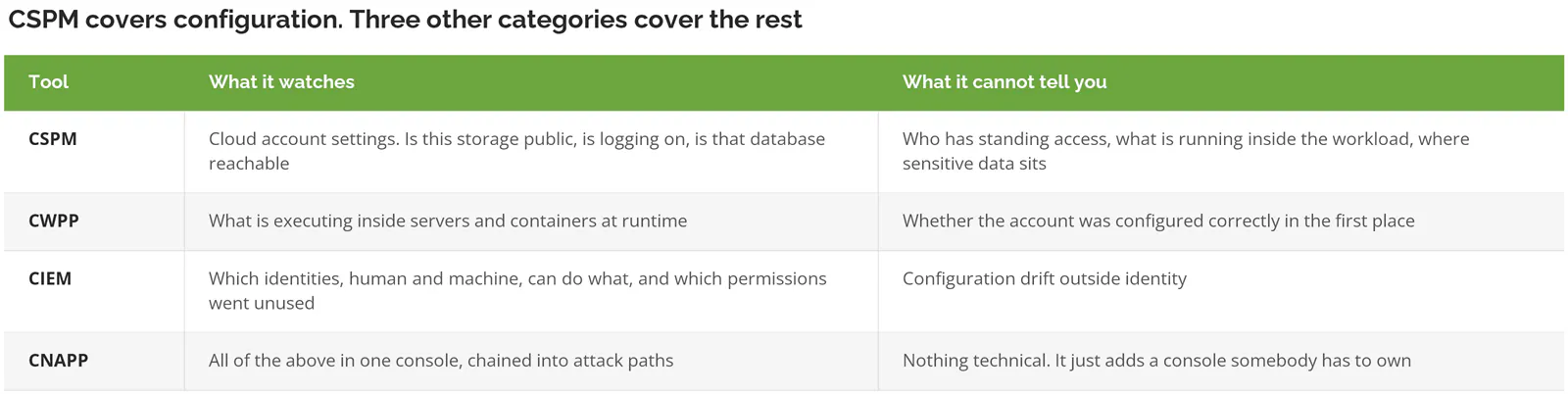
CSPM reads configuration. It doesn't watch what happens inside your workloads, doesn't tell you which identities have standing access to what, and doesn't find sensitive data. Three other tool categories handle those.
Acronyms get thick here, so in plain terms:
- CSPM watches the account settings. Is this bucket public, is logging on, is that database reachable from the internet.
- CWPP, cloud workload protection, watches what's running inside the servers and containers at runtime. Runtime meaning while the thing is actually executing, rather than how it was configured.
- CIEM, cloud infrastructure entitlement management, answers the question CSPM can't. Which accounts, human and machine, can do what, and which of those permissions has gone unused for 90 days.
- CNAPP bundles all of it into one platform. Gartner has treated CSPM as a component of CNAPP rather than a standalone category since 2023.
Look back at that CSA ranking for a second. Identity first, configuration fifth. A company that buys CSPM and stops there has aimed real money at the fifth-ranked problem while the first-ranked one keeps running on service accounts nobody has reviewed since the day they were created. Both need work. Only one of them usually gets funded, and it's rarely the one about permissions. Permissions are boring. They also break things when handled carelessly, which is why identity and access management deserves its own budget line rather than a footnote inside a cloud posture project that got scoped by whoever happens to own the cloud bill.
Microsoft's paid tier partially bridges the gap with attack path analysis, which chains findings together. A misconfigured virtual machine, running vulnerable software, reachable by an over-permissioned role becomes one prioritized path instead of three unrelated tickets. That's the feature worth paying for. Not the finding count. Config is the floor, not the ceiling.
Running Only Microsoft 365? Start Here Instead
If your cloud is Microsoft 365 and nothing else, you don't need to buy a CSPM product. CISA publishes free secure configuration baselines for M365, plus a free tool that audits your tenant against them.
CISA started the Secure Cloud Business Applications project, SCuBA, in 2022, after a run of SaaS intrusions made it clear that federal agencies had no consistent standard for how a cloud productivity suite should be configured. CISA finalized the M365 baselines and built ScubaGear to check them. It's PowerShell. It queries the M365 management APIs, compares what it finds against the published policies, and writes the results to HTML, JSON, and CSV. Cost, zero. Vendor relationship, none.
It's not a perfect substitute, and the limits matter. ScubaGear is a point-in-time scan rather than continuous monitoring, so somebody has to run it on a cadence and keep the reports. Whoever runs it needs real admin permissions, enough comfort with PowerShell not to panic at a red error, and a recurring calendar reminder, because a baseline check that happens once and never again tells you about the tenant you had in September rather than the one you're running in March. And it covers your Microsoft 365 tenant only. Nothing in Azure, nothing in AWS. Fair trade at that price.
Under 100 users, everything in Microsoft 365, no servers of your own in Azure or AWS? Run ScubaGear, fix what it surfaces, tighten your conditional access policies, and put the purchase conversation off for a year. Those three steps buy down more risk per dollar than any platform license will. That's not a hedge.
Who Owns the Findings?
Somebody with authority to change production, a deadline, and a place where exceptions get written down. A tool without an owner produces a dashboard. A dashboard without an owner produces nothing at all.
This is where these programs die, and it's not a tooling failure. Switch on the paid tier across three or four Azure subscriptions and week one hands back findings in the four figures. Single digits will matter this month. Sorting which ones takes an afternoon or two with whoever actually knows the environment, and that sorting is the whole value of the exercise, because the rest of the list is real, technically accurate, and irrelevant to how the company would ever get breached. What separates the few that matter isn't severity scoring, it's that each one sits on a path somebody outside the building could walk, from an exposed port to a machine to a set of credentials that opens something worth stealing.
Three buckets. Every finding goes in one of them, and once they're sorted the dashboard stops being noise.
- Fix automatically. Low risk, high volume, reversible. Turning on logging, tagging resources, closing a port nothing is using.
- Anything touching identity, data access, or a network path gets a ticket, a named person, and a date. An automated permission change at 2am is how you take your own order-entry system offline.
- Accept it in writing. A reason, a review date, a name. This is the bucket that keeps the other two credible, because a team that never accepts anything is a team quietly ignoring the bulk of its own dashboard.
Microsoft sells the mechanics of bucket two as governance rules, which assign owners and due dates to recommendations and escalate the ones that go stale. Useful feature. It still needs a human to decide who the owner is, and that decision is a management decision, not a security one. That's the job. A cybersecurity posture assessment usually surfaces the ownership gap faster than the tool does, because the first question is who signs off rather than what's wrong.
When CSPM Is Worth Paying For
Paid CSPM tools earn the line item when at least two of these are true. That's the test.
- You run more than one cloud account or subscription, or more than one cloud.
- There's a real infrastructure footprint. Virtual machines, storage, databases you manage yourself, not just SaaS applications somebody else runs.
- An audit date is on the calendar. SOC 2, CMMC, PCI, or a customer questionnaire with a deadline attached.
- You've just acquired a company. Inheriting somebody else's cloud is the fastest way to inherit their misconfigurations, and you have no institutional memory of why anything was set the way it was.
- Developers can create resources without asking anyone.
Skip it otherwise. Skip it when everything lives in Microsoft 365 or Google Workspace and you own no servers. Skip it when you have one subscription, one administrator, and nothing has changed in six months. And skip it if you can't name the person who would read the findings on a Tuesday morning, because buying the tool in that situation just moves the problem into a console nobody opens.
IBM's 2026 Cost of a Data Breach report puts the global average breach at $4.99 million, up 12% year over year, with the US average at $11.5 million. Numbers that size make any tool look cheap, which is precisely why they're a bad way to make this decision. Big numbers, bad inputs. The license isn't what closes the gap. The hours are, and the hours carry a real cost your vendor quote won't show you.
Three Findings Worth Checking This Week
You can answer these three questions today, in whatever console you already have, free tier or not.
Public storage first. Any storage account, bucket, or container reachable without authentication, meaning anyone with the address can read it. This is the finding that shows up in breach reports, and it's usually the fastest one to close. Start there.
Then standing administrator rights. Which accounts hold permanent admin access, and how many of those are service accounts created for a project that ended. Anything unused for 90 days is a candidate for removal, though removal needs a change window and a rollback plan rather than a bold Friday.
Last, inbound network rules nobody remembers writing. Specifically, rules that allow 0.0.0.0/0, which means every address on the internet, to reach a management port. Those get added during troubleshooting and almost never get removed. They just sit there.
Consilien runs managed IT and cybersecurity programs for companies with 20 to 1000 users nationwide, and cloud posture work usually arrives through an assessment rather than a purchase order, because the findings need an owner before they need a license. If you want a second read on what your cloud configuration looks like from the outside, speak to a cloud security expert and bring your subscription list.