What Is Privileged Access Management? How PAM Works and Where to Start
Privileged access management (PAM) is the set of controls that decides who can hold admin-level access, when they can use it, and what gets recorded while they do. It protects the few accounts that can change everything.
Table of Contents
PAM is one part of identity and access management, and it's the part attackers care about most. For a company with 20 to 1000 users, the first moves don't cost a license. Fewer admins, separate admin logins, and a unique local admin password on every PC. The password vault and Microsoft's just-in-time admin license (PIM) come later, once those basics are in place and someone can say exactly which accounts hold admin rights.
On March 11, 2026, somebody wiped nearly 80,000 of Stryker's devices in about three hours. No ransomware. No malware at all. According to BleepingComputer's reporting on the attack, the intruder compromised an administrator account, created a brand-new Global Administrator, and used Microsoft Intune, Stryker's own device management tool, to send the wipe command.
Nothing malfunctioned. The wrong person was holding the admin login.
Your company has a few accounts like that. You probably can't name every one of them from memory right now, and there's a fair chance the person who manages your IT would need an afternoon and a couple of admin portals to do it too. So what is privileged access management, in practice? It's the work of finding those accounts, shrinking the count, and putting a gate and a record in front of every one.
What Is Privileged Access Management, in Plain Terms?
Privileged access management is how a company controls its admin-level accounts. It keeps their number small, grants admin rights only when a task needs them, protects the passwords, and records what happens during each admin session.
NIST defines a privileged account as a system account with the authorizations of a privileged user. Put simply, it's any login that can change settings, create users, read everyone's data, or turn security controls off. The job title doesn't decide it. The permissions do.
That trips people up. Your controller isn't a privileged user just because they approve wires, but your office manager might be, if they're the one who set up Microsoft 365 back in 2019 and never handed off the admin role. Privilege follows the account, and accounts outlive the reasons someone created them.
And PAM isn't a single product. It's a set of controls, and some of them already sit inside software you pay for every month. Vendors sell platforms that bundle the whole set, and at a certain size those platforms earn their price. The practice comes first, though. A vault full of passwords nobody rotates is just a nicer spreadsheet.
Which Accounts Count as Privileged?
More than you'd guess. Start the list in a typical Microsoft-based company and it grows past the obvious two or three admins fast.
- The Microsoft 365 Global Administrator. Microsoft's own guidance notes that whoever signs up for the service gets this role by default, so your first admin might be a founder, a former employee, or the consultant who set things up.
- Domain admins in Active Directory, the user directory on a local Windows server, if one still runs in a closet somewhere.
- The local administrator account on every Windows PC. Same password on all 150 machines? Then one stolen password opens all 150.
- Service accounts, which are logins that software uses to talk to other software, like a backup job or an ERP connector.
- Admin roles inside business apps such as the ERP, the accounting system, and payroll.
- Your IT provider's technician accounts and remote management tools, one of the doors covered in our software supply chain security guide.
- Break-glass accounts. Emergency only, in theory.
- Automation scripts and AI agents that act with admin rights on somebody's behalf.
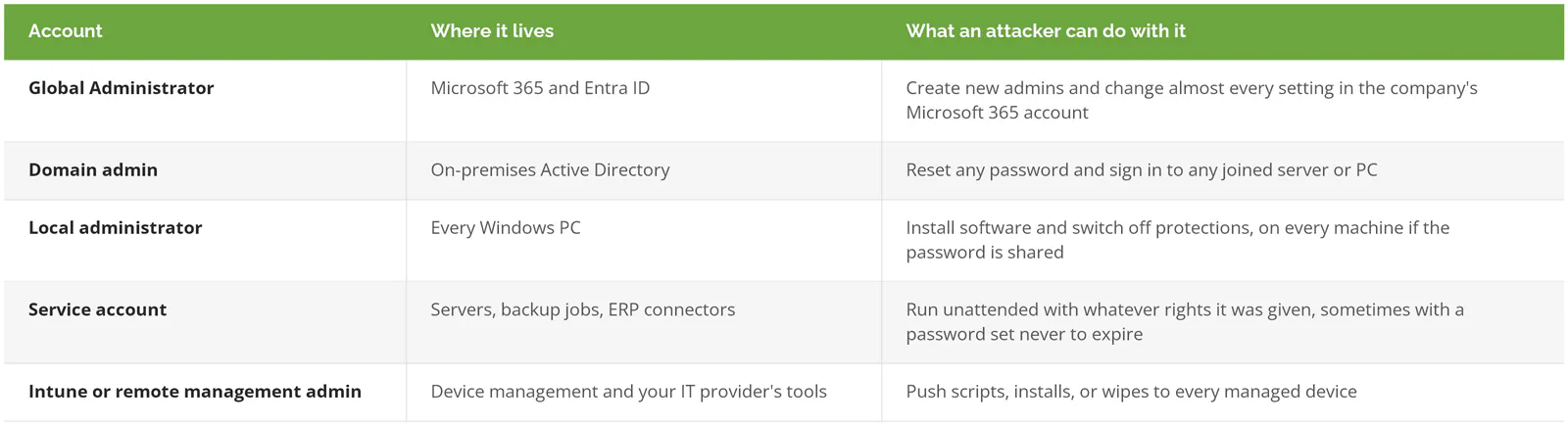
Count yours. Write the number down.
How Does PAM Work?
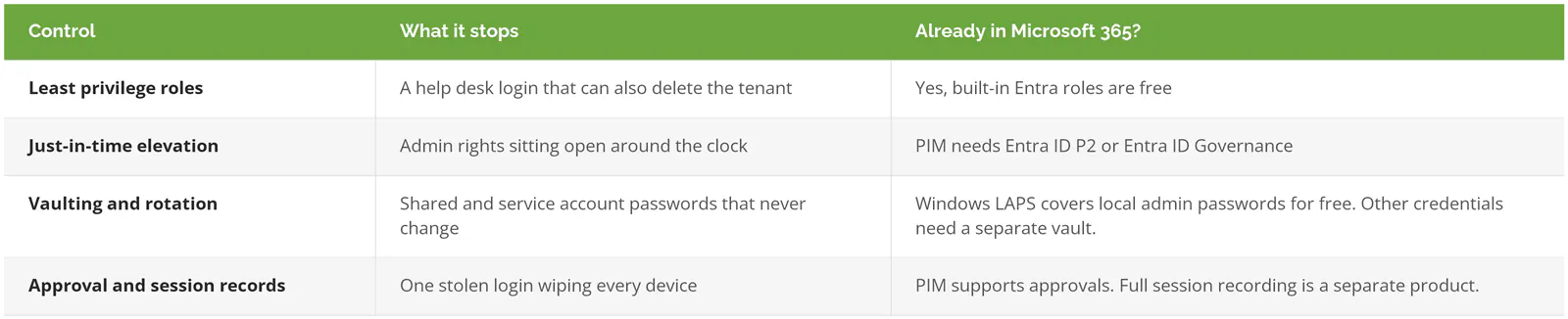
PAM works through four controls. Keep admin rights to the minimum, grant them only for the task at hand, lock up and rotate the passwords, and require approval and a record for high-impact actions.
Least privilege comes first. Every account gets only the permissions its job needs, and Microsoft Entra ID, the sign-in system behind Microsoft 365, ships more than 65 built-in roles for exactly that reason, so the person who resets passwords doesn't carry the same role as the person who can delete your Microsoft 365 tenant, the company's whole account with Microsoft.
Just-in-time access removes standing admin rights, so an admin is eligible for a role, activates it for a set window when a task calls for it, and loses it the moment that window closes. In Microsoft's world that's Entra Privileged Identity Management (PIM), which supports time-bound activation, approval, MFA at activation, a written reason, and access reviews. Standing admin rights are open around the clock. An attacker needs one hour.
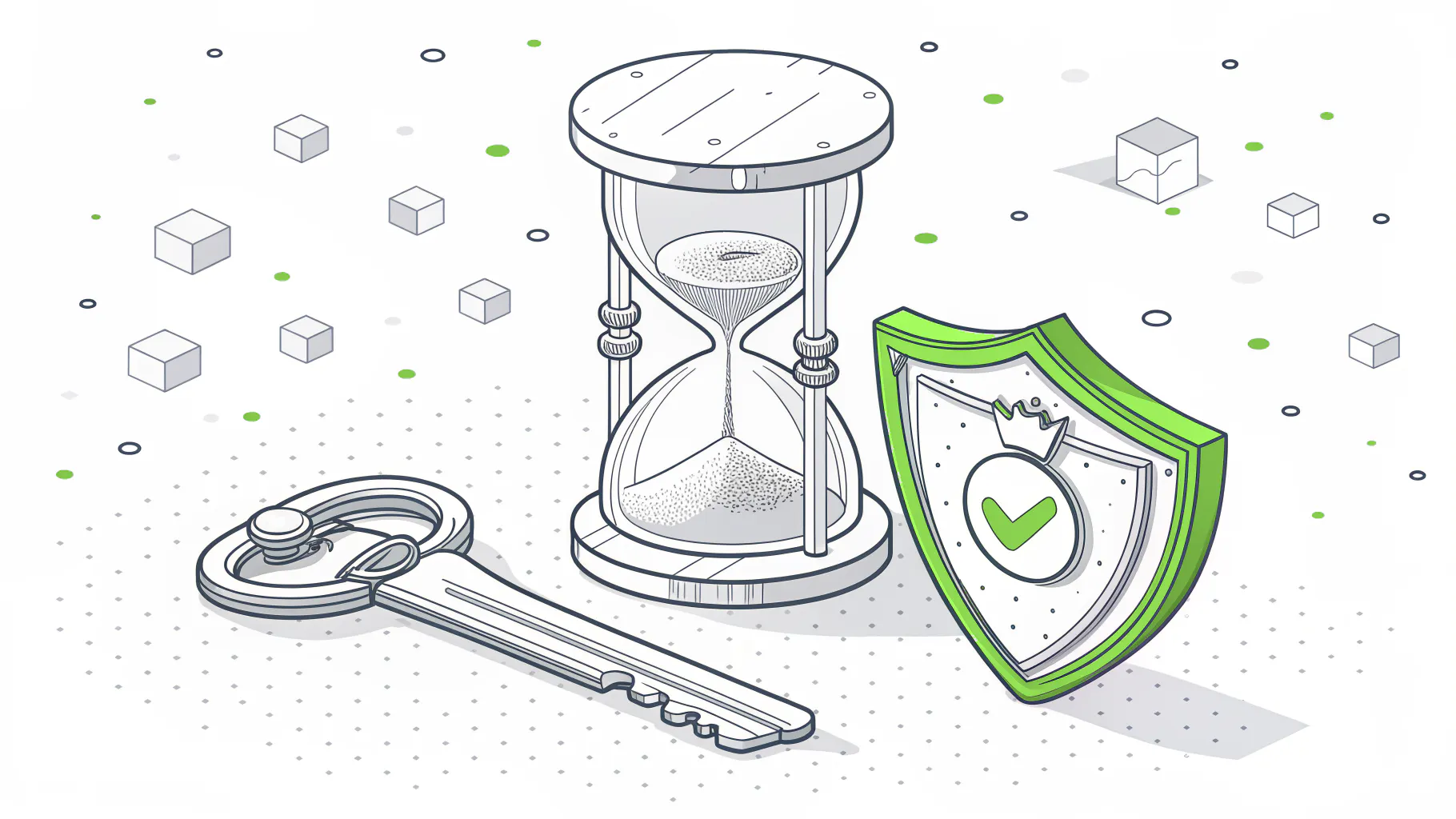
Credential vaulting is a different animal, and the two get confused. Easy mistake. PIM switches a role on and off for a person's own account and never holds a password. A vault holds the actual credentials, like the shared firewall login or a service account password, lends them out under supervision, and changes them afterward. Delinea, CyberArk, BeyondTrust, and Keeper all sell vaults. Windows LAPS does a narrow version of the same job for local admin accounts, at no charge.
The fourth control is oversight. After Stryker, CISA urged organizations to require a second administrator's approval before sensitive or high-impact changes go through. Session recording goes a step further and captures what an admin did while elevated, which matters most on the day an auditor or an incident responder asks.
If this sounds like zero trust pointed at your most dangerous logins, that's a fair reading.
Does the PAM vs IAM vs PIM Label Matter?
Not much. IAM is the whole system for who gets access to what, and our explainer on how identity and access management fits together covers it end to end. PAM is the slice of IAM that handles admin-level accounts. PIM is Microsoft's tool for handing out whole admin roles just in time. So when a proposal says PIM, ask what happens to the passwords PIM doesn't manage.
Why Do Attackers Go After Admin Accounts First?
One admin account turns a small break-in into a company-wide one. With admin rights, an attacker can create new accounts, switch off security tools, and push changes to every device, all through tools your IT team already trusts.
Stryker is the loud example. The quieter one sits in a February 2024 CISA advisory. An attacker got into a state government network using the account of a former employee who'd held administrative privileges, with credentials that had likely leaked in an unrelated breach. Nobody had removed the account. Inside, the attacker found a second set of admin credentials stored on a SharePoint server, and that one was a domain administrator with reach into both the on-premises directory and the cloud.
Two failures. Neither one exotic.
Then there's the phone. CISA's advisory on Scattered Spider, updated in July 2025, describes the group posing as employees and talking IT help desk staff into resetting passwords and moving MFA to a device the attackers control. IBM's 2026 Cost of a Data Breach Report ranked help desk impersonation as the second most expensive way in, according to Help Net Security's coverage of the report. The same report put the average breach at $4.99 million, with 247 days to identify and contain one. Over eight months.
Volume matters too. Microsoft's 2025 Digital Defense Report found that more than 97% of identity attacks are password attacks, and identity-based attacks rose 32% in the first half of 2025. Attackers guess and replay passwords at scale, and an admin password is the one that pays best. Basic push-notification MFA helps, but it has its own weak spot in MFA push bombing, which is why CISA keeps asking for phishing-resistant MFA on admin accounts specifically.
Would you sign off, in writing, on an admin account with no MFA? Probably not. Ask your IT lead whether every admin account has it. Then wait for a plain yes.
Does a Company with 20 to 1000 Users Actually Need PAM?
Every company with admin accounts needs the practice. Not every company needs a PAM product. The dividing line is the number of admin accounts and shared credentials you have, and whether servers, plant systems, or auditors are in the picture.
A 25-person firm that runs entirely on Microsoft 365, with two admins and no local server, doesn't need to buy a vault. Money spent to feel better. What it needs is two named admins with separate admin logins, phishing-resistant MFA on both, LAPS on every laptop, and a break-glass account nobody touches day to day.
Picture a 150-person manufacturer instead, with an on-premises domain controller (the server that runs Active Directory), an ERP server, and service accounts stitching the two together so orders, inventory, and shop-floor schedules keep moving through the night. Different problem entirely. Those service account passwords are the thing to vault, because they tend to be shared, they rarely change, and the systems behind them stop production when they break.
At 400 or 800 users, the picture shifts again. A dedicated IT team, admins spread across Microsoft 365, Azure, and a few Linux servers, and a customer asking for SOC 2 or CMMC evidence. Just-in-time elevation and recorded sessions stop being nice extras, because the evidence has to come from somewhere. Compliance readiness is its own engagement, separate from managed IT, but records of who held admin access, and when, are part of what an auditor asks to see.

What You Already Own Before You Buy Anything
Open the Microsoft Entra admin center and count your Global Administrators. Five minutes, tops. Microsoft recommends fewer than 5, and fewer than 10 privileged role assignments overall. Hit 5 Global Admins and the overview page shows an alert card, while going past 10 privileged assignments puts a warning on the roles page. Those thresholds come straight from Microsoft's best practices for Entra roles, which also recommend 2 cloud-only emergency access accounts that permanently hold Global Administrator for the day nobody else can sign in. Cloud-only matters. An account synced from on-premises Active Directory can fall along with it.
Windows LAPS is free. It shipped in the April 11, 2023 Windows update, gives each device's local administrator account its own rotating password, and backs that password up to Microsoft Entra ID even on the Free tier. If every PC in your office still shares one local admin password, this is the cheapest fix in the whole post.
Separate admin accounts cost nothing but a little friction. CISA's Cybersecurity Performance Goals 2.0 ask administrators to keep separate user accounts for anything unrelated to admin work, business email and web browsing included. An admin who opens a phishing link while signed in as admin has just handed over the admin account.
Microsoft's free security defaults also protect tenant admin accounts with MFA. Low bar. Clear it anyway.
According to Microsoft's Entra licensing documentation, Microsoft 365 Business Premium includes Entra ID P1, and PIM requires Entra ID P2 or Entra ID Governance. Business Premium alone won't get you PIM. The scope is smaller than people expect, though. Microsoft's own licensing examples count the eligible admins and approvers who use PIM, not every employee, so 5 eligible admins means 5 licenses. Entra ID P2 lists at $10 per user per month on an annual commitment, and it's already included if you bought Microsoft's Defender Suite add-on for Business Premium.
Where Should You Start with PAM?
Start with an inventory, then cut. List every privileged account, including your IT provider's, remove what isn't needed, and protect what's left before you buy a tool.
- Inventory every privileged account across Microsoft 365, Active Directory, business apps, and your IT provider's tools, and put an owner's name next to each one.
- Get Global Administrators under 5. Narrower roles like User Administrator or Exchange Administrator cover daily work.
- Split admin logins from everyday accounts.
- Require phishing-resistant MFA, meaning passkeys or FIDO2 security keys instead of text codes, on every admin account.
- Turn on Windows LAPS.
- Where you're licensed, move standing admin rights to just-in-time activation in PIM.
- Vault the shared passwords, such as the firewall login, service accounts, and the ERP's built-in admin.
- Require a second admin's approval for destructive actions like remote wipes and bulk deletions.
- Review admin access every quarter, and remove a departing employee's access the day they leave.
Steps 1 through 5 cost time, not licenses. Do those before anyone quotes you a platform.
Where PAM Projects Break
Tools rarely sink a PAM project. Unowned accounts do.
Picture a service account created years ago to connect a scanner to the file server. Someone gave it domain admin because the narrower permission didn't work on the first try, set its password never to expire, wrote none of it down, and eventually left the company. The account stayed. Rotate that password without knowing what depends on it and something stops working at 6 a.m., which is exactly why nobody wants to touch it, and exactly why it's worth an attacker's time.
Break-glass accounts get borrowed. The emergency login always works, and a few months later it's somebody's daily driver. At that point it's just a Global Administrator with worse habits.
The vault is the sneaky one, bought while the habits around it stay put. Admins keep their standing rights for now, shared passwords get copied out of the vault into a notes file, and the audit report says PAM is deployed. Nobody's lying. The vault just isn't protecting anything.
Staffing is the last one, and it's the least glamorous. ISC2's 2025 Cybersecurity Workforce Study found that 95% of respondents' organizations have at least one cybersecurity skills need, and 59% call that shortfall critical or significant. Quarterly access reviews are precisely the recurring work that slides when a two-person IT team is buried in tickets. Nobody notices a skipped one. Somebody has to chase down the owner of the account nobody recognizes.