What Is SSPM (SaaS Security Posture Management)?
SaaS security posture management, or SSPM, is software that continuously checks how your SaaS applications are configured, who can reach them, and what they're connected to, then flags the settings that put your data at risk. Microsoft 365. Salesforce. Google Workspace. Slack. The 40 other tools somebody expensed. None of them arrived hardened. They shipped configured for easy sharing, and that's a different problem from the cloud security work your provider is probably already doing.
Table of Contents
Between August 8 and 18, 2025, someone walked into hundreds of corporate Salesforce accounts without cracking a password. Palo Alto's Unit 42 traced the intrusion to stolen OAuth tokens, the digital permission slips that let one app read data inside another, belonging to Drift, a chatbot plenty of sales teams had connected to Salesforce a year or two earlier and then stopped thinking about. The attacker exported account records, contact records, and support cases, then combed the text for credentials employees had pasted into tickets.
No firewall saw it. No endpoint agent flagged it. The connection was authorized. Someone clicked approve, once, and that was the whole intrusion.
Your servers have an owner. Your laptops have an owner. The SaaS applications sitting between them, holding your customer list, your contracts, and your payroll exports, are governed by whatever the vendor picked as the default.
So What Does an SSPM Tool Actually Watch?
An SSPM tool connects to your SaaS apps through their admin APIs, reads how each one is configured, compares that against a security benchmark, and tells you which settings are exposing data. It watches continuously, not once a year.
Gartner defines it as a tool that continuously assesses the security risk and manages the security posture of SaaS applications. In practice it watches five things. Sharing and external access settings, admin and privileged roles, login policy and multi-factor authentication enforcement, third-party app connections, and accounts nobody ever closed.
Take a standard Microsoft 365 tenant, meaning your company's own walled-off instance of it. Out of the box, a user can generate an "Anyone with the link" URL to a SharePoint folder and email it outside the company, and that link keeps working after the person who made it leaves. Guest accounts persist. Legacy authentication may still be enabled for one mail-enabled service account nobody remembers creating. An SSPM tool reads all of that in an afternoon and hands you a ranked list. Your admin could find the same things by hand. Across 30 applications, quarterly, they won't.
Why Nobody Owns Your SaaS Stack
Ask a 200-person company how many SaaS applications it runs and you'll get a number somewhere between 15 and 30. The real figure is higher, usually by a lot.
Zylo's 2026 SaaS Management Index puts the average company at 305 applications. BetterCloud's 2026 State of SaaS report says 118, up from 106 the year before, and mid-size firms jumped from 116 to 164 applications in 12 months. Both numbers are correct. They're counting different things. So how many of yours did IT actually configure? Nobody asks that one, and it's the only count that changes what you do next.
The Cloud Security Alliance surveyed 420 IT and security professionals for its State of SaaS Security report. 55% said employees adopt SaaS without involving security at all. 63% reported data being overshared externally. 56% said staff upload sensitive files to applications nobody approved. None of that happens because people are careless. It happens because signing up for a SaaS tool takes 90 seconds and a work email address, while getting one approved through IT takes a week and an explanation of why the free version won't do.
This is the shadow IT problem with a new coat of paint, except the paint matters. Shadow IT used to mean an unapproved app holding a copy of some data. A modern SaaS app holds the data and a live API connection back into Microsoft 365. Then shadow AI tools arrived and made it worse, because the Verizon DBIR found employee use of unapproved AI jumped from 15% to 45% in a single year. Every one of those tools signs in with a corporate identity.
What Actually Goes Wrong in a SaaS Tenant
Almost none of it is exotic. The failure modes repeat.
- Over-permissioned users. The office manager who got global admin during the Microsoft 365 migration in 2022 and still has it.
- OAuth connections. A vendor's app was granted mailbox read access three years ago. The contract ended. The token didn't.
- External sharing links that never expire, sitting in the inbox of a contractor who finished the project and moved on to your competitor.
- Offboarding gaps. HR disables the Microsoft 365 account. Nobody touches Dropbox, Canva, or the CRM.
- Service accounts with MFA switched off, because turning it on broke an integration once, in a meeting nobody documented.
- Non-human identities. Bots, connectors, and AI agents holding standing access. 46% of CSA respondents said they can't monitor them.
Third parties are now involved in 48% of all breaches, a 60% increase year over year, according to the 2026 Verizon Data Breach Investigations Report. That's the Drift pattern, repeated at scale. Meanwhile AppOmni's survey of 803 security leaders found 75% had a SaaS security incident in the previous 12 months, up a third from the year before.
Run this exercise at a 180-person distributor and the shape of the result is predictable. Dozens of connected applications nobody inventoried. A handful holding mailbox read access. At least one belonging to a vendor the company stopped paying two years ago. Nothing breached. Nobody careless, either. Every one of those approvals was legitimate on the day it was granted, by somebody who had a reason and the authority to grant it, and then the project ended, the vendor got swapped out, the person who owned the relationship moved teams, and the permission sat there doing nothing visible since. That's the honest version of SaaS risk at this size. Not a break-in. An accumulation.
Identity and access management gets confused with SSPM constantly. They overlap. They aren't the same job.
SSPM, CSPM, CASB, and DLP Are Not the Same Thing
The acronyms fight for the same budget line and cover different ground.
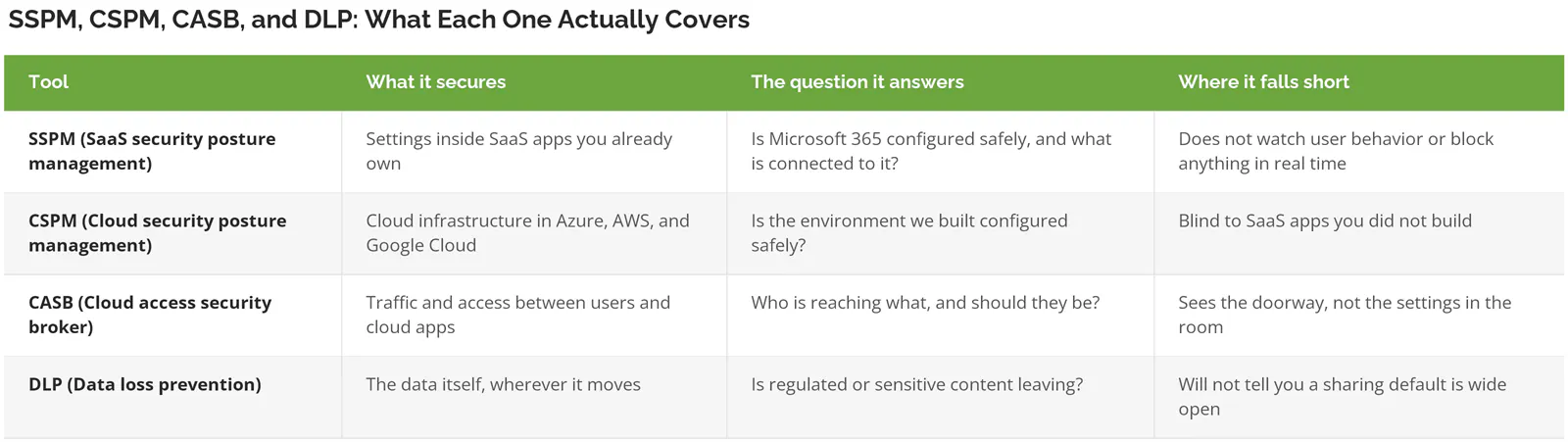
SSPM tells you the front door is unlocked. Data loss prevention tells you something walked out of it. Buying the second without the first is common and backward.
Skip This If
You run Microsoft 365 and two other applications, everybody's on MFA, and one person controls every admin console. Buy nothing. Put a recurring 90-minute calendar block on the person who owns the tenant and have them review sharing settings, admin roles, and connected apps. That's the entire program at your size, and a tool would mostly generate findings you already know about, dressed up in a dashboard you'd stop opening by the second month.
Same answer if you're under 20 users. The math doesn't work.
An SSPM tool starts earning its cost somewhere around these conditions, and you usually need more than one of them to be true.
- More than roughly 25 business applications holding company data.
- Customer, financial, or regulated data living in a SaaS app rather than a server you control.
- An audit ahead of you. SOC 2, CMMC, ISO 27001, and PCI all ask for evidence of configuration control, and screenshots taken the week before the assessment are a bad look.
- Contractors, agencies, or partners with guest access.
- Any acquisition in the last two years, which means two tenants and two sets of habits.
- AI features switched on inside applications your team already uses, which is its own governance question and closer to Copilot governance than to classic security tooling.
Companies between 20 and 500 users hit this wall hardest. The SaaS count outgrew the IT team years ago, and nobody noticed the day it happened.
What to Do Before You Spend a Dollar
Four moves, none of which require a purchase order. Do them in this order.
Pull the OAuth list first. In the Microsoft Entra admin center, look at enterprise applications. In Google Workspace, check the API controls page. You'll get a list of every third-party app somebody connected and what permissions it holds. This takes about an hour, and for a company that has never done it, that hour tends to be the most uncomfortable one of the quarter, because the list includes tools nobody remembers approving and permissions nobody would grant today.
Read your Secure Score, then ignore two-thirds of it. Microsoft Secure Score scores your tenant against its own recommendations. Plenty of the suggestions are noise for a 100-person company. The identity and external-sharing items are not.
Find out who has admin. In every app, not just Microsoft 365. Write the names down. The list is longer than the org chart suggests, and about a third of the time somebody on it left the company.
Fix offboarding before you buy monitoring. A checklist that covers every application beats a tool that alerts you about the accounts your checklist missed. Boring, unglamorous, and it closes more real exposure than anything you'd buy this year.
Run those four and you'll know whether you have an SSPM-sized problem or a process-sized one. The distinction saves companies real money, and the honest answer at 60 users is usually process.
Where This Sits in a Security Program
SSPM isn't a security program. It's one instrument inside a program, and it only reports on the applications you point it at.
Consilien is a security-first managed IT and cybersecurity provider working with companies of 20 to 500 users in manufacturing, distribution, professional services, and real estate. We've been doing it since 2001. Companies at that size rarely produce a current list of what's connected to their Microsoft 365 tenant, what those connections can read, or who approved each one, and the answer usually lives in one person's memory rather than in any document. That's a governance gap before it's a tooling gap, and buying an SSPM platform without closing it just gives you a dashboard full of findings nobody owns.
If your SaaS stack has grown past what one person can hold in their head, and you want the inventory and the configuration review done before you evaluate a single vendor, speak to a cybersecurity expert about where your exposure actually sits.